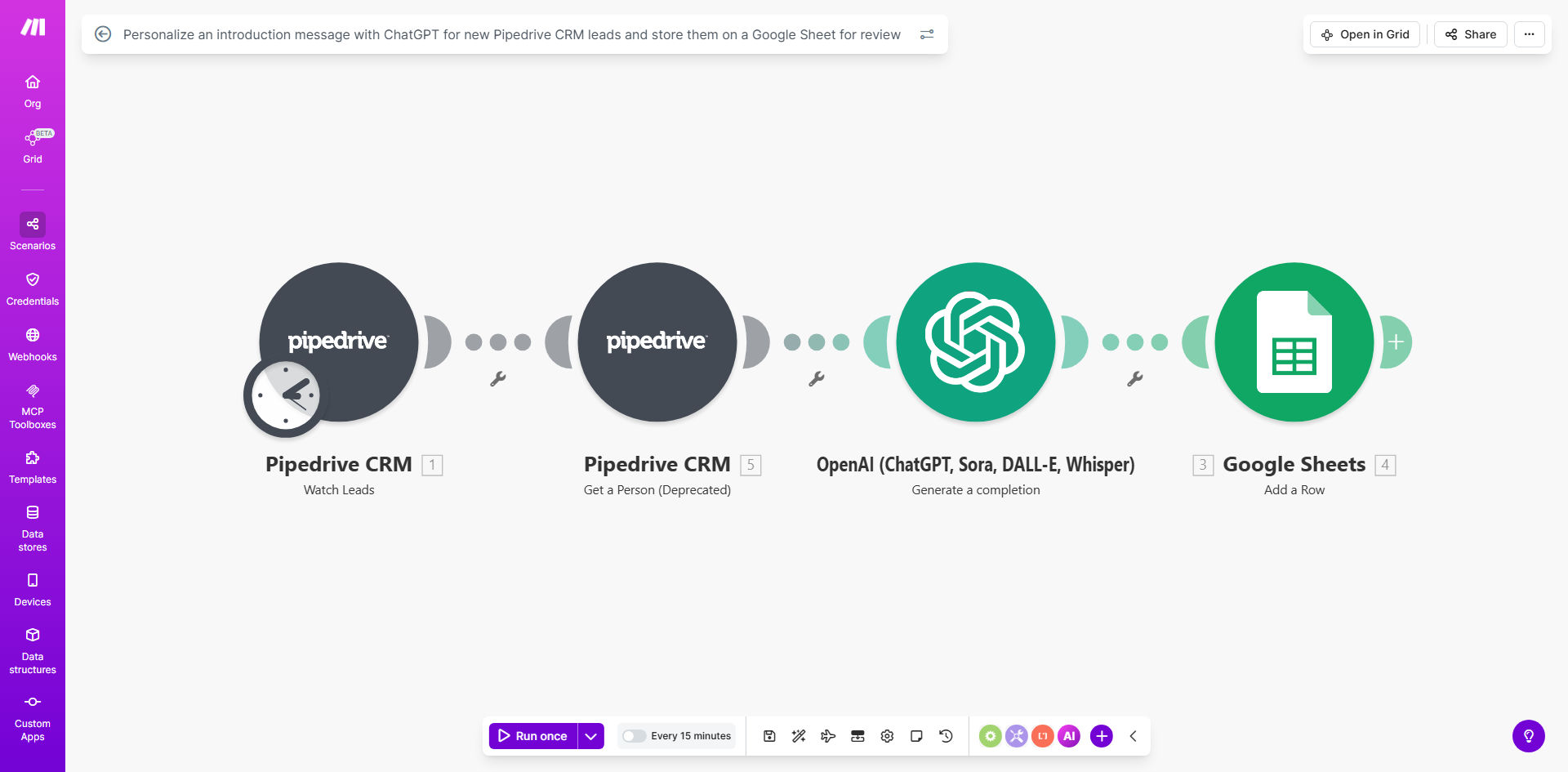
What This Workflow Does
This automation transforms how sales teams engage with new CRM leads by combining Pipedrive's lead data with ChatGPT's personalization power. When a new lead enters your Pipedrive pipeline, the system automatically generates a tailored introduction message based on the lead's profile, company information, and your ideal customer criteria.
The generated messages are then logged in Google Sheets, creating a searchable archive of all automated communications. This gives sales managers visibility into outreach quality while saving reps 5-10 hours per week on manual message composition.
Pro tip: Include specific lead details like industry, company size, or recent funding rounds in your ChatGPT prompts to generate highly relevant messages that outperform generic templates.
How It Works
1. New lead detection in Pipedrive
The workflow monitors your Pipedrive account for new lead creation triggers, capturing all relevant contact details and custom fields that will inform the personalization.
2. ChatGPT message generation
Lead data flows into carefully crafted ChatGPT prompts that generate human-like introductions incorporating the lead's name, company context, and your unique value proposition.
3. Google Sheets logging
Every generated message is timestamped and stored in a designated Google Sheet along with the original lead details, creating an auditable trail of all automated communications.
4. Optional approval step
For quality control, you can configure the workflow to send generated messages for manager approval before delivery, or automatically queue them in your email/SMS systems.
Who This Is For
This automation delivers the most value for:
- Sales teams managing 50+ new leads monthly
- B2B companies with complex sales cycles requiring personalized touchpoints
- Startups scaling their outbound efforts without sacrificing message quality
- Managers who want visibility into automated communications
What You'll Need
- An active Pipedrive account with admin access
- OpenAI/ChatGPT API access
- Google Sheets edit permissions
- Make.com account (free tier sufficient)
Quick Setup Guide
- Clone the template to your Make.com account
- Connect your Pipedrive, OpenAI, and Google Sheets accounts
- Customize the ChatGPT prompt template with your product details
- Specify your target Google Sheet and worksheet
- Test with sample lead data and refine your prompts
Key Benefits
20-40% higher response rates from leads receiving AI-personalized messages versus generic templates, based on aggregate customer data.
5-10 hours weekly savings per sales rep by eliminating manual message composition while maintaining personalization.
Centralized communication audit in Google Sheets helps managers track messaging effectiveness and refine AI prompts over time.
Scalable personalization allows growing teams to maintain high-touch communication standards without proportional headcount increases.