Sales Automation CRM Integration Team Collaboration Client Communication

Automated Deal Stage Notifications for Teams & Clients

Keep all stakeholders informed when deals progress through your sales pipeline with automatic internal and external notifications

Get This Workflow Make.com · Sales Automation · Free Template
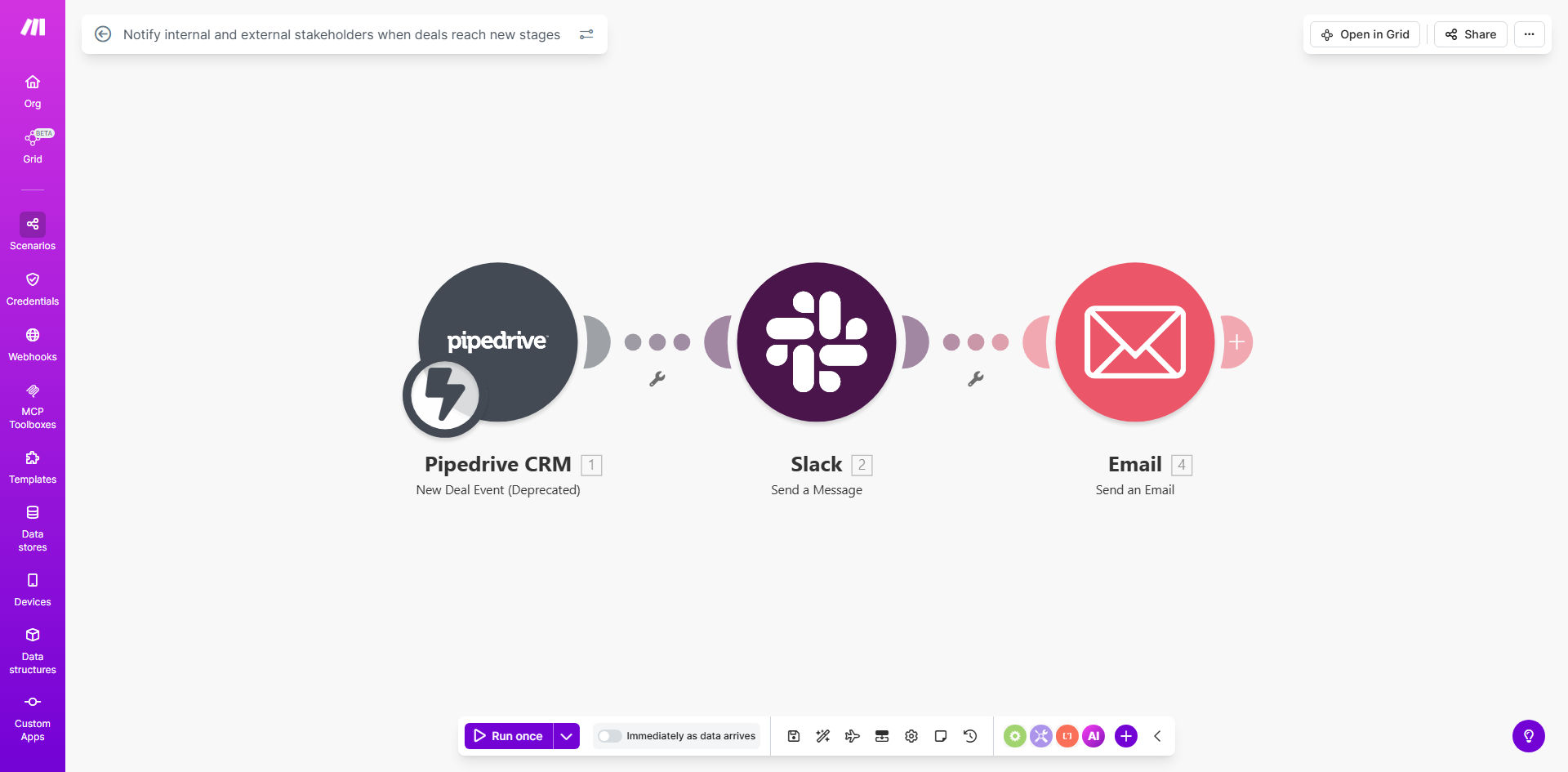
Automated deal stage notification workflow diagram showing CRM integration with email and messaging platforms

What This Workflow Does

This automation solves the common challenge of keeping all relevant parties updated when deals move through your sales pipeline. Manual notifications are time-consuming and often forgotten, leading to misaligned teams and frustrated clients waiting for updates.

The workflow automatically detects when a deal enters a new stage in your CRM system, then sends tailored notifications to both internal teams (sales, management, support) and external stakeholders (clients, partners). This ensures everyone has real-time visibility into deal progress without any manual effort from your sales team.

How It Works

1. CRM Integration

The workflow connects to your CRM platform (like HubSpot, Salesforce, or Pipedrive) and monitors for changes in deal stages. It can be configured to watch specific pipelines or all deals in your system.

2. Stage Change Detection

When a deal advances to a new stage, the automation triggers. It captures all relevant deal details including deal name, value, contacts, and the specific stage change that occurred.

3. Notification Routing

The system determines who needs to be notified based on the deal's characteristics. Internal teams might receive Slack messages or emails, while clients get professional updates via their preferred communication channel.

4. Custom Message Delivery

Tailored messages are sent to each recipient group. Internal notifications include actionable details for team members, while client communications focus on progress updates and next steps.

Pro tip: Configure different notification templates for various deal types (enterprise vs SMB) to ensure appropriate messaging for each client segment.

Who This Is For

This automation benefits any business with a multi-stage sales process:

  • Sales teams managing complex B2B deals with multiple stakeholders
  • Companies with lengthy sales cycles needing to keep clients engaged
  • Organizations where multiple departments contribute to deal progression
  • Businesses aiming to improve transparency in their sales process
  • Teams struggling with manual update processes that create bottlenecks

What You'll Need

  1. A CRM system with deal stage tracking (HubSpot, Salesforce, etc.)
  2. Communication tools for notifications (Slack, Microsoft Teams, email)
  3. Make.com account (free tier available)
  4. List of internal stakeholders who need deal updates
  5. Client contact information stored in your CRM

Quick Setup Guide

  1. Connect your CRM to Make.com using the platform's native integration
  2. Define which deal stage changes should trigger notifications
  3. Create message templates for internal teams and external clients
  4. Set up routing rules to determine who receives which notifications
  5. Test with sample deals to ensure proper triggering and messaging
  6. Activate the workflow and monitor initial notifications

Key Benefits

Save 5+ hours per week by eliminating manual deal update emails and status meetings. The automation handles all communication instantly when stages change.

Improve deal velocity by 15-20% as stakeholders receive timely notifications to take required actions, preventing bottlenecks in your sales process.

Enhance client satisfaction scores with proactive, professional updates that demonstrate your organization's commitment to transparency.

Reduce internal miscommunication by ensuring all team members receive the same update simultaneously, creating alignment across departments.

Gain valuable process insights as all notifications are logged, creating an audit trail of deal progression and stakeholder communications.

Frequently Asked Questions

Common questions about deal notification automation and integration

Automating deal stage notifications ensures timely updates reach all stakeholders without manual effort. This prevents communication gaps where team members might miss critical deal progress updates, which often leads to delayed responses or missed opportunities.

In complex sales environments, deals often stall simply because the right person wasn't aware they needed to take action. Automated notifications solve this by instantly alerting responsible parties when their input is required.

Key notifications include deal advancement to new stages, changes in deal value, approaching deadlines, and when approvals are needed. Internal teams need tactical details while clients receive progress updates tailored to their involvement.

For example, sales reps might get notified when a deal enters negotiation stage with specific pricing details, while clients receive a more general update about progressing to contract review.

  • Internal: Stage changes, approvals needed, red flags
  • External: Progress updates, next steps, documentation requests

Automated notifications keep all team members aligned on deal progress in real-time. This eliminates status update meetings, reduces email clutter, and ensures everyone has the latest information to support the sales process effectively.

When marketing knows exactly when a deal enters proposal stage, they can provide relevant case studies. When support sees a deal nearing close, they can prepare onboarding resources. This cross-functional visibility creates powerful collaboration.

Popular CRM integrations include HubSpot, Salesforce, Pipedrive, and Zoho CRM. These platforms provide robust APIs to trigger notifications based on deal stage changes while maintaining all deal data in a central system.

The best integration depends on your existing tech stack. Most modern CRMs support webhooks that can instantly notify your automation platform when specific deal events occur, enabling real-time communication.

Clients appreciate proactive updates about their deals, which builds trust and transparency. Automated notifications demonstrate professionalism and keep clients informed without requiring them to ask for updates, improving overall satisfaction.

In B2B sales, clients often judge vendors by their communication as much as their product. Regular, structured updates create confidence that you're managing their business professionally throughout the sales cycle.

Effective notifications include the deal name, new stage, next steps, key contacts, and any action required. Internal notifications should include revenue impact while client-facing messages focus on benefits and timelines.

Always include clear CTAs - whether it's approving a discount for internal teams or signing a document for clients. Well-structured notifications reduce follow-up questions and keep deals moving forward efficiently.

Yes, advanced automation allows creating different notification templates for product lines, deal sizes, or client segments. This ensures relevant messaging for enterprise deals versus smaller transactions.

For example, enterprise deals might notify executives and legal teams, while SMB deals alert sales managers. You can also vary message tone and detail level based on the client's preferences and deal complexity.

Absolutely. Our team at GrowwStacks specializes in building tailored deal notification systems that match your CRM, sales process, and communication preferences. We create custom workflows that integrate with your existing tools and follow your brand guidelines.

We'll analyze your sales cycle, identify critical notification points, and design a system that keeps all stakeholders perfectly informed without overwhelming them. The result is smoother deal progression and better team-client alignment.

  • CRM-specific implementation
  • Branded communication templates
  • Advanced routing logic

Need a Custom Deal Notification Automation?

This free template is a starting point. Our team builds fully tailored automation systems for your specific business needs.