Make.com Pipedrive Email Automation CRM Lead Nurturing

Automate Follow-Up Emails for Pipedrive Deals

Never miss a deal follow-up again with scheduled nurturing emails that boost conversions and save your sales team hours each week

Get This Workflow → Make.com · Pipedrive · Free Template
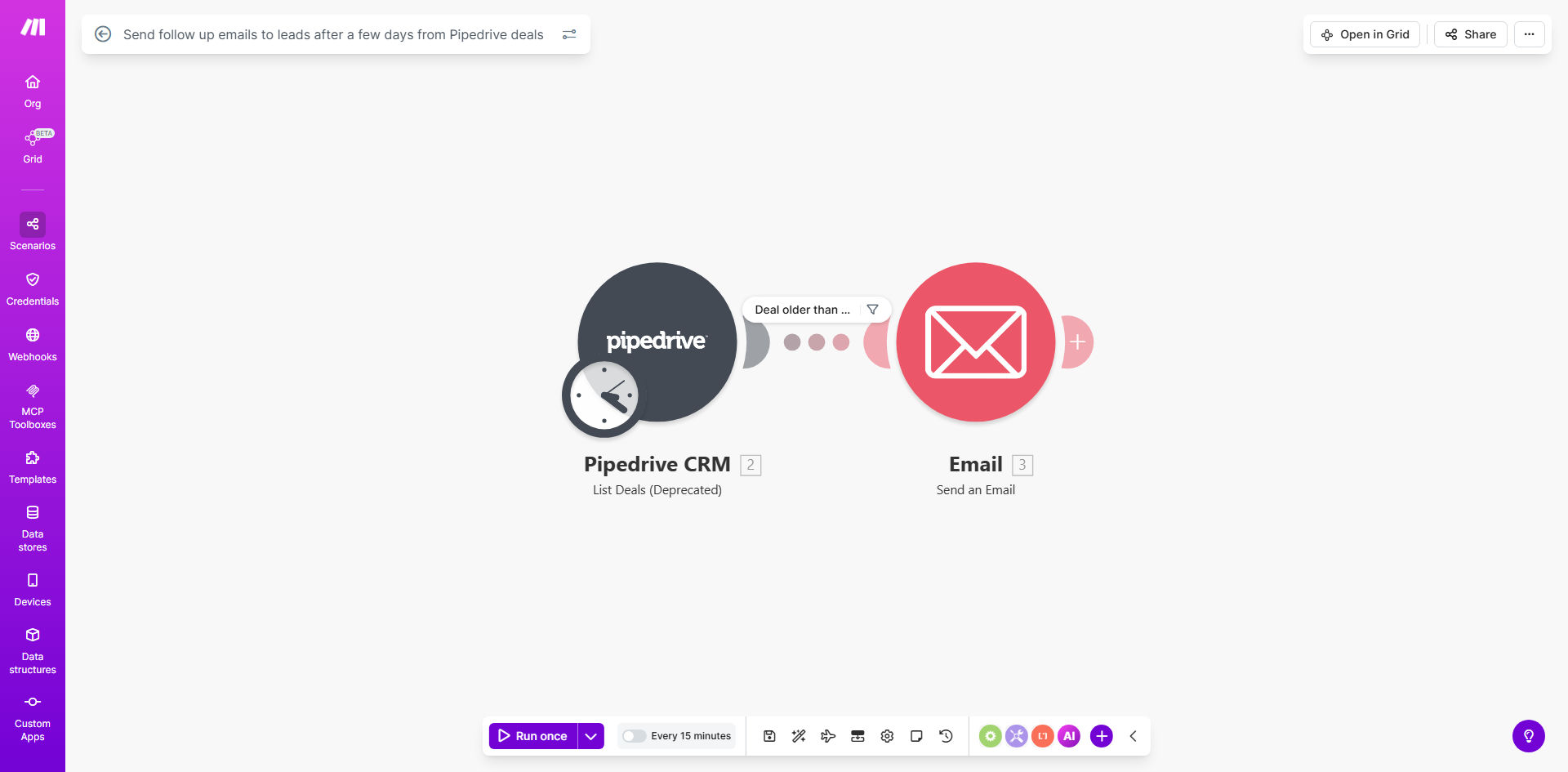
Pipedrive deal follow-up email automation workflow diagram

What This Workflow Does

This automation solves the critical challenge of timely follow-ups in sales pipelines. When deals sit in Pipedrive without proper nurturing, conversion rates drop significantly. The workflow automatically sends personalized follow-up emails at strategic intervals after a deal reaches specific stages in Pipedrive.

By automating this process, you ensure no lead falls through the cracks while freeing your sales team from manual email tracking. The system pulls relevant deal information from Pipedrive to create context-rich emails that feel personal rather than generic.

How It Works

1. Pipedrive Deal Trigger

The workflow monitors your Pipedrive account for deals that reach designated stages (like "Contact Made" or "Proposal Sent"). You can configure which stages should trigger follow-up sequences.

2. Delay Timer

After a deal reaches the trigger stage, the system waits for your specified number of days (typically 2-5 days) before sending the follow-up. This delay ensures the email arrives at the optimal moment in the buyer's journey.

3. Email Composition

The template pulls key details from Pipedrive like contact name, company, deal value, and previous interactions to craft personalized emails. You can customize the email content to match your brand voice and sales process.

4. Delivery & Tracking

Emails are sent through your connected email service (like Gmail or Outlook). The system can optionally log these communications back to Pipedrive for complete visibility into all touchpoints.

Pro tip: Configure different follow-up sequences for different deal stages. Early-stage deals might need educational content while late-stage deals benefit from urgency-building messages.

Who This Is For

This automation delivers the most value for:

  • Sales teams using Pipedrive who struggle with consistent follow-ups
  • Businesses with complex/long sales cycles requiring multiple touchpoints
  • Organizations wanting to scale their sales process without hiring more reps
  • Companies tracking email effectiveness as part of their sales analytics

What You'll Need

  1. An active Pipedrive account with deals pipeline configured
  2. Make.com account (free tier works for basic usage)
  3. Email service connected (Gmail, Outlook, etc.)
  4. Basic email templates for different deal stages

Quick Setup Guide

  1. Install the template from Make.com
  2. Connect your Pipedrive account
  3. Configure which deal stages should trigger follow-ups
  4. Set your preferred delay periods between follow-ups
  5. Customize the email templates with your branding
  6. Connect your email service
  7. Test with a few deals before going live

Key Benefits

30-50% higher response rates from perfectly timed, personalized follow-ups that reference specific deal details from Pipedrive.

5-10 hours weekly saved per sales rep by eliminating manual follow-up tracking and email drafting.

20% faster deal progression through consistent nurturing that keeps your solution top-of-mind.

Complete communication history automatically logged in Pipedrive for better team visibility and reporting.

Scalable sales process that maintains personalization even as your deal volume grows.

Frequently Asked Questions

Common questions about Pipedrive email automation and lead nurturing

Timely follow-ups significantly impact conversion rates. Research shows leads contacted within 5 minutes are 9x more likely to convert than those contacted after 30 minutes. This automation ensures no deal slips through cracks by sending perfectly timed follow-ups based on your Pipedrive deal stages.

The psychology behind follow-up timing matters. Early follow-ups capitalize on the prospect's initial interest, while later follow-ups maintain momentum through the sales cycle. Automation removes human timing inconsistencies.

Automating follow-ups saves sales reps 5-10 hours weekly by eliminating manual email tracking. It ensures consistent messaging while allowing reps to focus on high-value conversations rather than administrative tasks.

Beyond time savings, automation reduces cognitive load. Salespeople don't need to remember which deals need follow-ups or juggle multiple reminder systems. The workflow handles all tracking behind the scenes.

Effective follow-ups combine value-add content with clear next steps. Common types include: 1) Deal stage-specific check-ins 2) Helpful resources related to the deal 3) Gentle reminders with new information 4) Personalized success stories relevant to the lead's needs.

The best sequences alternate between different email types. For example, after sending a proposal, you might follow up with: Day 3 - Check if they received it, Day 7 - Share a relevant case study, Day 14 - Offer to answer any questions.

Absolutely. The template pulls Pipedrive deal details to personalize emails with: 1) Contact name and company 2) Deal-specific references 3) Relevant product/service details 4) Customized call-to-actions based on deal stage. Personalization boosts response rates by 30-50%.

Advanced personalization options include: Dynamic content blocks that change based on deal characteristics, attachments tailored to the prospect's industry, and even variable discount offers based on deal size or urgency.

Track these key metrics: 1) Email open and response rates 2) Deal progression speed 3) Conversion rates by follow-up sequence 4) Sales cycle length. Compare these against your manual follow-up benchmarks to measure impact.

For deeper analysis, segment results by: Deal size, industry, lead source, or sales rep. This reveals which follow-up strategies work best for different scenarios in your pipeline.

Most deals require 5-8 touchpoints. This workflow lets you configure sequences based on: 1) Deal value 2) Sales cycle length 3) Lead source 4) Engagement level. High-ticket deals often benefit from more nurturing touches over longer periods.

The optimal sequence varies by industry. While SaaS companies might see results in 3-5 emails, complex B2B solutions may need 10+ touches over several months. Test different approaches to find your sweet spot.

Yes! GrowwStacks specializes in tailored Pipedrive automations. We'll design workflows that match your: 1) Sales process stages 2) Email templates and branding 3) Team collaboration needs 4) Reporting requirements. Book a free consultation to discuss your specific needs.

Our custom solutions go beyond basic follow-ups to include: Lead scoring, automated task creation for reps, integration with other tools in your stack, and advanced analytics dashboards to track performance.

  • 100% tailored to your sales workflow
  • Seamless integration with existing tools
  • Ongoing optimization and support

Need a Custom Pipedrive Automation?

This free template is a starting point. Our team builds fully tailored automation systems for your specific business needs.