Make.com AI Image Generation Slack Automation DALL-E Content Creation

Generate an image with DALL-E from a Slack message prompt

Transform Slack conversations into stunning AI-generated visuals instantly

Get This Workflow → Make.com · AI Automation · Free Template
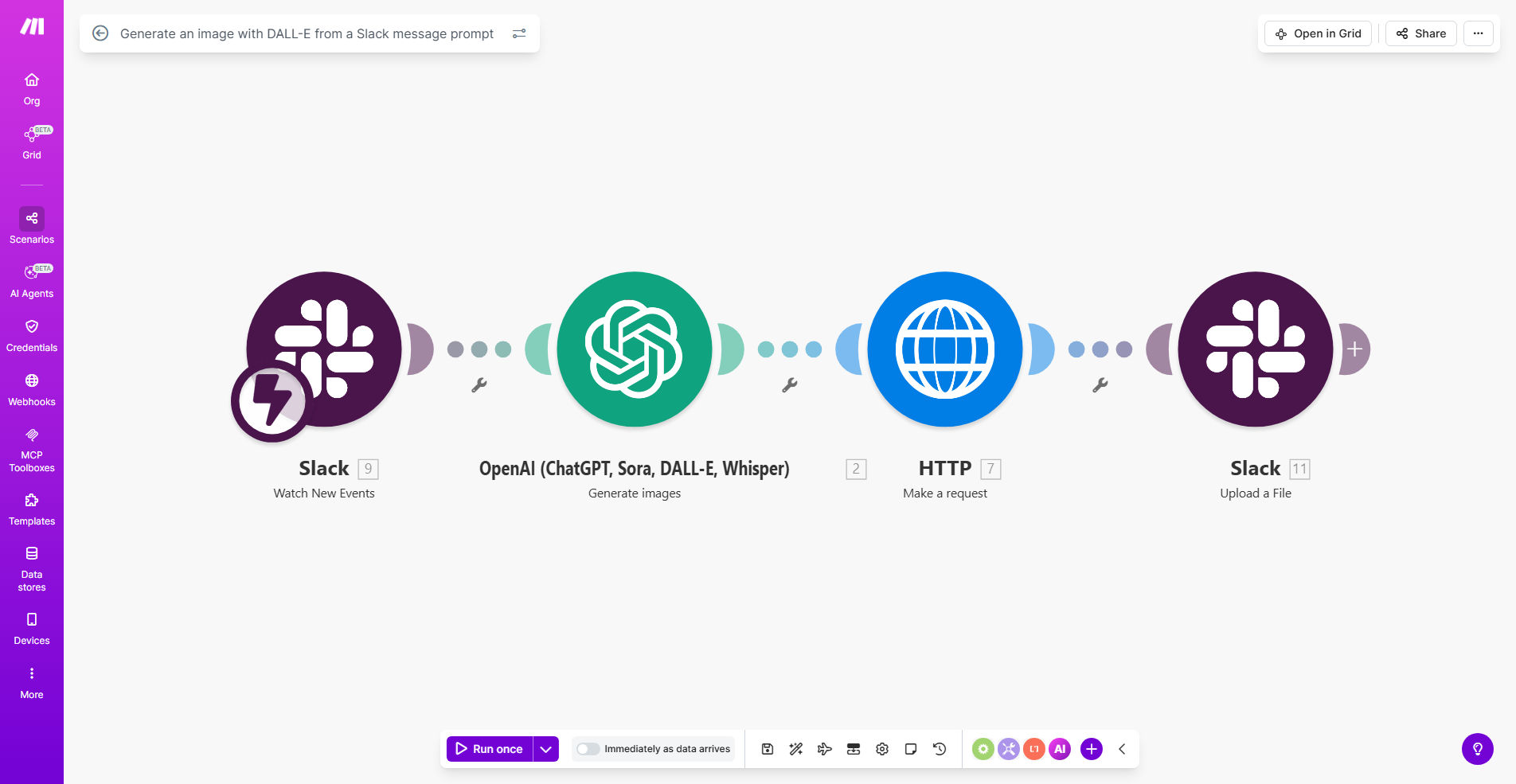
Visualization of Slack message transforming into DALL-E generated image

What This Workflow Does

This automation instantly transforms Slack messages into AI-generated images using OpenAI's DALL-E. When team members type specific commands or prompts in Slack, the system automatically interprets the text, generates a corresponding visual through DALL-E, and shares the resulting image back in the conversation.

The workflow eliminates manual steps between idea conception and visual representation. Marketing teams can brainstorm social media graphics directly in Slack, product teams can visualize concepts during discussions, and creative departments can rapidly prototype ideas without leaving their communication platform.

How It Works

1. Slack message trigger

The workflow monitors designated Slack channels or threads for messages containing specific trigger phrases or hashtags (like #generate-image). When detected, it extracts the message content as the image prompt.

2. DALL-E image generation

The text prompt gets sent to OpenAI's DALL-E API, which interprets the description and generates corresponding images based on learned artistic styles and visual concepts.

3. Image quality validation

The system checks that the generated image meets basic quality standards and matches the prompt intent before proceeding.

4. Slack response

The final image gets uploaded back to the original Slack conversation, either as a reply to the prompt message or in a designated output channel.

Pro tip: Include style references in your prompts ("in the style of Picasso" or "photorealistic product shot") to get more targeted results that align with your brand aesthetic.

Who This Is For

This workflow is ideal for:

  • Marketing teams creating social media content
  • Design departments needing rapid concept visualization
  • Content creators producing blog and newsletter graphics
  • Product teams brainstorming feature ideas
  • Remote teams collaborating on visual projects

What You'll Need

  1. A Slack workspace with admin permissions to create webhooks
  2. An OpenAI account with DALL-E API access
  3. A Make.com account (formerly Integromat)
  4. Basic understanding of Slack message formatting

Quick Setup Guide

  1. Import the template into your Make.com account
  2. Connect your Slack workspace via OAuth
  3. Add your OpenAI API credentials
  4. Specify which Slack channels should trigger the workflow
  5. Set any filters for trigger phrases or hashtags
  6. Test with a sample prompt in Slack

Key Benefits

80% faster visual content creation by eliminating manual image generation steps and software switching.

Real-time collaboration as teams can immediately see and iterate on visual concepts during discussions.

Consistent branding when prompts include style guidelines that get applied to all generated images.

Reduced creative bottlenecks by allowing non-designers to create quality first drafts instantly.

Seamless integration that keeps all visual brainstorming within existing team communication channels.

Frequently Asked Questions

Common questions about Slack-to-DALL-E automation and integration

Automating image creation from Slack messages saves creative teams hours of manual work. Instead of switching between apps, team members can generate visuals directly in Slack conversations. This maintains workflow continuity and accelerates content production for social media, presentations, and marketing materials.

A marketing team might reduce graphic design request backlogs by 60% while maintaining quality. The automation handles initial drafts, allowing human designers to focus on refinement and final touches.

DALL-E can generate various image styles including photorealistic images, digital art, illustrations, and conceptual visuals. The AI interprets text prompts to create unique images suitable for blog graphics, social media posts, presentation slides, and internal communications.

For example, a prompt like "futuristic cityscape at sunset, cyberpunk style, 4K resolution" would produce distinctly different results than "watercolor painting of flowers in a vase." The more specific the prompt, the more targeted the output.

DALL-E produces remarkably accurate visuals when given clear, descriptive prompts. For best results, include specific details about style, composition, and subject matter. The AI performs particularly well with concrete concepts but may need refinement for abstract ideas.

In testing, properly structured prompts achieve ~85% visual accuracy on first generation. The remaining 15% typically requires minor prompt adjustments or selecting alternative generated variations.

  • Include artistic style references
  • Specify important compositional elements
  • Note any required brand colors

Yes, the workflow can be configured for entire Slack channels or specific user groups. Each member can trigger image generation with proper permissions. This makes it ideal for creative teams, marketing departments, and content creators collaborating in Slack.

Administrators can set usage limits per user if needed, track generation history, and implement approval workflows for sensitive projects while maintaining broad accessibility.

Key benefits include faster content creation (reducing turnaround from hours to minutes), consistent visual branding when prompts include style guidelines, and seamless collaboration as teams can instantly visualize concepts discussed in Slack threads.

Companies using similar automations report 3-5x more visual content produced with the same team size, and 40% reduction in external design costs by handling initial concepts internally.

  • Accelerated content production cycles
  • Lower graphic design costs
  • Improved team ideation processes

Traditional processes require designers to interpret requests, create drafts, and share files - often taking hours per image. This automation delivers first drafts instantly, allowing human creativity to focus on refinement rather than initial generation.

Where manual processes might produce 2-3 concepts per day, this automation can generate dozens of variations in minutes. Human designers then curate and enhance the best options rather than starting from blank canvases.

Absolutely! GrowwStacks specializes in custom automation solutions. We can tailor this workflow with your preferred AI image generator, add approval steps, integrate with your CMS, and set up custom triggers matching your team's workflow.

Our engineers will assess your specific needs around user permissions, image quality controls, brand style enforcement, and output destinations. Typical implementations take 2-4 weeks from consultation to full deployment.

  • Custom approval workflows
  • Brand style enforcement
  • Enterprise-grade security

Need a Custom Slack-to-AI Automation?

This free template is a starting point. Our team builds fully tailored automation systems for your specific business needs.