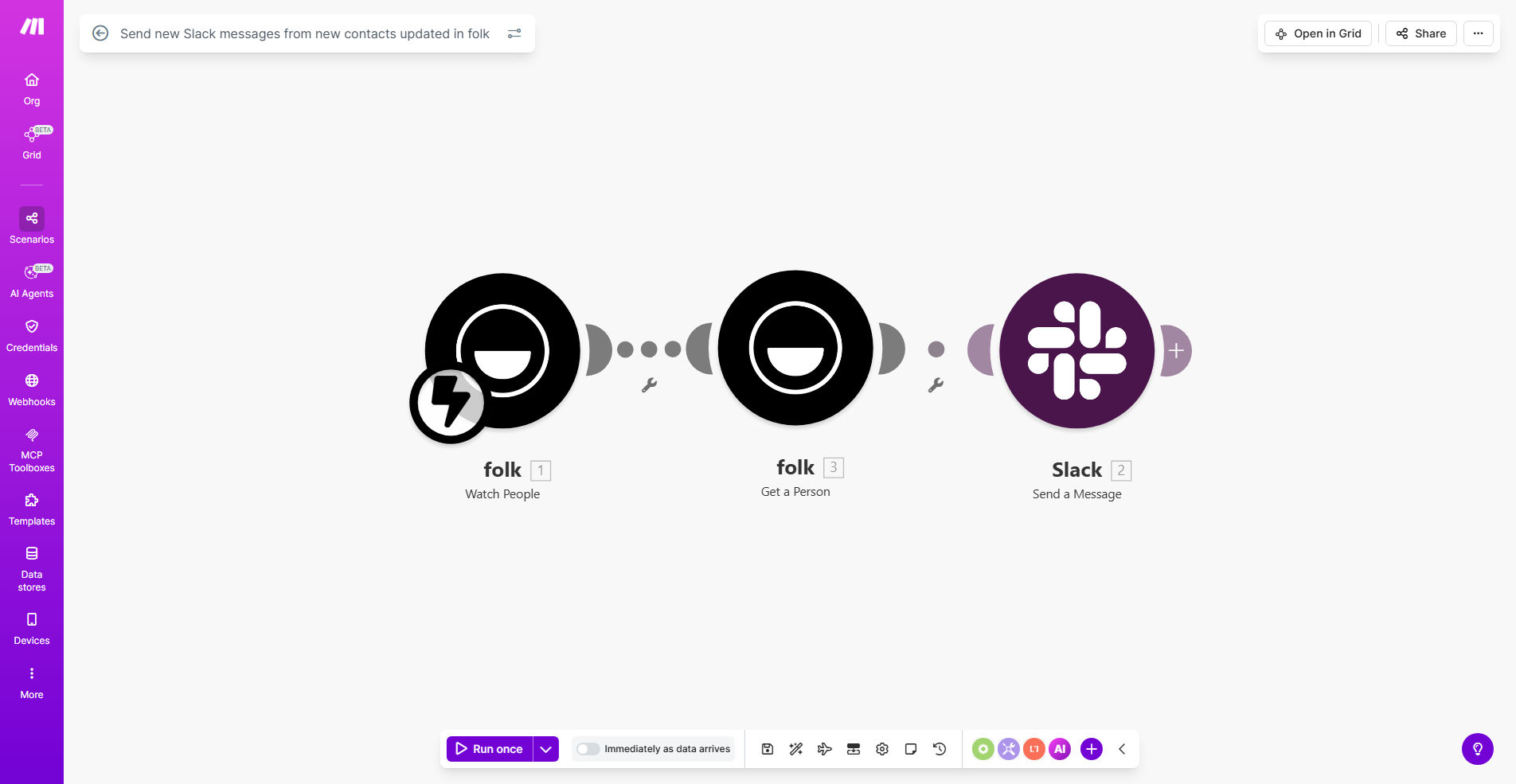
What This Workflow Does
This automation solves the common problem of stale contact information in sales and client management. When team members work from outdated CRM records, they miss opportunities and damage relationships with incorrect details. The workflow instantly bridges Folk CRM and Slack, creating a real-time notification system for any contact updates.
Whenever a contact's information changes in Folk—whether it's a new job title, updated phone number, company change, or status update in your pipeline—the workflow automatically sends a formatted message to your designated Slack channel. This eliminates manual checking while ensuring your team always has the freshest information for outreach and relationship management.
How It Works
1. Folk CRM detects contact changes
The workflow monitors your Folk account for any modifications to contact records, using Make.com's instant trigger capability. This could include new contacts added, existing contact updates, or status changes in your sales pipeline.
2. Data is processed and formatted
Make.com extracts the relevant changed fields and prepares them for Slack, highlighting what changed (old vs new values) and including any important context about the contact's status or relationship with your company.
3. Notification sent to Slack
The formatted message is delivered to your specified Slack channel, complete with @mentions for relevant team members and a direct link back to the Folk contact record for quick access. The message structure is customizable to show only the most important information for your team.
Pro tip: Configure your workflow to only notify on high-value changes (like job title or company updates) to avoid alert fatigue from minor field changes.
Who This Is For
This automation delivers the most value for:
- Sales teams using Folk CRM who need real-time visibility into prospect changes
- Account managers tracking client organization changes
- Recruiting teams monitoring candidate status updates
- Marketing teams segmenting contacts based on new information
- Leadership teams wanting visibility into key relationship changes
What You'll Need
- An active Folk CRM account with contacts already populated
- A Slack workspace where you have permission to create incoming webhooks
- A Make.com account (free tier sufficient for basic usage)
- 5-10 minutes to configure the connections
Quick Setup Guide
- Click "Get This Workflow" to copy the template to your Make.com account
- Connect your Folk CRM account in the first module
- Set up the Slack connection with your webhook URL
- Customize which contact fields should trigger notifications
- Test with a manual contact update in Folk to verify the Slack message format
- Activate the scenario and start receiving real-time alerts
Key Benefits
Never miss important contact changes that could impact deal timing or outreach strategy. The average sales team misses 27% of prospect updates without automation.
Reduce manual CRM checks by 80% as your team can trust important changes will come to them in Slack, saving 1-2 hours per rep daily.
Improve response times to key updates with instant notifications when prospects change jobs or companies—prime moments for outreach that often get missed.
Maintain cleaner CRM data as team members are more likely to update records when they see the immediate impact of their changes through Slack alerts.
Customizable notification logic lets you highlight only the most valuable changes for your specific sales process and team structure.