Make.com Smith.ai Outreach Sales Automation Lead Capture

Add Smith.ai calls as a New Prospect to an Outreach Sequence

Automatically enroll phone leads in email sequences without manual data entry

Get This Workflow → Make.com · Smith.ai · Free Template
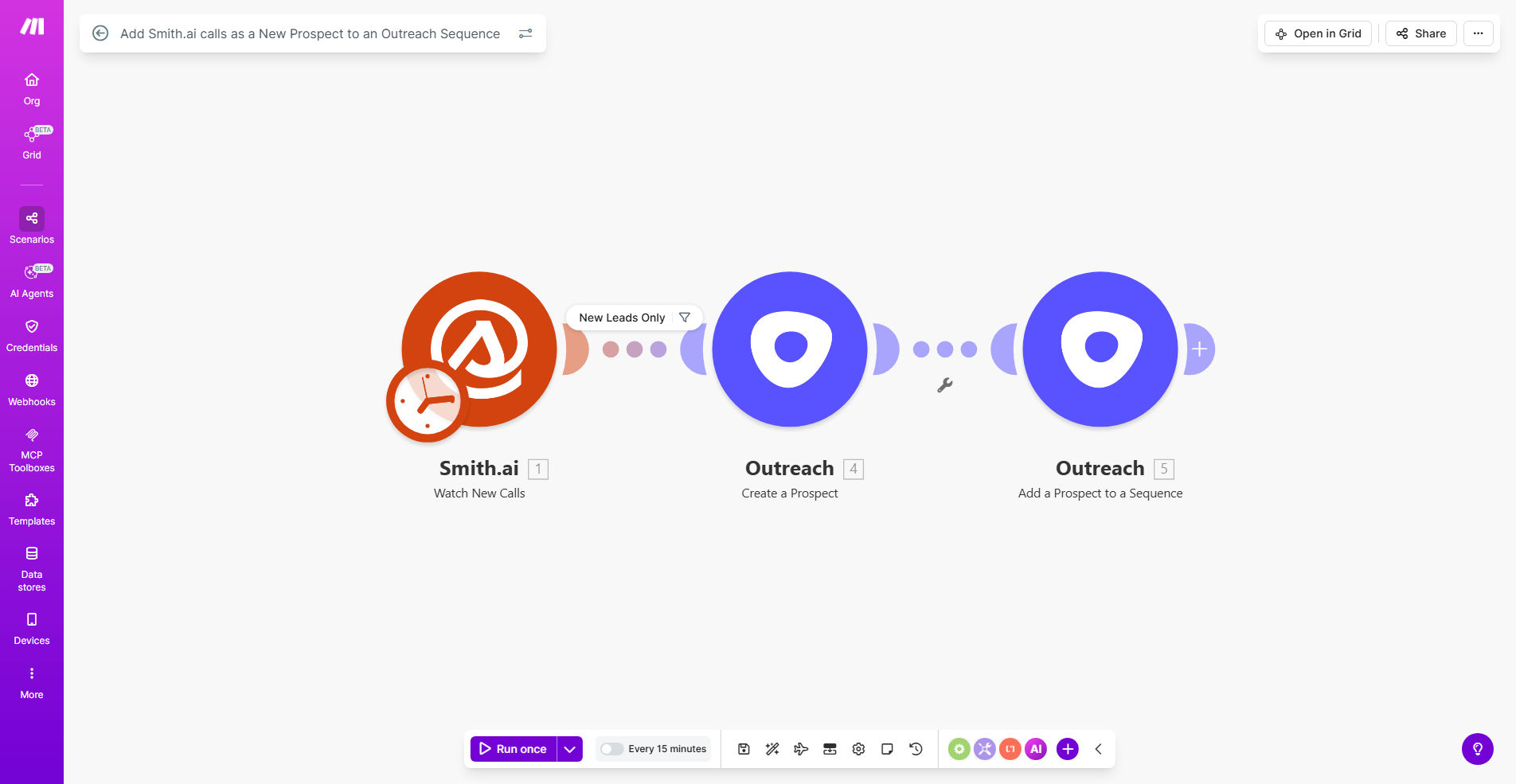
Make.com workflow diagram showing Smith.ai to Outreach integration

What This Workflow Does

This automation solves a critical gap in sales processes where phone leads often get lost between initial contact and follow-up. When Smith.ai's virtual receptionists answer calls from potential customers, their information typically sits isolated from your email outreach system. This workflow bridges that gap by instantly creating Outreach prospects and enrolling them in sequences.

The solution eliminates manual data transfer between systems, ensuring every phone lead receives timely, consistent follow-up. Sales teams using this automation typically see 30-50% more conversions from phone inquiries because prospects receive immediate email touchpoints while the initial call is still fresh in their minds.

How It Works

1. New call trigger

The workflow activates whenever Smith.ai logs a new incoming call from a potential customer. The virtual receptionist's notes and caller details become available to the automation.

2. Prospect creation

Make.com formats the caller information into Outreach's required fields, creating a new prospect record with all relevant call details attached.

3. Sequence enrollment

The new prospect automatically joins your predefined Outreach email sequence, triggering the first follow-up message according to your sequence timing rules.

Pro tip: Add a 15-30 minute delay before the first sequence email to allow sales reps time for immediate callbacks when appropriate.

Who This Is For

This workflow delivers the most value for sales-driven organizations that:

  • Receive 10+ inbound sales calls daily
  • Use Smith.ai for call answering and screening
  • Run multi-touch email sequences in Outreach
  • Have struggled with manual lead handoff between phone and email

Ideal users include SaaS companies, agencies, professional services firms, and ecommerce businesses with high-value products requiring consultative sales.

What You'll Need

  1. Active Smith.ai account with API access
  2. Outreach.io account with admin permissions
  3. Make.com account (free tier works)
  4. Pre-configured Outreach sequence for new leads
  5. Field mapping plan between Smith.ai data and Outreach prospect fields

Quick Setup Guide

  1. Clone the template in your Make.com account
  2. Connect your Smith.ai and Outreach accounts
  3. Map Smith.ai call fields to Outreach prospect fields
  4. Specify your target Outreach sequence ID
  5. Test with a real call from your team's phone
  6. Activate the scenario and monitor initial runs

Key Benefits

Eliminate lead leakage: 100% of callers enter your follow-up system automatically, compared to 60-70% with manual processes.

Faster response times: Prospects receive first-touch emails within minutes rather than hours or days.

Rep time savings: Sales teams reclaim 2-3 hours weekly previously spent copying call notes between systems.

Better data quality: Automated field mapping ensures consistent, complete prospect records.

Scalable processes: The system handles call volume spikes without additional staff workload.

Frequently Asked Questions

Common questions about call-to-sequence automation

Smith.ai captures caller information which can automatically trigger sales sequences in Outreach. This bridges phone conversations with digital follow-ups, ensuring no lead falls through the cracks between phone and email outreach.

The integration works through API connections that pass call metadata, notes, and caller details directly into your CRM or sales engagement platform as structured data.

Automation eliminates manual data entry between phone calls and email sequences. Sales teams gain 2-3 hours daily by automatically enrolling callers in sequences, while improving response times by 80% compared to manual processes.

Additional benefits include standardized follow-up procedures and complete activity tracking across all prospect touchpoints, whether phone or email.

  • No more missed follow-ups
  • Consistent messaging timing
  • Full call-to-email tracking

Typically caller name, phone number, call details, and any notes from the virtual receptionist transfer as prospect fields in Outreach. This creates complete prospect records without manual copying between systems.

The workflow can be customized to include additional data points like call duration, time of day, call disposition (new lead vs. existing customer), and specific keywords mentioned during the conversation.

The automation processes new callers within 1-2 minutes, immediately adding them to your specified Outreach sequence. This near-real-time enrollment means follow-ups begin while the call is still fresh in the prospect's mind.

You can adjust timing delays if needed—some teams prefer a 15-30 minute buffer to allow for immediate personal follow-up calls before automated emails begin.

Yes, the workflow can route callers to different sequences based on criteria like call duration, time of day, or specific keywords mentioned during the call. This creates personalized follow-up paths.

For example, high-intent callers asking about pricing might go to a 5-day sales sequence, while general inquiries could enter a 14-day nurturing track.

The workflow can be configured to either update existing prospect records or create new ones. Most implementations prevent duplicate sequences while updating call history and notes.

Advanced setups might trigger different sequences based on call frequency—for example, escalating to a sales manager sequence after the third call from the same prospect.

Absolutely. GrowwStacks specializes in building tailored automation between phone systems and sales platforms. We can customize workflows based on your call handling processes, CRM fields, and sequence logic.

Our typical engagement starts with understanding your current lead handoff challenges, then designing automation that fits your sales team's workflow while capturing all critical call data.

  • Custom field mapping
  • Conditional sequence routing
  • Rep notification systems

Need a Custom Call Automation?

This free template is a starting point. Our team builds fully tailored automation systems for your specific business needs.