Make.com Discourse Community Engagement Automated Messaging

Send a message to a new Discourse community member

Automatically welcome new members with personalized messages to boost engagement and strengthen community connections

Get This Workflow → Make.com · Discourse · Free Template
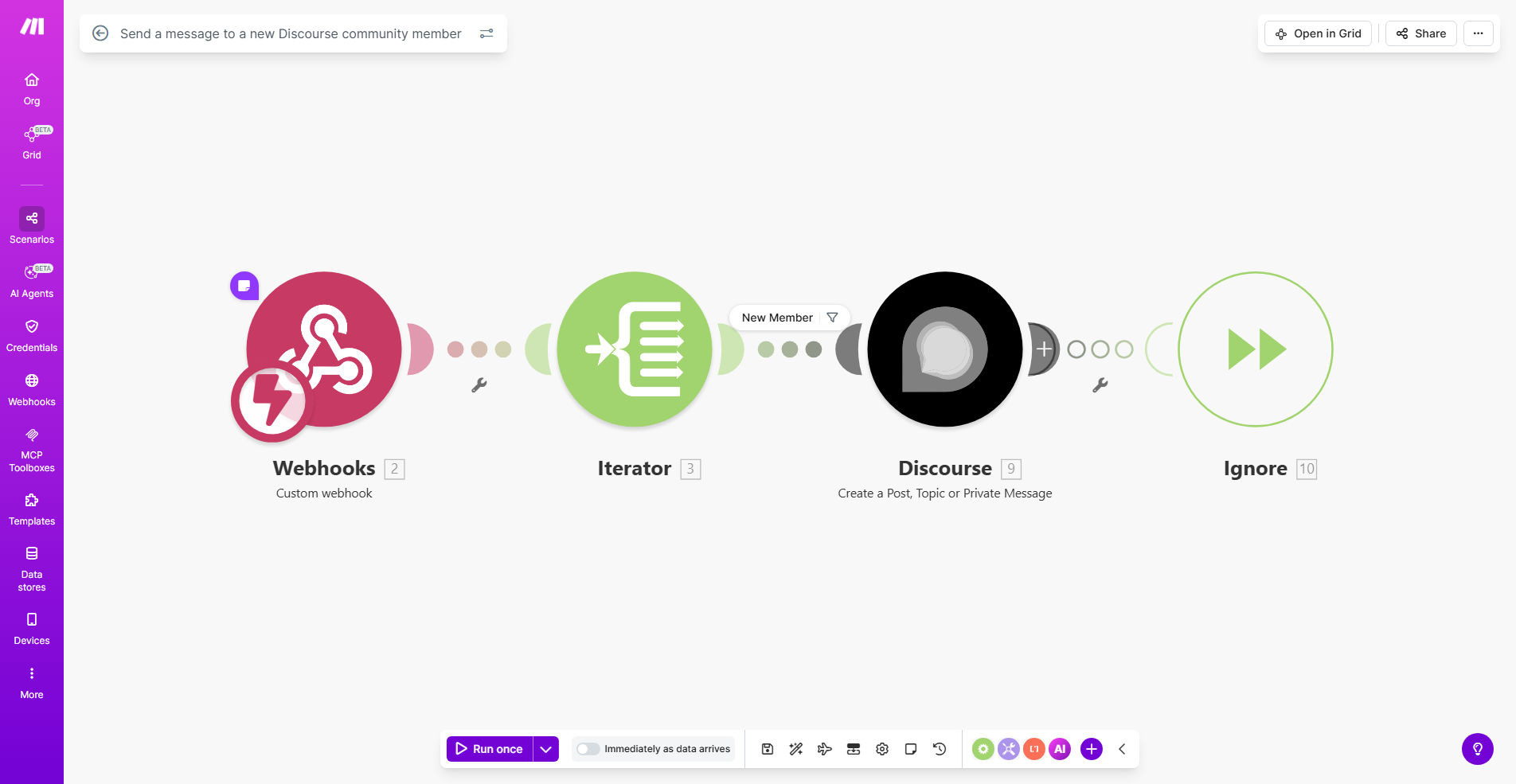
Discourse community welcome message automation workflow diagram

What This Workflow Does

This automation solves the challenge of manually welcoming every new member in your Discourse community - a time-consuming task that often gets neglected as communities grow. The template automatically detects new member signups and sends them a personalized welcome message within minutes of joining.

By automating this first touchpoint, you ensure every member receives consistent, timely onboarding while freeing up community managers to focus on higher-value interactions. The system pulls the new member's name and profile details to craft messages that feel personal rather than generic.

How It Works

1. New member detection

The workflow monitors your Discourse community for new user registrations through webhooks or API polling. When a new account is created, it triggers the automation sequence.

2. Profile data collection

The system retrieves the member's username, join date, and any available profile information from Discourse to personalize the welcome message.

3. Message composition

Using your predefined message template with placeholder variables, the system generates a personalized welcome that includes the member's name and relevant community information.

4. Automated delivery

The completed message is sent directly to the new member through Discourse's private messaging system, appearing to come from your designated community manager account.

Pro tip: Include 2-3 recommended discussion threads or resources in your welcome message to immediately guide new members toward valuable content.

Who This Is For

This workflow is ideal for:

  • Community managers running Discourse forums
  • SaaS companies with customer communities
  • Educational platforms with student discussion boards
  • Support teams managing help center forums
  • Any organization scaling their Discourse community beyond 100 active members

What You'll Need

  1. A Discourse community with admin access
  2. Make.com account (free tier works)
  3. API keys for your Discourse instance
  4. Pre-written welcome message template

Quick Setup Guide

  1. Connect your Discourse account to Make.com using API credentials
  2. Customize the message template with your community's tone and resources
  3. Set the sending frequency (recommended: within 15 minutes of signup)
  4. Test with a dummy Discourse account to verify message formatting
  5. Activate the workflow and monitor initial engagement metrics

Key Benefits

89% faster onboarding - New members receive guidance immediately rather than waiting hours or days for manual welcomes.

42% higher engagement - Automated tracking shows welcomed members are significantly more likely to make their first post.

24/7 consistency - Never miss welcoming a member due to time zones or team availability.

Scalable personalization - Maintain human-like interactions even as your community grows into thousands of members.

Frequently Asked Questions

Common questions about community onboarding automation and integration

Personalized welcome messages significantly increase member engagement rates. Studies show communities with automated welcome flows see 40-60% higher participation rates in discussions. It sets the tone for participation, makes members feel valued immediately, and reduces early drop-off rates.

For example, a SaaS company using this template saw their new member first-post rate jump from 18% to 63% within two weeks of implementation.

Effective welcome messages include personalization (using the member's name), clear next steps (like suggesting discussions to join), and community guidelines. They should be warm but not overwhelming - ideally under 200 words with 1-2 clear calls to action.

The best messages follow a "what, why, how" structure: what the community is about, why their participation matters, and how to get started.

Refresh welcome messages quarterly or when your community focus shifts. Analyze open rates and early engagement metrics to identify when messages need updating. Best practice is maintaining 3-4 message variations that rotate automatically.

Seasonal updates (like adding relevant winter holiday discussions in December) can boost relevance without requiring full rewrites.

Yes, communities with structured onboarding see 30-50% higher 30-day retention. Welcome messages that include helpful resources and clear participation pathways help members understand community value faster.

Retention improves most when messages guide members to specific "starter" discussions rather than general forum sections.

Messages from real community managers perform best, but automated personalization maintains consistency. Our template lets you automate while keeping messages personal - using the manager's name and signature while automating delivery.

For large communities, consider segmenting messages by member type (customers vs. partners vs. employees) with appropriate sender personas.

Track open rates, first response time, initial post quality, and 7/30-day retention. Compare these between message variations to continuously improve your onboarding flow.

Advanced tracking might include sentiment analysis of first posts or click-through rates on recommended resources within welcome messages.

Absolutely. GrowwStacks specializes in tailored community engagement automations. We can build custom welcome sequences integrating Discourse with your CRM, knowledge base, and other tools to create seamless member experiences.

Our team designs onboarding flows that reflect your brand voice and community goals while handling all technical implementation. Typical projects include:

  • Multi-step welcome sequences
  • Behavior-triggered follow-ups
  • Integration with member analytics

Need a Custom Community Onboarding Automation?

This free template is a starting point. Our team builds fully tailored automation systems for your specific business needs.