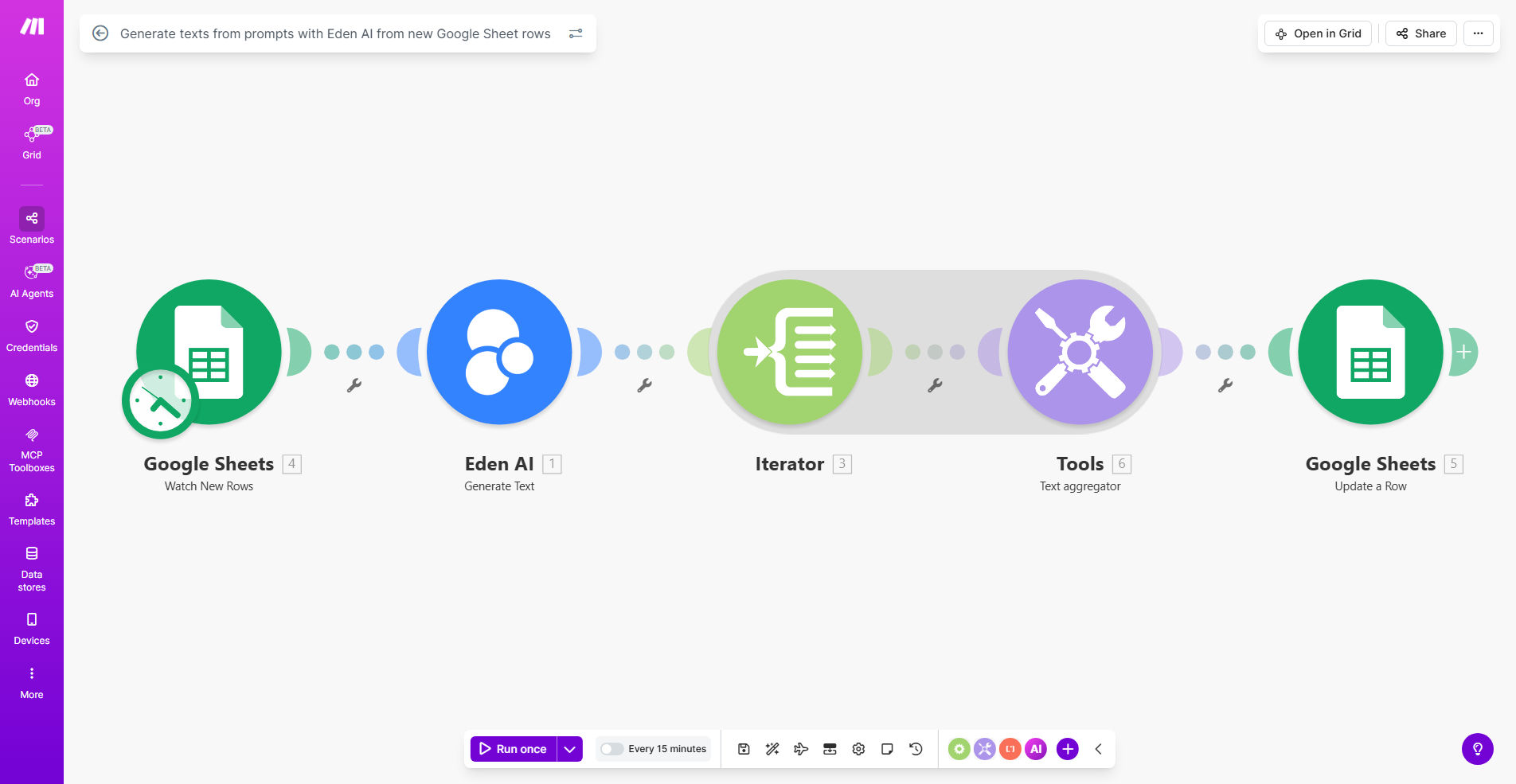
What This Workflow Does
This automation solves the time-consuming process of manually generating AI content from spreadsheet data. Whenever new rows are added to your Google Sheet containing text prompts, the workflow automatically sends them to Eden AI's powerful text generation models and returns polished content ready for use.
Businesses use this to create product descriptions at scale, generate marketing copy variations, produce first drafts of blog content, and automate repetitive writing tasks. The integration handles all the API calls, error checking, and formatting automatically, saving hours of manual work each week.
How It Works
1. New row detection
The workflow monitors your designated Google Sheet for new rows containing text prompts in a specified column. It triggers whenever content is added or modified.
2. Prompt processing
Each new prompt is extracted from the spreadsheet and formatted with any additional context or instructions you've configured in the workflow settings.
3. AI text generation
The processed prompt is sent to Eden AI's API, which routes it to the most appropriate text generation model based on your configuration and content requirements.
4. Result validation
The generated text is checked for quality, length, and formatting before being returned to your workflow.
5. Output delivery
The final AI-generated content is written back to your Google Sheet in a designated output column or sent to other connected apps like your CMS, email platform, or document storage.
Pro tip: Structure your prompts with clear instructions, examples, and tone guidelines in separate spreadsheet columns to get more consistent results from the AI models.
Who This Is For
This workflow is ideal for content teams, ecommerce stores, marketing agencies, and any business that needs to produce large volumes of written content. Specific use cases include:
- Ecommerce managers generating product descriptions for hundreds of SKUs
- Content marketers creating blog post outlines and first drafts
- Social media teams producing caption variations for posts
- Customer support leaders automating response templates
- SEO specialists building content at scale for landing pages
What You'll Need
- A Make.com account (free plan available)
- Google Sheets with your text prompts
- Eden AI API key (free tier available)
- Clear content guidelines for consistent AI output
Quick Setup Guide
- Copy this template to your Make.com account
- Connect your Google Sheets account and select the spreadsheet
- Configure which columns contain prompts and where to output results
- Add your Eden AI API key in the workflow settings
- Test with sample prompts and adjust parameters as needed
- Activate the workflow and start adding prompts to your sheet
Key Benefits
Save 10+ hours per week by eliminating manual copy-pasting between spreadsheets and AI tools. The automation handles all the repetitive work.
Ensure brand consistency across all generated content by applying your style guidelines automatically to every AI output.
Scale content production without adding headcount. Generate hundreds of quality text pieces daily from your existing team's prompts.
Reduce human error in content formatting and delivery. The workflow follows your exact specifications every time.
Test multiple AI models easily by modifying the workflow to compare outputs from different providers in Eden AI's platform.