What This Workflow Does
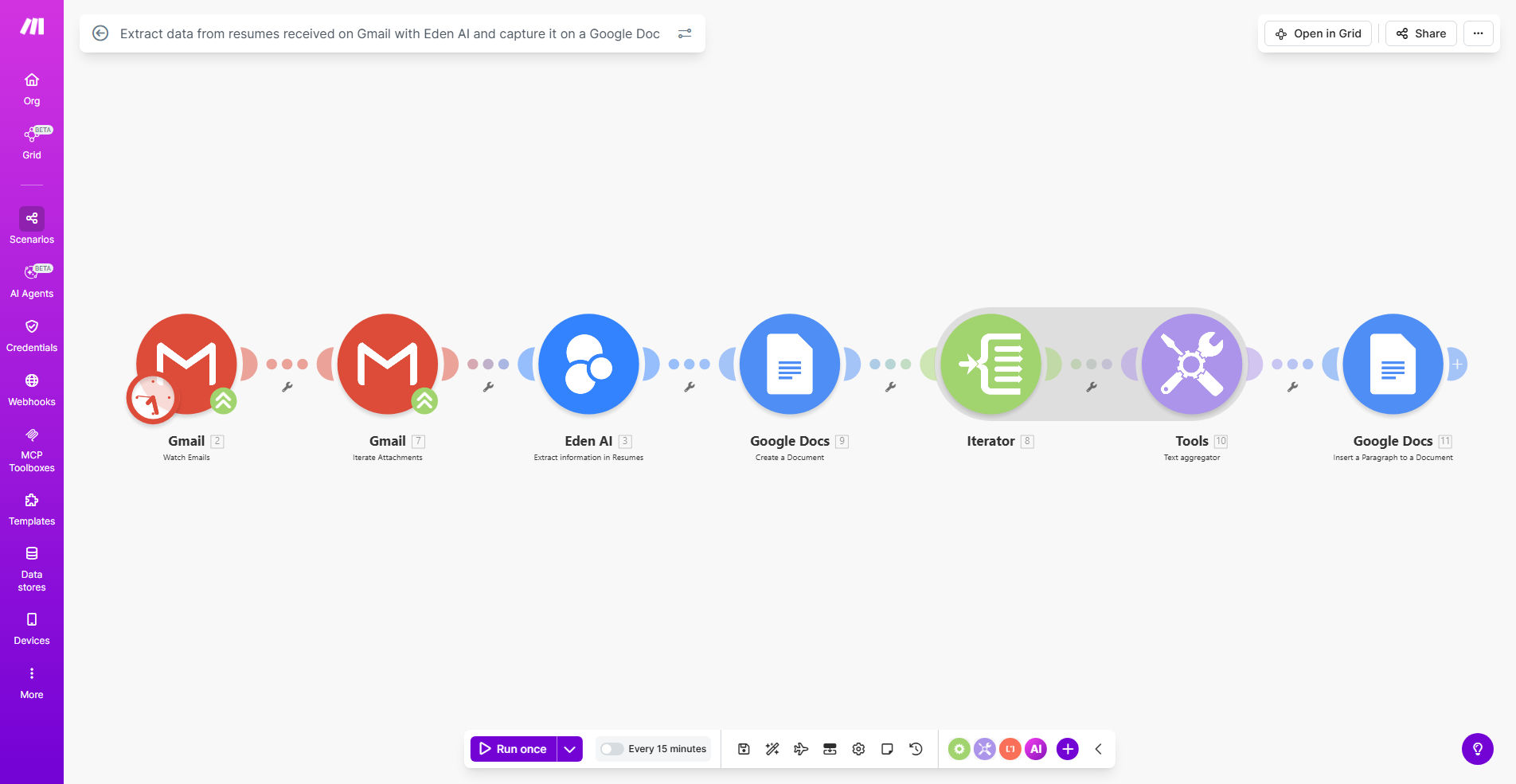
This automation solves the tedious manual process of extracting information from resumes received via email. When candidates send their resumes to your Gmail, the workflow automatically processes the attachments using Eden AI's powerful parsing technology, then organizes the extracted data into a structured Google Doc.
Recruiters and hiring managers waste countless hours manually reviewing resumes and copying information into tracking systems. This workflow eliminates that repetitive work by instantly converting unstructured resume data into organized candidate profiles with consistent formatting. The AI understands different resume layouts and extracts key details like contact information, work history, education, and skills.
How It Works
1. New Resume Detection
The workflow monitors your Gmail account for new messages with resume attachments. It can be configured to watch specific labels or folders, or scan all incoming mail for PDF or DOCX attachments that likely contain resume content.
2. AI-Powered Data Extraction
When a new resume is detected, the file is sent to Eden AI's parsing engine. The AI analyzes the document structure, identifies sections, and extracts relevant candidate information with impressive accuracy, regardless of the resume's original format.
3. Structured Data Organization
The extracted information is then formatted into a clean, standardized Google Doc. The workflow creates a new document for each candidate, with consistent section headings and logical organization of the parsed data.
4. Automatic Storage & Notification
Completed candidate profiles are saved to a designated Google Drive folder, and the workflow can optionally send notifications to your team via email or Slack when new profiles are added.
Pro tip: Configure the workflow to add candidate ratings based on keyword matches for skills or qualifications you're seeking. This creates an instant scoring system to prioritize top applicants.
Who This Is For
This automation is ideal for:
- Recruitment agencies processing high volumes of resumes
- HR teams managing multiple job openings simultaneously
- Hiring managers who want to streamline candidate screening
- Startups building their talent pipeline without dedicated recruiters
- Companies receiving 50+ applications per job posting
What You'll Need
- A Make.com account (free plan available)
- Gmail account where resumes are received
- Google Drive account to store parsed resumes
- Eden AI API key (free tier available)
- 5 minutes to configure the template
Quick Setup Guide
- Click "Get This Workflow" to copy the template to your Make.com account
- Connect your Gmail and Google Drive accounts in Make.com
- Obtain an API key from Eden AI and add it to the workflow
- Specify the Gmail labels/folders to monitor for resumes
- Set your preferred Google Drive folder for parsed resumes
- Test with sample resumes to verify parsing accuracy
- Activate the scenario to begin automatic processing
Key Benefits
Save 5-8 minutes per resume by eliminating manual data entry. For 100 applications, that's 8-13 hours of recruiter time reclaimed.
Reduce human error in transcribing candidate information. The AI extracts data exactly as presented in the original resume.
Standardize candidate profiles regardless of original resume format. All parsed resumes follow your preferred document structure.
Enable faster candidate screening with instantly organized information. Recruiters can quickly scan for key qualifications.
Create searchable candidate databases since Google Docs content is fully indexable by Google Drive search.