Make.com Email Automation AI Summarization Slack Integration OpenAI

Summarize Emails with OpenAI and Share on Slack

Automatically extract key points from emails using AI and post concise summaries to your team's Slack channels

Get This Workflow Make.com · Email Automation · Free Template
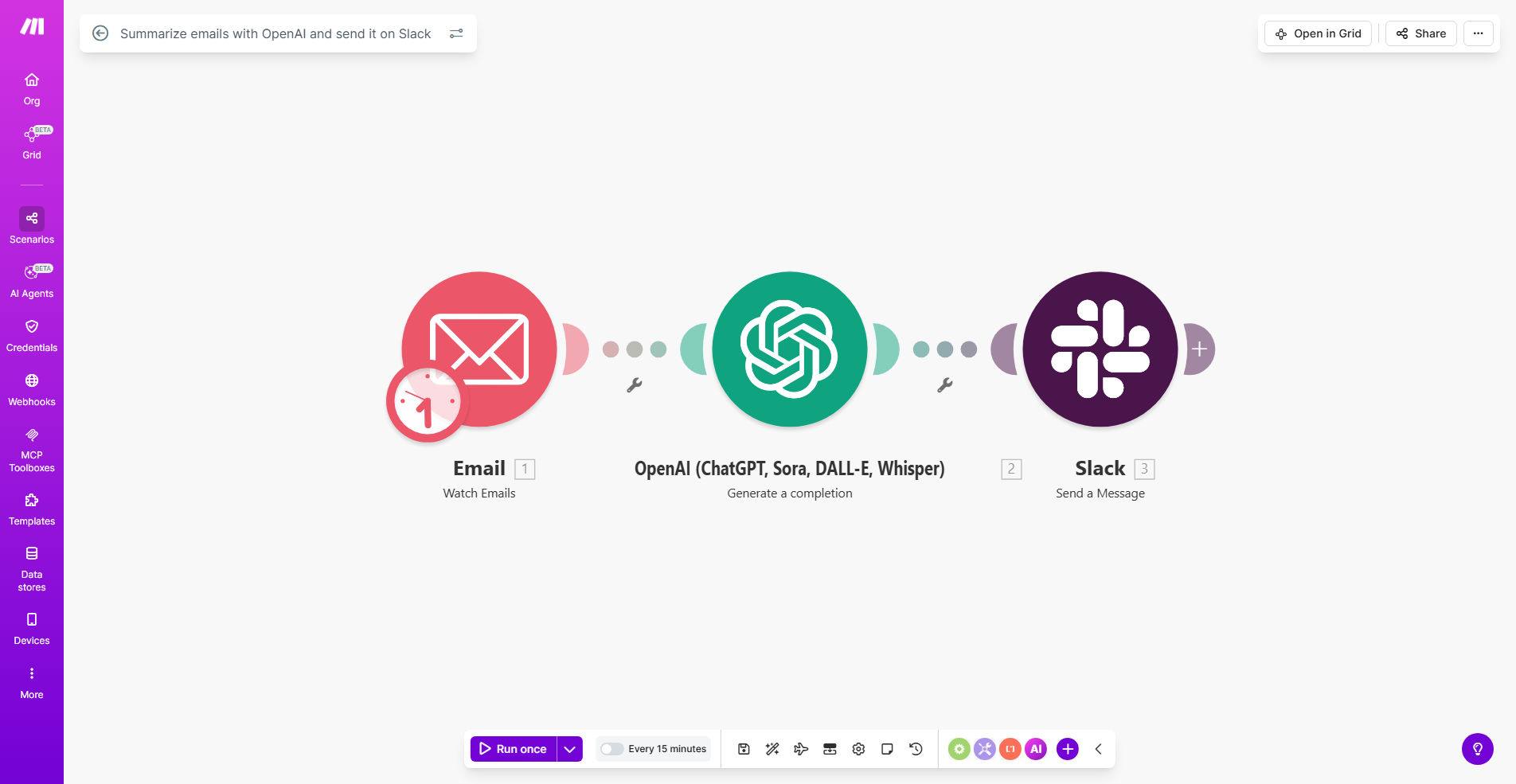
Email summarization workflow diagram showing OpenAI processing emails and sending summaries to Slack

What This Workflow Does

This automation solves the common problem of email overload by using artificial intelligence to extract and share only the most important information. Instead of forwarding entire email threads or asking team members to read lengthy messages, the workflow automatically generates concise summaries using OpenAI's natural language processing and posts them directly to your Slack channels.

The system processes incoming emails in real-time, analyzing the content to identify key points, action items, and decisions. This reduces the time teams spend reading emails by up to 80% while ensuring critical information isn't missed. It's particularly valuable for managers, customer support teams, and remote workers who need to stay informed without being overwhelmed by their inbox.

How It Works

1. Email Trigger

The workflow activates when new emails arrive in your designated inbox. You can configure it to watch specific folders or apply filters based on sender, subject, or labels.

2. Content Extraction

The system extracts the email body, stripping away signatures, disclaimers, and quoted text to focus on the core message content.

3. AI Summarization

OpenAI processes the extracted text, identifying key themes, decisions, and action items. The AI generates a concise summary (typically 3-5 sentences) that captures the essence of the message.

4. Slack Notification

The formatted summary is posted to your chosen Slack channel, including relevant metadata like sender, subject, and priority level. Team members can react or reply directly in Slack.

Pro tip: Create a dedicated #email-summaries channel in Slack to keep all AI-processed messages organized and searchable.

Who This Is For

This workflow benefits any team that deals with high email volume:

  • Executives and managers who need to stay informed without reading every message
  • Customer support teams monitoring shared inboxes
  • Project managers tracking multiple email threads
  • Remote teams across different time zones
  • Sales teams processing lead inquiries

What You'll Need

  1. A Make.com account (free tier available)
  2. OpenAI API access (GPT-3.5 or higher)
  3. Slack workspace with appropriate permissions
  4. Email account that supports IMAP/POP3 (Gmail, Outlook, etc.)

Quick Setup Guide

  1. Clone the template in your Make.com account
  2. Connect your email service and configure filters
  3. Add your OpenAI API key and adjust summary length
  4. Connect Slack and select target channels
  5. Test with sample emails and refine settings

Key Benefits

Save 5+ hours per week per employee by eliminating unnecessary email reading time. Team members can quickly scan summaries instead of parsing full messages.

Reduce missed action items by 60% as AI highlights critical tasks and decisions in standardized formats that are easier to track.

Improve response times by surfacing urgent messages through Slack notifications rather than buried in inboxes.

Create searchable knowledge base as all summaries are archived in Slack with consistent formatting and metadata.

Scale email processing without adding staff during high-volume periods like product launches or seasonal peaks.

Frequently Asked Questions

Common questions about email automation and AI summarization

AI email summaries save time by extracting key points from lengthy emails, allowing teams to focus on action items rather than reading entire messages. This reduces information overload and helps prioritize important communications.

For example, a support team processing 200+ daily emails can quickly identify urgent customer issues from summaries rather than opening each message. Managers can scan summaries in half the time it takes to read full threads.

The workflow works best for newsletters, meeting recaps, project updates, and customer inquiries. It's less effective for highly technical or confidential communications that require full context.

Best results come from well-structured business emails with clear subjects and paragraphs. The AI can identify action items, decisions, and key information while filtering out boilerplate content.

OpenAI's summaries typically capture 80-90% of key points accurately for standard business communications. The system understands context and relationships between concepts better than simple keyword extraction.

Accuracy improves when emails follow conventional business formats. You can train the system by providing sample summaries for your specific email types during setup.

Yes, you can configure which Slack channels receive summaries, set priority levels for different senders, and adjust summary length based on your team's needs.

The workflow supports rules like: "Summarize emails from execs in 3 sentences to #leadership" or "Post full customer complaint summaries to #support with high priority."

Automated summaries are 10x faster than manual processing and available 24/7. They provide consistent formatting and can handle volume spikes without additional staff time.

While humans might catch subtle nuances better, AI delivers reliable summaries at scale. Most teams find the trade-off favorable for routine communications.

The workflow uses encrypted connections between services. You can exclude sensitive emails and configure data retention policies to meet compliance requirements.

For added security: restrict Slack channel access, mask sensitive data in summaries, and automatically delete processed emails after a set period if needed.

Absolutely! Our team specializes in building tailored email processing systems that match your specific workflows. We can create custom rules, integrate with your existing tools, and design outputs that fit your team's needs.

Custom solutions might include: multiple output channels (Slack + Teams + SMS), approval workflows for sensitive summaries, or integration with your CRM/ticketing system.

  • Free consultation to assess your needs
  • 2-week implementation typical
  • Ongoing support and optimization

Need a Custom Email Automation?

This free template is a starting point. Our team builds fully tailored automation systems for your specific business needs.