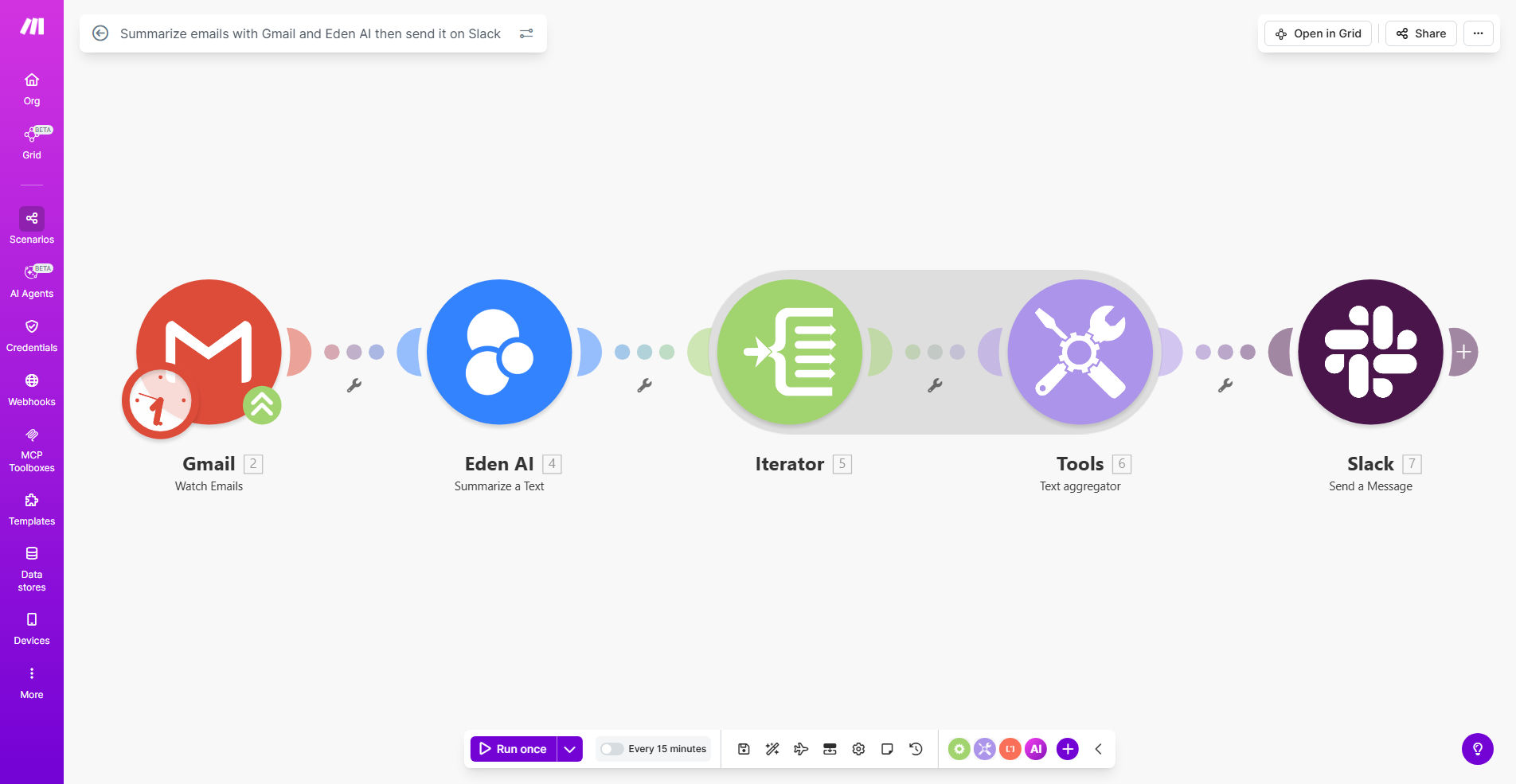
What This Workflow Does
This automation solves the growing problem of email overload by using artificial intelligence to identify and extract the most important information from your Gmail messages. Instead of your team wasting time reading lengthy email threads, the system automatically generates concise summaries highlighting key decisions, action items, and updates.
The processed summaries are then posted to designated Slack channels, creating a searchable knowledge base that keeps everyone informed without inbox clutter. This is particularly valuable for customer support teams, project managers, and executives who receive high volumes of critical communications but need to stay focused on strategic work.
How It Works
1. Email Trigger
The workflow monitors your Gmail account for new messages matching your criteria (specific senders, labels, or keywords). You can configure it to process all incoming mail or only tagged messages.
2. AI Processing
Each selected email is sent to Eden AI's natural language processing engine, which analyzes the content to identify the core message, extract names/dates/actions, and generate a summary at your preferred length (bullet points or short paragraphs).
3. Slack Delivery
The system formats the summary with the original sender, subject line, and urgency indicators, then posts it to your chosen Slack channel. You can set different routing rules for various email types (e.g., customer inquiries vs. internal updates).
Pro tip: Combine this with Slack reminders to create follow-up tasks directly from summarized emails, closing the loop on action items.
Who This Is For
This workflow delivers exceptional value for:
- Customer support teams who need to quickly triage and share client requests
- Project managers coordinating across multiple stakeholders via email
- Executives who receive lengthy reports but need distilled insights
- Remote teams across time zones needing asynchronous updates
- Sales teams tracking multiple client conversations
What You'll Need
- A Make.com account (free tier available)
- Gmail account with API access enabled
- Eden AI API key (free tier available)
- Slack workspace with permissions to create webhooks
- 5-10 minutes for initial configuration
Quick Setup Guide
- Duplicate the template in your Make.com account
- Connect your Gmail account and select target labels/filters
- Enter your Eden AI API key in the designated module
- Configure your Slack webhook URL and channel mapping
- Test with sample emails and adjust summary length as needed
- Activate the scenario and monitor initial summaries for accuracy
Key Benefits
Reduce email processing time by 70-80% by automating the most time-consuming aspect of email management - extracting key information from lengthy threads.
Improve team response times by 40% according to case studies, as critical information becomes immediately visible in Slack without digging through inboxes.
Create searchable knowledge archives since Slack preserves all summaries, unlike emails that get buried or deleted. One client reduced duplicate information requests by 63%.
Scale executive attention by providing distilled versions of lengthy reports and updates, allowing faster decision-making without missing key details.
Enhance remote collaboration across time zones by making email updates immediately visible to entire teams, not just individual recipients.