Make.com Competitor Tracking Browse AI Google Sheets Automation

Monitor Website Pricing with Browse AI & Google Sheets

Automatically track competitor price changes and log them to a spreadsheet for analysis

Get This Workflow Make.com · Pricing Monitor · Free Template
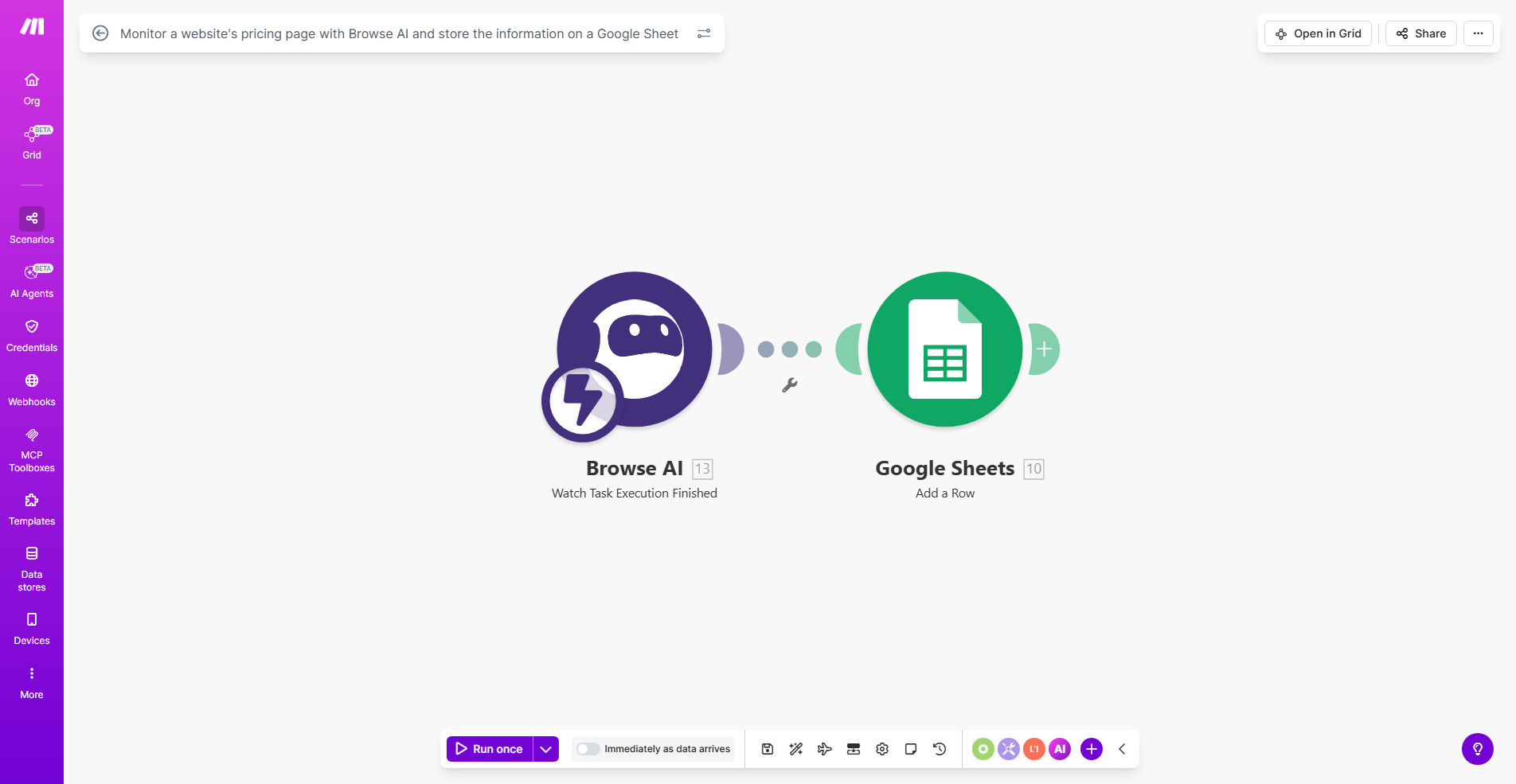
Website pricing monitoring automation workflow diagram

What This Workflow Does

This automation solves the time-consuming task of manually checking competitor websites for pricing changes. It combines Browse AI's web scraping capabilities with Make.com's automation power to create a reliable pricing monitoring system.

The workflow periodically checks specified pricing pages, extracts the current pricing information, and logs it to a Google Sheet with timestamps. This creates a historical record you can use to identify trends, spot promotions, and make data-driven pricing decisions.

How It Works

1. Scheduled Monitoring Trigger

The workflow starts on a schedule you define (daily, weekly, etc.) to check your competitor's pricing page.

2. Browse AI Extracts Pricing Data

Browse AI visits the target website and extracts the current pricing information using its trained AI models.

3. Data Processing

Make.com processes the scraped data to format it consistently and prepare it for storage.

4. Google Sheets Logging

The processed pricing data gets appended to your designated Google Sheet with a timestamp for tracking changes over time.

Who This Is For

This automation is ideal for:

  • Ecommerce businesses tracking competitor pricing
  • SaaS companies monitoring subscription plan changes
  • Retailers comparing product prices across vendors
  • Marketing agencies providing competitive intelligence to clients
  • Pricing analysts needing historical pricing data

What You'll Need

  1. A Make.com account (free tier available)
  2. Browse AI account (free trial available)
  3. Google Sheets with write permissions
  4. The URL of the pricing page you want to monitor

Quick Setup Guide

  1. Duplicate the template scenario in your Make.com account
  2. Connect your Browse AI account and train a robot for your target pricing page
  3. Connect your Google Sheets account and select/create your tracking spreadsheet
  4. Set your preferred monitoring frequency (daily recommended)
  5. Test the workflow with a manual run
  6. Activate the scenario for automatic monitoring

Pro tip: Create a dashboard in Google Sheets with charts showing price trends over time. Add conditional formatting to highlight significant changes.

Key Benefits

Saves 5+ hours per month by eliminating manual price checking across multiple competitor sites.

Never miss a price change with automated monitoring running 24/7 on your schedule.

Data-driven pricing decisions backed by historical records instead of guesswork.

Early trend detection spots competitor promotions or market shifts before they impact your sales.

Team transparency with shared Google Sheets access for marketing, sales, and leadership teams.

Frequently Asked Questions

Common questions about pricing monitoring automation

Tracking competitor pricing helps you stay competitive by identifying market trends, spotting opportunities to adjust your own pricing strategy, and understanding how competitors position their products. Without automation, manually checking prices is time-consuming and prone to missing important changes.

For example, an ecommerce store discovered their main competitor ran flash sales every Thursday afternoon through this automation, allowing them to schedule counter-promotions.

For most businesses, checking prices weekly is sufficient. However, industries with frequent price changes (like ecommerce or SaaS) may benefit from daily monitoring. This automation lets you set any monitoring frequency without manual effort.

The ideal frequency depends on your industry volatility and how quickly you need to respond to changes. We recommend starting with daily checks, then adjusting based on how frequently prices actually change.

Google Sheets provides historical tracking, easy sharing with teams, and integration with other tools. You can create visualizations, set up alerts for significant changes, and analyze pricing trends over time.

Unlike standalone databases, Sheets allows non-technical team members to access and work with the data. You can also connect it to BI tools like Looker Studio for advanced reporting.

Browse AI can handle some login-protected pages if you configure it with credentials during setup. However, complex authentication systems may require custom solutions.

For member-only pricing pages, we recommend testing with Browse AI first. If unsuccessful, we can develop custom authentication solutions that work with your specific login requirements.

Modern AI scraping tools like Browse AI achieve 90-95% accuracy for structured pricing pages. They handle website redesigns better than traditional scrapers by understanding page structure rather than relying on fixed selectors.

Accuracy depends on page complexity. Simple pricing tables extract perfectly, while creative pricing displays may need manual verification. We recommend spot-checking initially until you confirm consistent accuracy.

Use the data to: 1) Adjust your pricing strategy, 2) Identify competitor promotions, 3) Benchmark your value proposition, 4) Spot market trends early, 5) Inform sales and marketing campaigns.

One client used historical data to prove their premium pricing was justified by consistently offering more features than competitors. Another detected a market-wide price increase trend and raised prices preemptively.

  • Create price change alerts for key products
  • Compare your price positioning over time
  • Identify seasonal pricing patterns

Yes, GrowwStacks specializes in building custom pricing monitoring solutions tailored to your specific competitors, products, and business needs. We can integrate additional data sources, create advanced analytics dashboards, and set up automated alerts.

Our custom solutions typically monitor 5-50 competitor pricing pages with features like: anomaly detection for sudden price drops, integration with your internal pricing systems, and executive summary reports.

  • Multi-competitor tracking
  • Price change notifications
  • Competitor feature comparisons

Need a Custom Pricing Monitoring Automation?

This free template is a starting point. Our team builds fully tailored automation systems for your specific business needs.