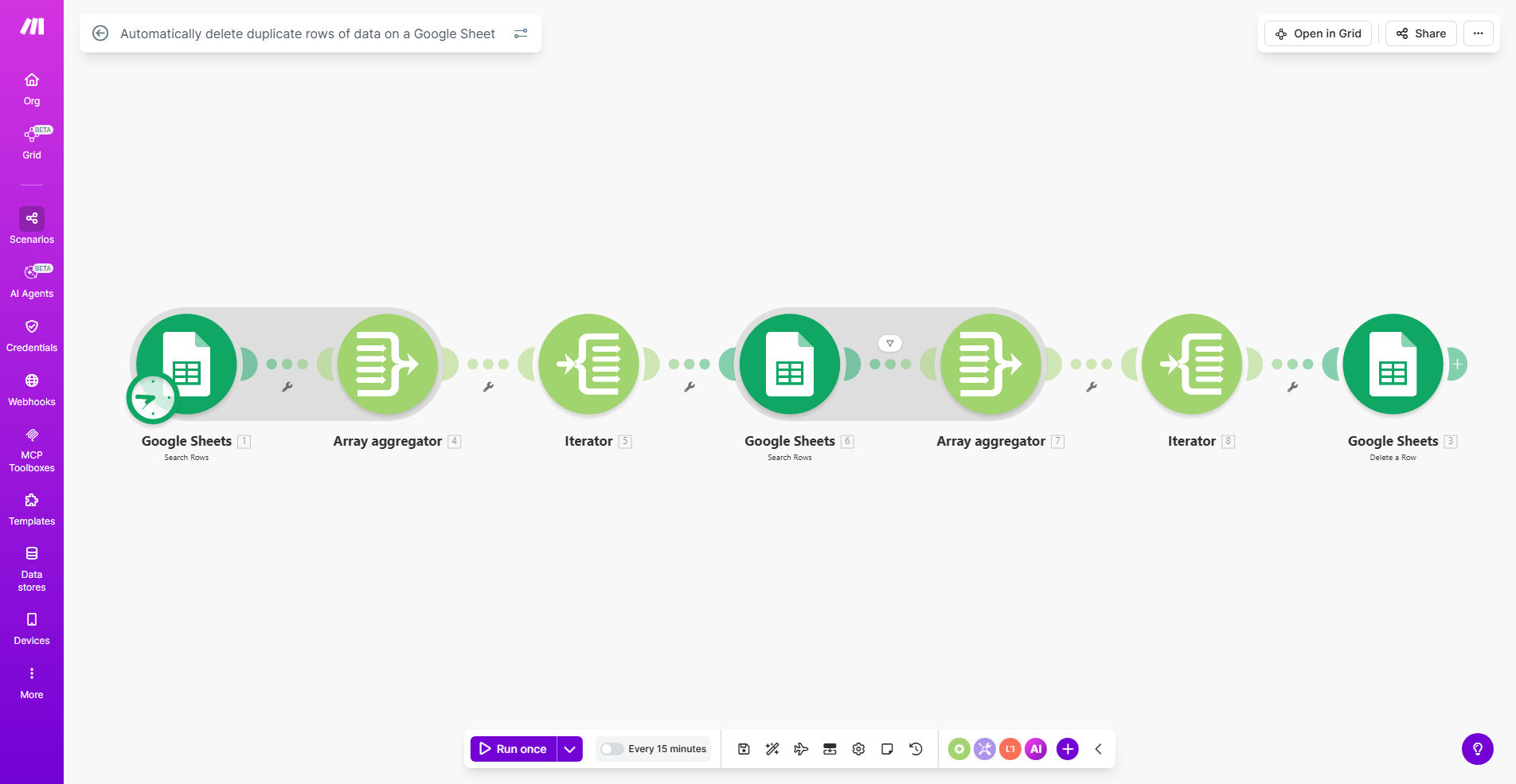
What This Workflow Does
Duplicate data plagues spreadsheets, causing reporting errors, wasted storage, and operational inefficiencies. This automation identifies and removes redundant rows from your Google Sheets based on your custom criteria, ensuring clean datasets for accurate analysis and decision-making.
The solution goes beyond simple duplicate detection - it can be configured to handle partial matches, fuzzy logic comparisons, and complex multi-column validation rules. Unlike manual cleanup that consumes hours each month, this workflow runs automatically on your schedule without human intervention.
How It Works
1. Data Scanning
The workflow connects to your specified Google Sheet and scans all rows against your defined duplicate criteria (specific columns or combinations).
2. Duplicate Identification
Using your configured matching rules (exact, partial, or fuzzy), the system flags duplicate entries while preserving the original record.
3. Verification & Action
Depending on your settings, duplicates can be: deleted permanently, moved to an archive sheet, or flagged for manual review in a separate tab.
4. Logging & Notification
The system maintains an audit log of all actions and can notify your team via email or Slack when duplicates are processed.
Who This Is For
This automation benefits any business relying on Google Sheets for:
- CRM and contact management
- Inventory tracking
- Financial reporting
- Marketing campaign data
- Survey response aggregation
- Any dataset where data integrity is critical
What You'll Need
- A Google Sheet with edit permissions
- Make.com account (free tier available)
- Basic understanding of your duplicate criteria (which columns indicate duplicates)
- Optional: Google Drive backup if working with critical data
Quick Setup Guide
- Install the template from Make.com
- Connect your Google Sheets account
- Specify your target spreadsheet and worksheet
- Define your duplicate detection rules (columns to compare)
- Set your preferred action for duplicates (delete, archive, flag)
- Configure scheduling (daily, weekly, or trigger-based)
- Test with a small dataset before full deployment
Key Benefits
Saves 5-15 hours monthly by eliminating manual spreadsheet cleanup tasks that typically consume 1-3 hours weekly.
Reduces errors by 90% in reports and analytics by ensuring no duplicate data skews your numbers.
Maintains data integrity automatically, even as multiple team members edit the same sheet.
Scalable solution that handles sheets with thousands of rows without performance degradation.
Customizable logic to match your specific business rules for what constitutes a duplicate.