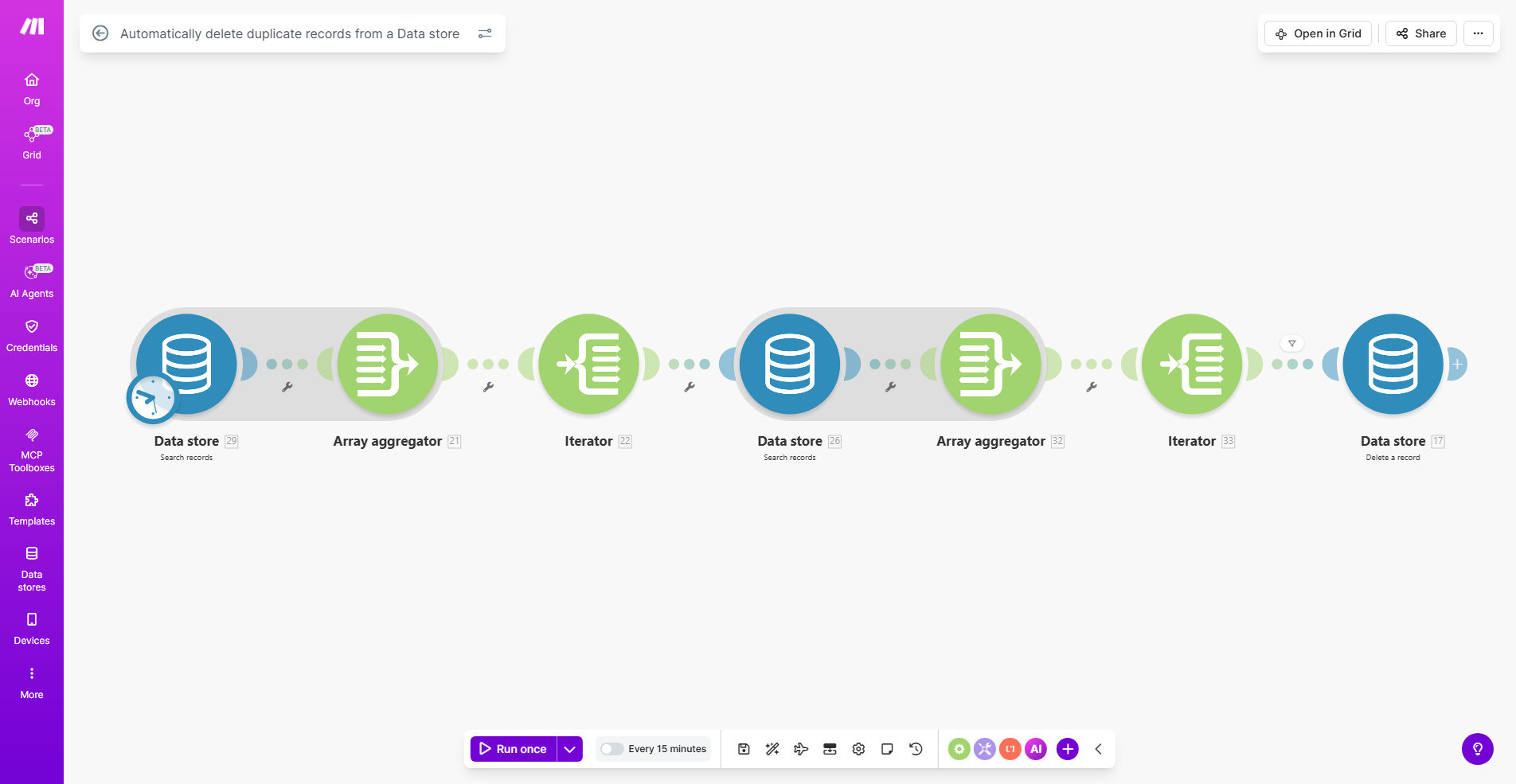
What This Workflow Does
Duplicate records plague databases of all sizes, creating inconsistencies that affect reporting accuracy and operational efficiency. This Make.com workflow automatically identifies and removes duplicate entries from your Data Store, ensuring clean, reliable data.
The system scans your records based on configurable matching criteria (like email addresses or customer IDs), flags potential duplicates for review, and automatically removes confirmed duplicates according to your business rules. This eliminates manual cleanup efforts while maintaining data integrity.
How It Works
1. Record Scanning
The workflow periodically scans your Data Store, comparing records against your specified duplicate detection fields. You can configure the scan frequency based on your data volume needs.
2. Duplicate Identification
Using fuzzy matching logic, the system identifies potential duplicates even with minor variations (like "gmail.com" vs "gmail.co"). You can adjust matching sensitivity to balance thoroughness with false positives.
3. Verification & Action
Depending on your configuration, the workflow can either automatically remove confirmed duplicates or flag them for manual review. Optional email notifications keep you informed of actions taken.
Who This Is For
This automation benefits any business using Make.com Data Stores who:
- Collect customer or product data through multiple channels
- Experience duplicate entries in CRM systems or databases
- Need clean data for accurate reporting and analytics
- Want to optimize storage space by removing redundant records
What You'll Need
- A Make.com account with access to Data Stores
- Administrator permissions to modify the target Data Store
- Clear criteria for what constitutes a duplicate record in your system
- (Optional) Email integration if you want notification alerts
Quick Setup Guide
- Install the template from Make.com
- Connect to your target Data Store
- Configure your duplicate matching criteria
- Set your preferred action (auto-delete or manual review)
- Schedule the frequency of duplicate checks
- Test with a small dataset before full deployment
Key Benefits
Save 5-10 hours monthly by eliminating manual duplicate cleanup tasks that typically consume valuable staff time.
Improve data accuracy by 30-50% by systematically removing redundant records that skew analytics and reporting.
Reduce storage costs by eliminating unnecessary duplicate entries that bloat your database.
Enhance customer experience by preventing duplicate communications or conflicting records in your systems.
Maintain compliance with data protection regulations by keeping only necessary, accurate records.
Pro tip: Before running your first deduplication, export a backup of your Data Store. This gives you a recovery point if needed.