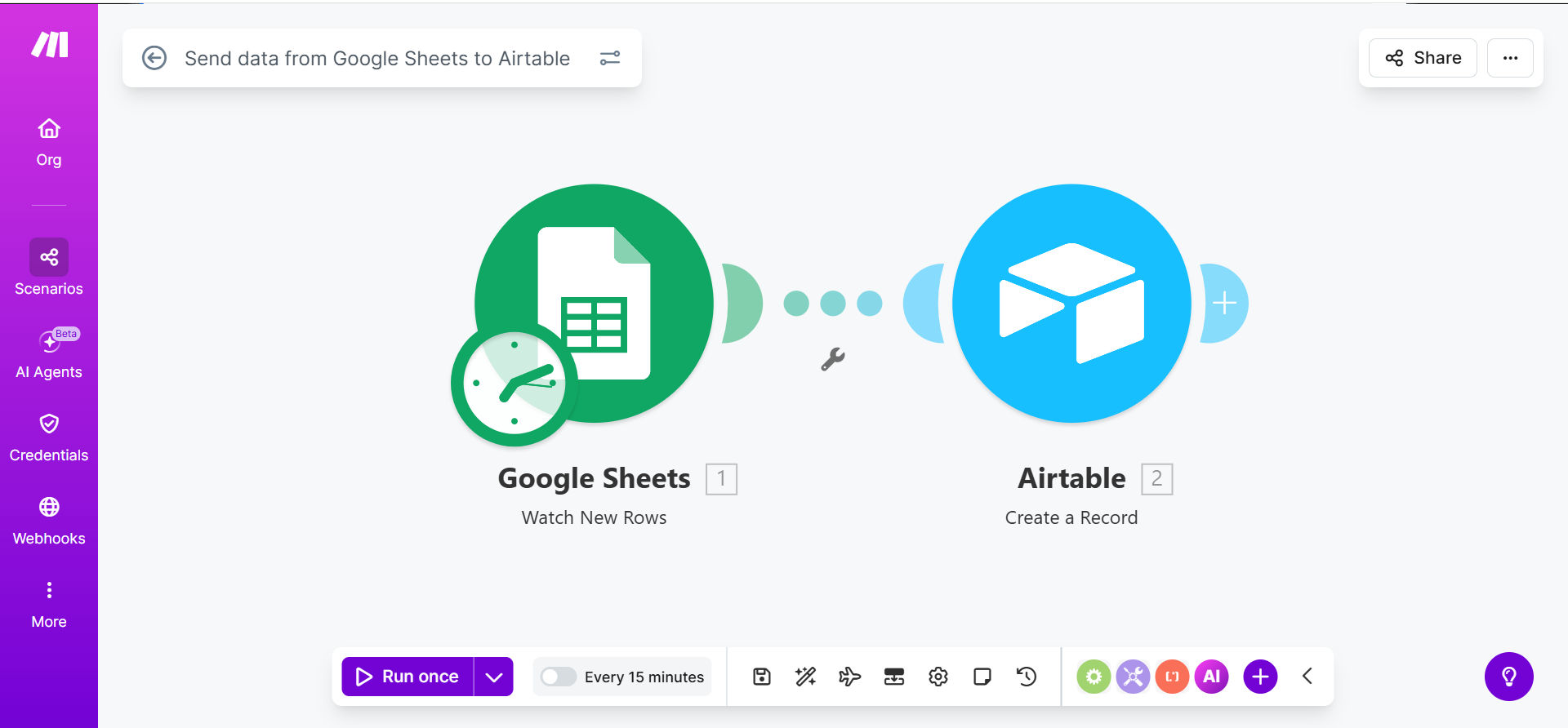
What This Workflow Does
Businesses often find themselves trapped in a cycle of manual data transfer. Information collected in Google Sheets—be it leads from a marketing campaign, inventory updates, project tasks, or customer feedback—needs to be manually copied and pasted into Airtable for better organization, relational database features, and team collaboration. This process is not only tedious and time-consuming but also highly susceptible to human error, leading to outdated records, data inconsistencies, and missed opportunities.
This free Make.com template solves that problem by creating a seamless, automated bridge between Google Sheets and Airtable. It watches for new or updated rows in your designated spreadsheet and instantly creates or updates corresponding records in your Airtable base. The workflow ensures your Airtable database is always synchronized with your source data, providing a single, reliable source of truth for your entire team without any manual intervention.
The value extends beyond saving time. It enhances data integrity, accelerates processes like lead assignment or inventory management, and allows your team to focus on analysis and action using the clean, structured data in Airtable, rather than wasting energy on data entry.
How It Works
The automation acts as a smart connector, orchestrating the flow of data between two powerful platforms. Here’s a step-by-step breakdown of the process:
Step 1: Trigger on New or Updated Sheet Data
The workflow is initiated by a trigger module in Make.com that monitors your specified Google Sheet. It can be set to watch for new rows added, specific cells changed, or on a scheduled interval (e.g., every hour). This ensures any new information is captured immediately.
Step 2: Map and Format the Data
Once a new row is detected, the automation maps each column from your Google Sheet to the corresponding field in your Airtable table. You can define this mapping once during setup. The workflow can also perform basic formatting, like converting text to proper case or parsing dates, to ensure data lands in Airtable in the correct format.
Pro tip: Use a dedicated "Status" column in your Google Sheet (e.g., "Synced to Airtable"). Configure the automation to only process rows where this status is blank or "Pending," and then update the status after a successful sync. This prevents duplicate records.
Step 3: Create or Update Records in Airtable
The core action is performed by the Airtable module. It takes the mapped data and either creates a brand new record in your chosen Airtable base or updates an existing record if a unique identifier (like an email or order ID) matches. This keeps your database current without creating duplicates.
Step 4: Error Handling and Notifications
A robust workflow includes error handling. If the connection fails or data is invalid, the automation can be configured to send an alert via email or Slack and log the error. This allows for quick troubleshooting without losing data or corrupting your Airtable base.
Who This Is For
This automation is a game-changer for any business or team that uses Google Sheets for data collection and Airtable for organization and workflow management. It's ideal for:
- Marketing Teams: Automatically pipe new leads from a Google Sheets lead list into an Airtable CRM for immediate follow-up.
- Operations & Inventory Managers: Sync updated stock levels or supplier information from a master spreadsheet to a live Airtable inventory tracker.
- Project Managers: Keep project tasks and deliverables, initially brainstormed in a Sheet, automatically reflected in an Airtable project management dashboard.
- Researchers & Analysts: Seamlessly transfer raw data collected via Google Forms into a structured Airtable base for filtering, visualization, and reporting.
- Small Business Owners: Eliminate the manual hassle of moving customer orders, contact lists, or content calendars between tools, saving precious hours each week.
What You'll Need
To implement this workflow, you'll need the following accounts and assets set up:
- A Make.com account (free tier available to get started).
- A Google Sheets spreadsheet containing the data you want to sync.
- An Airtable account and a base with a table ready to receive the data.
- Editor or owner permissions for both the Google Sheet and the Airtable base to establish the connections.
- A clear understanding of which columns in your Sheet correspond to which fields in your Airtable table.
Quick Setup Guide
Getting started is straightforward. Follow these steps to configure your automated data pipeline:
- Clone the Template: Click the "Get This Workflow" button above to open the template in your Make.com account and create a copy.
- Connect Your Apps: Authorize Make.com to access your specific Google Sheet and your Airtable base. These are secure OAuth connections.
- Configure the Trigger: Select the Google Sheet and worksheet you want to monitor. Choose your trigger type (new rows, updates, or schedule).
- Map Your Fields: In the Airtable module, map each column from your Sheet sample data to the correct field in your Airtable table. This is a one-time setup.
- Test the Flow: Use the "Run once" feature to process a single row from your Sheet and verify it creates the correct record in Airtable.
- Activate & Monitor: Turn the scenario on. It will now run automatically based on your trigger. Monitor the execution history for any errors initially.
Key Benefits
Eliminate Manual Data Entry: Save 5-10 hours per month per employee previously spent on copying and pasting data between platforms. This time can be redirected to strategic work.
Ensure 100% Data Accuracy: Remove the risk of human error from transposition mistakes, missed rows, or incorrect formatting. Your Airtable base will always reflect an exact copy of your source data.
Real-Time Information Flow: Enable instant action on new data. A lead submitted via a Google Form can appear in your Airtable sales pipeline within seconds, allowing for faster response times and improved conversion rates.
Centralize Your Operations: Break down data silos. By having all your critical information flow into Airtable automatically, you create a unified command center for your business operations, improving visibility and collaboration.
Scalable Foundation: This automation grows with you. As your data volume increases from hundreds to thousands of rows, the workflow handles it without requiring additional staff, providing a cost-effective foundation for scaling your processes.