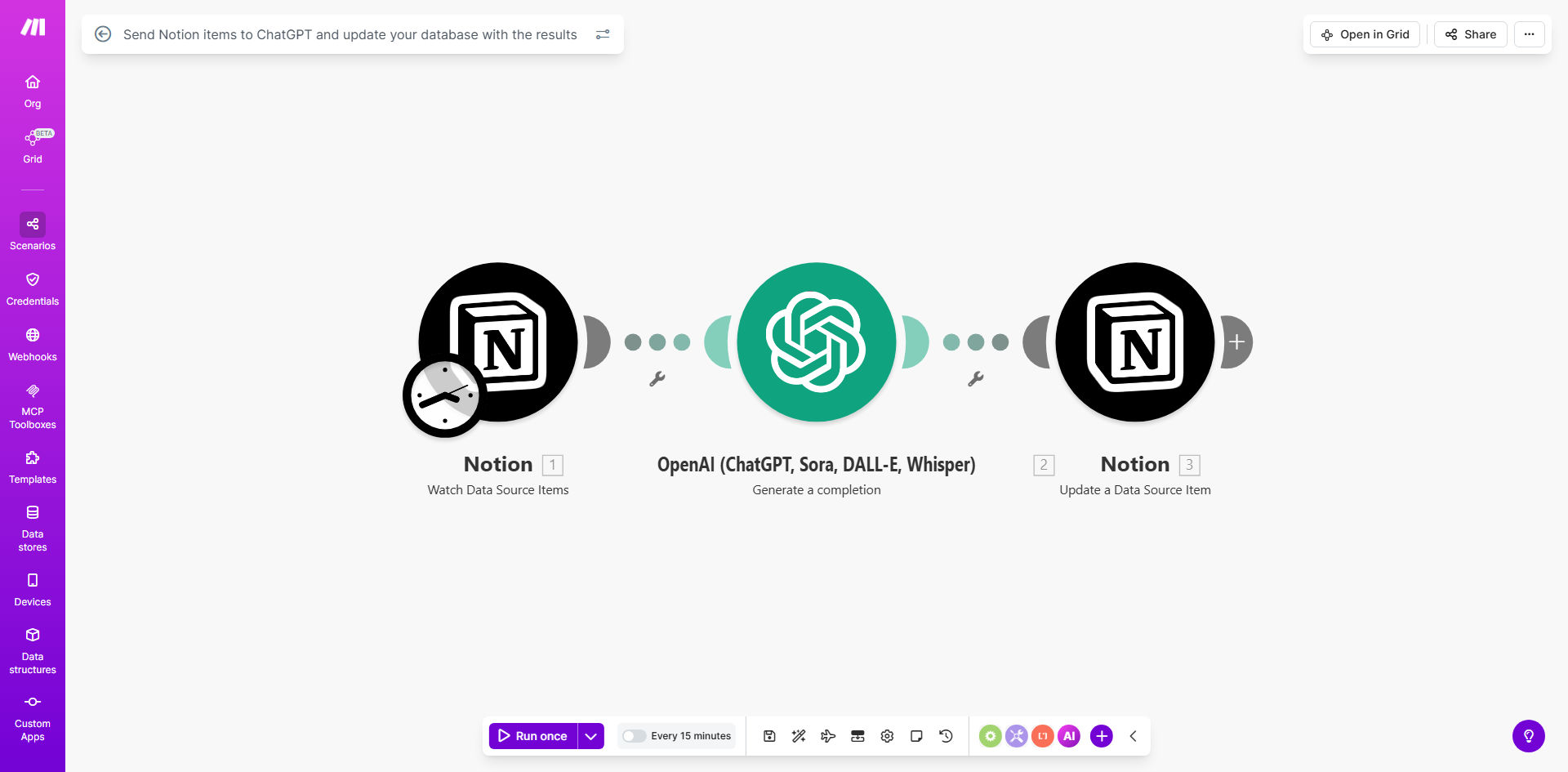
What This Workflow Does
This automation bridges Notion and ChatGPT to transform your static database into an AI-powered knowledge base. It automatically sends selected Notion items to ChatGPT for processing, then updates your database with the enhanced results. This eliminates manual copy-pasting between tools while adding valuable AI-generated insights to your records.
The workflow is ideal for teams managing research databases, content calendars, customer feedback, or any text-heavy Notion system. It can summarize long notes, extract key points, suggest improvements, categorize information, or reformat content according to your specifications - all without leaving your Notion workspace.
How It Works
1. Trigger from Notion
The workflow starts when new items are added or existing items are modified in your specified Notion database. You can configure filters to process only certain types of items or those meeting specific criteria.
2. Send to ChatGPT
Selected fields from the Notion item are sent to ChatGPT with your custom instructions. This could be a request to summarize, analyze, categorize, or otherwise process the content according to your needs.
3. Process AI Response
The workflow receives ChatGPT's response and extracts the relevant information. This might involve parsing structured data, cleaning up the output, or formatting it for Notion compatibility.
4. Update Notion Record
The processed AI output is then written back to the original Notion item in specified fields. This could be adding summaries to a dedicated column, populating tags based on content analysis, or appending improvement suggestions.
Pro tip: Use this workflow in batches by setting up a manual trigger to process multiple Notion items at once when you're ready to enhance your entire database.
Who This Is For
This automation delivers the most value for knowledge workers, content teams, researchers, and anyone managing information-heavy Notion databases. Common use cases include:
- Content teams maintaining editorial calendars who want AI-generated topic suggestions
- Researchers needing automatic summarization of lengthy notes or papers
- Product teams collecting customer feedback that requires categorization
- Consultants building knowledge bases with automatically generated related concepts
- Students organizing study materials with AI-enhanced notes
What You'll Need
- A Notion account with a database you want to enhance
- A Make.com account (formerly Integromat)
- OpenAI API access for ChatGPT integration
- Basic understanding of Notion database structure
- Clear goals for what you want ChatGPT to do with your data
Quick Setup Guide
- Duplicate the template in your Make.com account
- Connect your Notion account and select the target database
- Configure which fields to send to ChatGPT and which to update
- Set up your ChatGPT instructions and parameters
- Test with a few sample items to verify the output format
- Activate the scenario and let it process your database
Key Benefits
Save 5-15 minutes per database item by eliminating manual processing between Notion and ChatGPT. The automation handles all transfers and updates automatically.
Enhance data quality consistently with standardized AI processing applied uniformly across all your Notion items, removing human inconsistency.
Scale your knowledge management by processing hundreds of Notion items in batches without additional time investment.
Discover hidden insights as ChatGPT identifies patterns, connections, and summaries you might miss during manual review.
Maintain a single source of truth with AI-enhanced data living directly in your Notion workspace rather than scattered across multiple tools.