RSS Monitoring Email Alerts Content Tracking

Email new RSS posts containing a specific keyword

Automatically receive email notifications when new RSS content matches your keywords

Get This Workflow → Make.com · Free Template
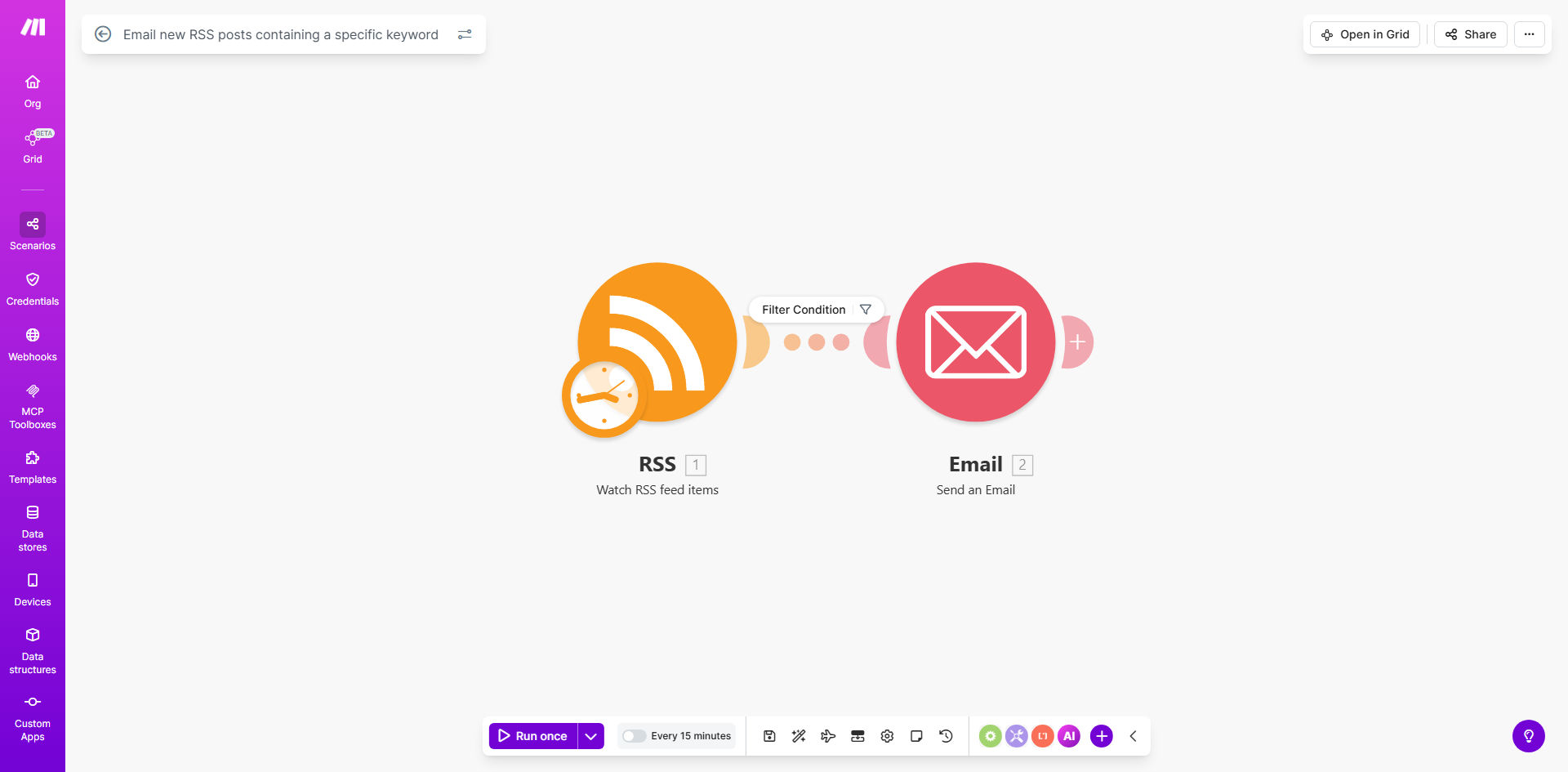
Make.com workflow interface for RSS keyword monitoring automation

What This Workflow Does

This automation solves the time-consuming problem of manually monitoring multiple RSS feeds for relevant content. Instead of checking feeds throughout the day, you'll receive instant email notifications whenever new posts contain your specified keywords. The workflow connects your RSS sources directly to your email, filtering out irrelevant content so you only see what matters.

Businesses use this to track industry trends, competitor mentions, or specific product references. A marketing team might monitor "AI marketing tools" across industry blogs, while a PR agency could track client names in news outlets. The automation handles the monitoring work, freeing up hours each week for more strategic tasks.

How It Works

1. RSS Feed Connection

The workflow begins by connecting to your specified RSS feed URLs. You can add multiple feeds from blogs, news sites, or any content source with an RSS output.

2. Keyword Filtering

Each new post gets scanned for your predefined keywords. The system checks both titles and content, with options for exact matches or partial matches depending on your needs.

3. Email Notification

When a match is found, the workflow automatically generates and sends an email with the post details. You control the email format, recipients, and frequency of alerts.

Pro tip: Combine this with Slack or Teams notifications for instant team awareness of important content.

Who This Is For

This workflow delivers the most value for professionals who need to stay updated on niche topics without constant manual checking:

  • Marketing teams tracking brand mentions or industry trends
  • Researchers monitoring academic or technical publications
  • Sales professionals following prospect company news
  • Content creators keeping tabs on competitor blogs
  • PR agencies managing client media coverage

What You'll Need

  1. A Make.com account (free tier available)
  2. RSS feed URLs you want to monitor
  3. A list of keywords or phrases to track
  4. Email service connected to Make.com (Gmail, Outlook, etc.)

Quick Setup Guide

  1. Click "Get This Workflow" to import the template to your Make.com account
  2. Add your RSS feed URLs in the designated module
  3. Enter your keywords separated by commas
  4. Configure your email settings (sender, recipients, subject line)
  5. Test with sample RSS items to verify keyword matching
  6. Activate the workflow and receive your first alerts

Key Benefits

Save 5+ hours weekly by eliminating manual RSS feed checks while ensuring you never miss important content.

Improve response time by getting instant notifications about relevant posts instead of discovering them days later.

Reduce information overload by filtering out 90%+ of irrelevant content that doesn't match your criteria.

Scale monitoring efforts by tracking dozens of feeds and hundreds of keywords simultaneously without added work.

Maintain compliance with automated records of important industry updates or regulatory changes.

Frequently Asked Questions

Common questions about RSS monitoring automation

Automating RSS feed monitoring saves hours of manual checking while ensuring you never miss relevant content. Businesses use this to track industry news, competitor updates, or trending topics without constantly refreshing feeds.

A marketing director might monitor "customer experience trends" across 20 industry blogs. Without automation, this would require checking each site daily. The workflow delivers only matching content directly to their inbox.

  • Eliminates daily manual feed checks
  • Provides timely competitive intelligence
  • Scales to monitor dozens of sources

Marketing teams, PR agencies, research firms, and content creators benefit most. For example, a marketing agency might track client mentions, while researchers monitor academic publications for specific terms.

Legal firms use similar workflows to track case law updates containing relevant statutes. The common thread is needing to monitor specialized content across multiple sources efficiently.

  • Ideal for information-sensitive roles
  • Valuable across multiple industries
  • Customizable to specific monitoring needs

Modern automation tools like Make.com offer 95%+ accuracy with options for exact matching, partial matches, or boolean logic. You can filter by title, content, or both to reduce false positives.

The template includes settings to exclude certain terms. For example, tracking "cloud storage" could ignore posts about weather clouds. Advanced users can add AI filters to improve relevance further.

  • Multiple matching algorithms available
  • Configurable precision levels
  • Option to review borderline matches

Yes, you can configure the workflow to distribute alerts to entire departments, client teams, or specific roles. Some companies use this to keep sales teams updated on prospect news.

The template supports dynamic recipient lists based on keyword matches. For instance, FinTech-related posts could go to your payments team while eCommerce content routes to retail specialists.

  • Distribute by team function
  • Route based on content type
  • Include external stakeholders

For feeds with 50+ daily posts, add filters like publication date ranges or content length thresholds. The workflow can also batch notifications instead of sending individual emails.

News organizations monitoring breaking stories might configure hourly digests. The template includes options to bundle alerts during peak periods while maintaining real-time delivery for priority keywords.

  • Batch processing options
  • Priority keyword exceptions
  • Volume-based routing rules

Use a recognized sender domain, include unsubscribe options, and maintain consistent sending patterns. The template includes best practices for email deliverability.

For enterprise deployments, we recommend dedicated IP addresses and SPF/DKIM authentication. The workflow can also integrate with professional email services like SendGrid for higher inbox placement rates.

  • Built-in deliverability features
  • Professional email integration
  • Compliance-ready templates

Absolutely. GrowwStacks specializes in tailored monitoring solutions that integrate with your existing tools and workflows. We can build custom filters, reporting dashboards, and multi-channel alert systems.

Our clients typically see 3-5x efficiency gains from customized automation. A recent project for a media company reduced their editorial research time by 70% while improving coverage accuracy.

  • Enterprise-grade monitoring systems
  • Integration with internal databases
  • Analytics and reporting dashboards

Need a Custom RSS Monitoring Automation?

This free template is a starting point. Our team builds fully tailored automation systems for your specific business needs.