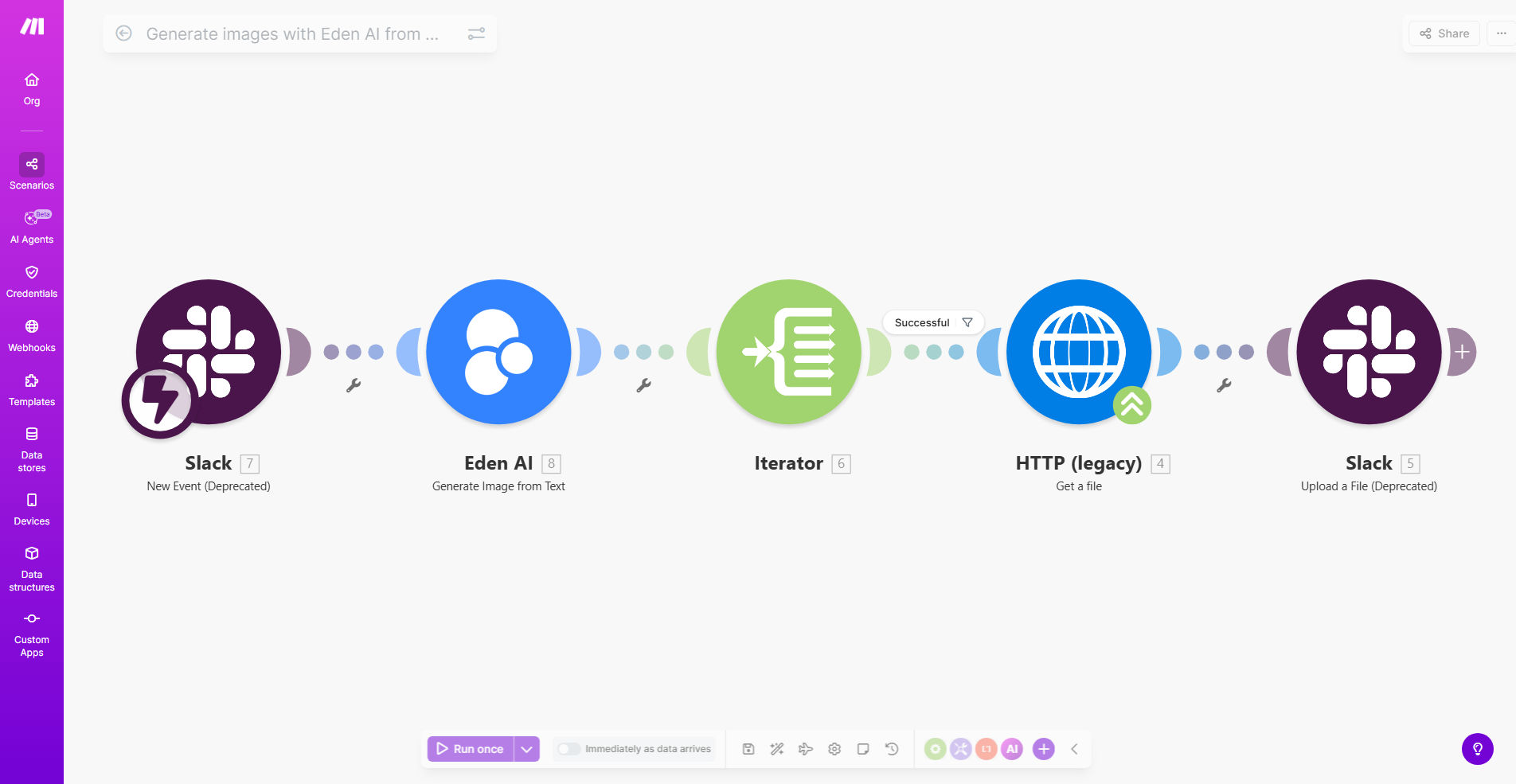
What This Workflow Does
In today's fast-paced digital environment, visual content is king, but creating it can be a bottleneck. Marketing teams, content creators, and even sales departments often have brilliant ideas in Slack conversations that never become visuals because the process of briefing a designer, waiting for drafts, and making revisions is too slow. This automation solves that by connecting your team's communication hub directly to powerful AI image generation.
This Make.com workflow listens for specific Slack messages—like a channel post or a direct message containing an image description—and automatically sends that prompt to Eden AI. Eden AI processes the request using one of its many integrated AI models and returns a generated image. The result is a seamless pipeline where a simple text command in Slack can produce a custom graphic, illustration, or photo-realistic image in minutes, not days.
The business value is immense: it democratizes design, drastically reduces time-to-market for visual content, and empowers non-technical team members to contribute directly to creative projects. Imagine your social media manager typing "Create a vibrant graphic about summer productivity tips" in Slack and having a ready-to-post image delivered to a designated folder before the meeting ends.
How It Works
The workflow acts as a intelligent bridge between your team's conversations and AI-powered creativity. Here's a step-by-step breakdown of the automation process.
Step 1: Trigger from Slack
The scenario starts by monitoring a specific Slack channel, direct message, or a keyword. When a user sends a message formatted as an image request (e.g., "/image a futuristic cityscape at dusk"), the Make.com trigger module captures the message text, the user who sent it, and any other relevant metadata.
Step 2: Process the Prompt
The captured text is then parsed and formatted. This step can include cleaning the input, adding predefined style parameters (like "digital art" or "photorealistic"), or combining it with brand-specific guidelines stored in a database. This ensures the prompt sent to the AI is optimized for the best possible output.
Step 3: Generate Image with Eden AI
The refined prompt is sent to the Eden AI module. Eden AI acts as a gateway, allowing you to choose from various image generation engines (like DALL-E, Stable Diffusion, or Midjourney via API). The module specifies parameters like image size, number of variations, and style. Eden AI handles the API call and returns the generated image URL.
Step 4: Deliver & Notify
Finally, the workflow delivers the result. It can post the generated image back to the originating Slack channel or thread, send it via direct message to the requester, and simultaneously save the file to a cloud storage platform like Google Drive, Dropbox, or Notion for asset management. A completion notification ensures the team knows their visual is ready.
Pro tip: Use a dedicated Slack channel like #ai-image-requests to keep all prompts and generated images organized. This creates a searchable visual library for your team.
Who This Is For
This automation is a game-changer for any team that relies on visual content but lacks immediate design resources.
Marketing & Social Media Teams: Quickly generate graphics for campaigns, posts, and ads based on real-time trends and discussions.
Content Creators & Bloggers: Produce unique article illustrations, eBook covers, and newsletter banners without leaving their writing workflow.
Product & Sales Teams: Create mockups, presentation visuals, and concept art for pitches and product ideas during brainstorming sessions.
Startups & Small Businesses: Access professional-grade visual creation without the budget for a full-time designer or expensive stock photo subscriptions.
Educators & Trainers: Develop custom diagrams, infographics, and learning materials directly from lesson-planning conversations.
What You'll Need
To implement this workflow successfully, you'll need the following accounts and access:
- A Make.com account (free tier available) to build and run the automation scenario.
- A Slack workspace where you have permission to create a Slack app and add webhooks.
- An Eden AI API key. Sign up on their platform to get credits and access to their aggregation API.
- (Optional) A cloud storage account like Google Drive or Dropbox if you wish to automatically save the generated images.
Quick Setup Guide
Follow these steps to get your Slack-to-AI-image generator running in under 30 minutes.
- Duplicate the Template: Click "Get This Workflow" to copy the ready-made template into your Make.com account.
- Connect Slack: In the Make.com scenario, authorize the Slack module by signing into your workspace and selecting the channel you want to monitor.
- Configure Eden AI: Add your Eden AI API key to the module. Choose your preferred image generation engine and set default parameters like image size and style.
- Set Up a Trigger: Define the trigger phrase or command in Slack (e.g., listening for messages starting with "/aiimage").
- Test and Activate: Send a test message in your connected Slack channel. Check that the image is generated and returned correctly. Turn the scenario "ON" to go live.
Key Benefits
Cut visual content creation time from hours to seconds. Eliminate the back-and-forth with designers. What used to take days in a request queue now happens in the time it takes to type a sentence.
Empower every team member to be a creator. Democratize design by allowing anyone on your team to generate professional visuals with simple text commands, fostering innovation and participation.
Maintain a consistent and agile brand presence. Generate on-demand graphics for social media, ads, and blogs that keep up with trending topics and conversations, making your brand more responsive and relevant.
Significantly reduce costs on stock photography and freelance design. Generate unlimited custom images for a predictable API cost, providing a far better return on investment than traditional asset sourcing.
Build a searchable library of brand assets. By automatically saving every generated image to cloud storage with descriptive filenames, you create a growing, organized repository of visuals that can be reused and repurposed.