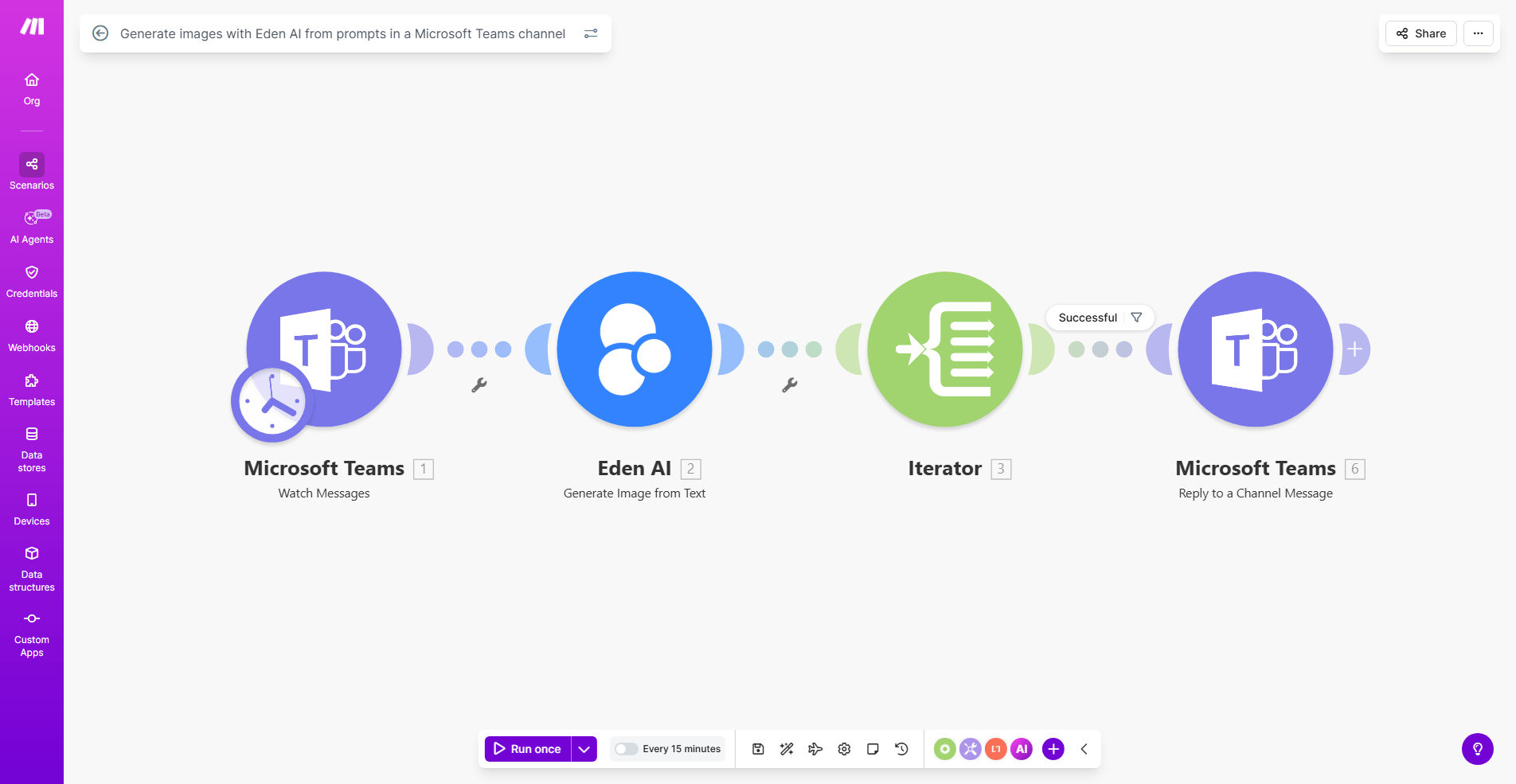
What This Workflow Does
In today's fast-paced business environment, visual content is king, but creating it is a bottleneck. Teams often get stuck switching between communication platforms like Microsoft Teams and separate design tools or AI image generators. This context-switching kills momentum, delays projects, and relies on individual team members having specific software skills.
This automation workflow solves that by embedding AI image generation directly into Microsoft Teams. When a team member posts a text prompt in a designated channel, the system automatically sends it to Eden AI, generates a high-quality image, and posts the result back into the conversation. It turns a creative idea into a visual asset in minutes, without anyone leaving the collaboration hub.
The value is profound: it democratizes design, accelerates content creation cycles, and enhances collaboration by making visual brainstorming a seamless, integrated part of the discussion. From marketing mock-ups and presentation graphics to concept art for product development, this workflow turns your Teams channel into a powerful visual content studio.
How It Works
The workflow acts as an intelligent bridge between your team's conversations and AI-powered creativity. Here’s the step-by-step process:
Step 1: Trigger from Microsoft Teams
The automation monitors a specific Microsoft Teams channel for new messages. It's configured to watch for messages that contain a trigger phrase (like "/image") or it can process all messages. When a new message is detected, the workflow captures the text content to use as the image generation prompt.
Pro tip: Set up a dedicated channel like "#ai-image-requests" to keep generated images organized and avoid triggering the automation in general chat.
Step 2: Process & Format the Prompt
The raw message text is cleaned and formatted. This step might remove the trigger command, add predefined style modifiers from your brand guidelines (e.g., "corporate minimalist style, high resolution"), or validate that the prompt meets minimum length requirements. This ensures the AI receives clear, effective instructions.
Step 3: Generate Image with Eden AI
The formatted prompt is sent to the Eden AI API. Eden AI acts as a gateway to multiple image generation models (like DALL-E, Stable Diffusion). The workflow specifies parameters such as image size, model preference, and number of variations. Eden AI processes the request and returns the generated image URL.
Step 4: Post Image Back to Teams
The workflow downloads the generated image and then creates a new message in the same Teams channel. This reply can tag the original user, include the generated image, and even add the refined prompt for context. The visual asset is now immediately available for team feedback and use.
Who This Is For
This template is a game-changer for any team that relies on visual communication and needs to move quickly.
Marketing & Content Teams: Quickly generate visuals for social media, blog posts, ad concepts, and presentations without waiting for a designer or navigating complex software.
Product & Development Teams: Create concept art, UI mockups, and visual representations of new features during brainstorming sessions in Teams.
Sales & Enablement: Produce custom graphics for sales proposals, pitch decks, and client presentations directly from discussion points.
HR & Internal Comms: Generate engaging images for onboarding materials, internal announcements, and training guides to boost engagement.
Small Businesses & Startups: Achieve a professional visual presence without the budget for a full-time designer or expensive design software subscriptions.
What You'll Need
To implement this automation, you'll need to have the following accounts and access set up:
- A Make.com account (free tier available) to build and run the automation scenario.
- Admin or appropriate permissions in your Microsoft Teams to create a webhook or connect an app to a specific channel.
- An active Eden AI account with API credits. Eden AI offers a free tier to get started.
- The API keys from both Microsoft Teams (via Azure) and Eden AI to authenticate the connections in Make.com.
- A clear idea of which Teams channel will be used and any basic prompt guidelines for your team.
Quick Setup Guide
You can have this workflow live in under 30 minutes by following these steps:
- Import the Template: Click "Get This Workflow" to open the template in your Make.com account and create a new scenario from it.
- Connect Microsoft Teams: In the first module, click to add a connection. Sign in with your Microsoft work account and authorize Make.com to access Teams. Select the specific team and channel to monitor.
- Connect Eden AI: In the AI generation module, add your Eden AI API key. You can find this in your Eden AI account dashboard.
- Configure the Trigger: Set up the Teams trigger to watch for new messages. You can optionally add a filter so it only runs when a message contains a keyword like "create image".
- Customize the Prompt (Optional): Add a router or text parser module to prepend style instructions (e.g., "digital art, 4k") to every user prompt for consistent branding.
- Test and Activate: Turn on the scenario and send a test message like "create an image of a team collaborating in a modern office" to your connected Teams channel. Within seconds, you should see the AI-generated image posted as a reply.
Key Benefits
Dramatically faster visual content creation. Reduce the time from idea to visual from hours or days to under two minutes. This acceleration is critical for meeting tight deadlines for campaigns, presentations, and product launches.
Eliminate costly software and skill barriers. You don't need a team member proficient in Photoshop or Canva. The AI handles the technical creation, allowing anyone on the team to contribute visual ideas, which fosters innovation and inclusivity.
Keep creative momentum within the collaboration flow. By removing the need to exit Teams and open another app, you maintain focus and engagement. Brainstorming becomes a dynamic, visual conversation, leading to better ideas and faster consensus.
Ensure brand consistency with automated styling. The workflow can automatically append your brand's visual style guidelines (e.g., "use a bright color palette, flat design") to every prompt, ensuring all generated images align with your brand identity without manual oversight.
Scalable and cost-effective content production. Compared to stock photo subscriptions or freelance designer fees, AI generation via automation offers a predictable, low-cost model for producing a high volume of unique, on-brand visuals.