What This Workflow Does
Staying ahead of the competition requires constant vigilance, but manual competitor analysis is a time-consuming and often inconsistent process. Marketing teams, founders, and strategists spend hours scouring websites, news articles, and reviews, only to have those insights buried in scattered documents or forgotten in meeting notes. This creates a reactive strategy instead of a proactive one.
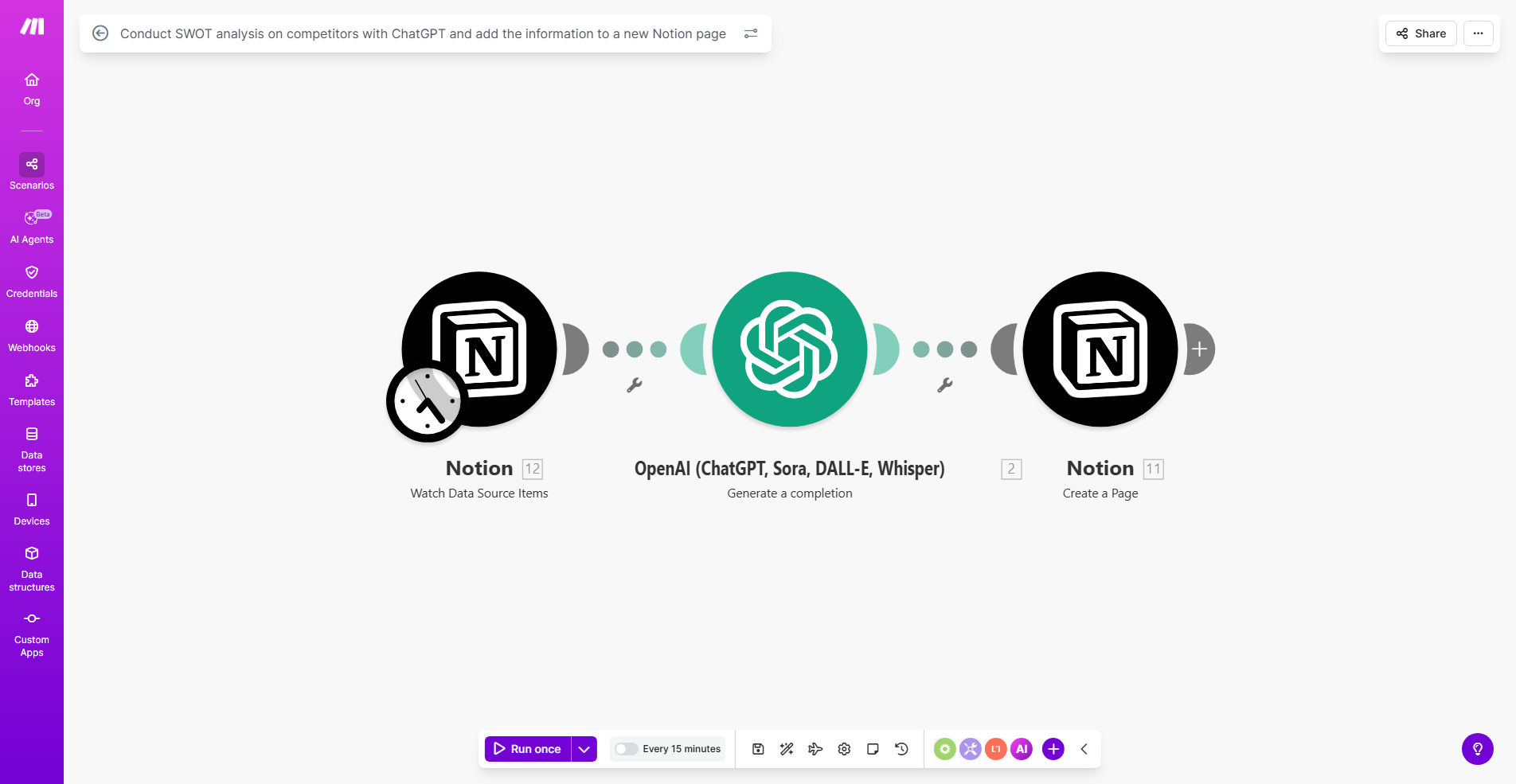
This automated workflow solves that by creating a systematic competitor intelligence pipeline. You provide a competitor's name or key details, and the system uses ChatGPT to conduct a structured SWOT (Strengths, Weaknesses, Opportunities, Threats) analysis. It then takes the generated insights and automatically creates a new, richly formatted page in your designated Notion database. This turns ad-hoc research into a centralized, searchable, and actionable knowledge base that your entire team can leverage.
How It Works
The automation connects three powerful tools to create a seamless intelligence-gathering machine.
Step 1: Trigger & Data Input
The workflow can be triggered manually for a one-off analysis or scheduled to run periodically for key competitors. You input the competitor's name, website, and any initial context or specific areas you want the AI to focus on (e.g., "analyze their new pricing page" or "review recent customer feedback").
Step 2: AI-Powered SWOT Generation
Make.com sends this information to the ChatGPT module using a carefully crafted prompt. The prompt instructs the AI to act as a strategic analyst, researching the competitor (based on the provided data and its own knowledge base) and organizing its findings into the four clear SWOT categories. It outputs a coherent, bullet-pointed analysis.
Pro tip: You can customize the ChatGPT prompt to tailor the analysis depth, focus on specific business units (like marketing vs. product), or even ask it to suggest strategic responses based on the identified weaknesses and threats.
Step 3: Structured Notion Database Entry
The workflow takes the AI-generated SWOT text and maps each section to the corresponding properties in your Notion database. It creates a new page, populating fields like "Competitor Name," "Date of Analysis," "Strengths," "Weaknesses," etc. The result is a clean, standardized record that is instantly available for team review and strategic planning.
Who This Is For
This automation is a game-changer for businesses that rely on market awareness. It's ideal for startup founders and product managers who need to track rival feature launches. Marketing agencies and consultants can use it to deliver superior competitive insights to clients. Business development and sales teams benefit from understanding competitor positioning to refine their pitches. Any strategist or executive who makes data-driven decisions will find this centralized intelligence hub invaluable.
What You'll Need
- A Make.com account (free tier works for moderate use).
- An OpenAI API key with access to ChatGPT (GPT-3.5-turbo or GPT-4).
- A Notion account and a pre-existing database set up with properties to capture SWOT data (e.g., Title, Strengths, Weaknesses, Opportunities, Threats, Date).
- A Notion Internal Integration Token to allow Make.com to write to your database.
Quick Setup Guide
Get your automated analysis engine running in under 30 minutes.
- Clone the Template: Click "Get This Workflow" and duplicate the scenario into your Make.com account.
- Connect Your Apps: In the Make.com scenario, authorize the ChatGPT and Notion modules by entering your API key and Notion integration token.
- Configure Your Notion Database: Copy the database ID from your Notion page URL and paste it into the Notion module's "Database ID" field in Make.com.
- Test the Flow: Run the scenario once manually. Input a test competitor name (e.g., "A known industry brand") and verify that a new page appears in your Notion database with a structured SWOT analysis.
- Set a Schedule (Optional): Add a Schedule module to trigger the analysis for your core competitors weekly or monthly, ensuring your intelligence is always fresh.
Key Benefits
Save 5–10 hours per month on manual research. Automating the collection and synthesis of competitor data frees up your team to focus on strategy and action, not just information gathering.
Ensure consistent, unbiased analysis. Using a standardized AI prompt removes personal bias and ensures every competitor is evaluated against the same criteria, making comparisons meaningful.
Create a single source of truth for competitive intelligence. By centralizing all SWOT analyses in Notion, you eliminate information silos. Your product, marketing, and sales teams all work from the same, up-to-date insights.
Become proactive, not reactive. With scheduled analyses, you're alerted to competitor movements and market shifts as they happen, allowing you to adjust your strategy before you lose ground.
Scale your market research effortlessly. Analyzing 5 competitors takes the same automated effort as analyzing 50. This allows you to broaden your competitive landscape monitoring without increasing overhead.