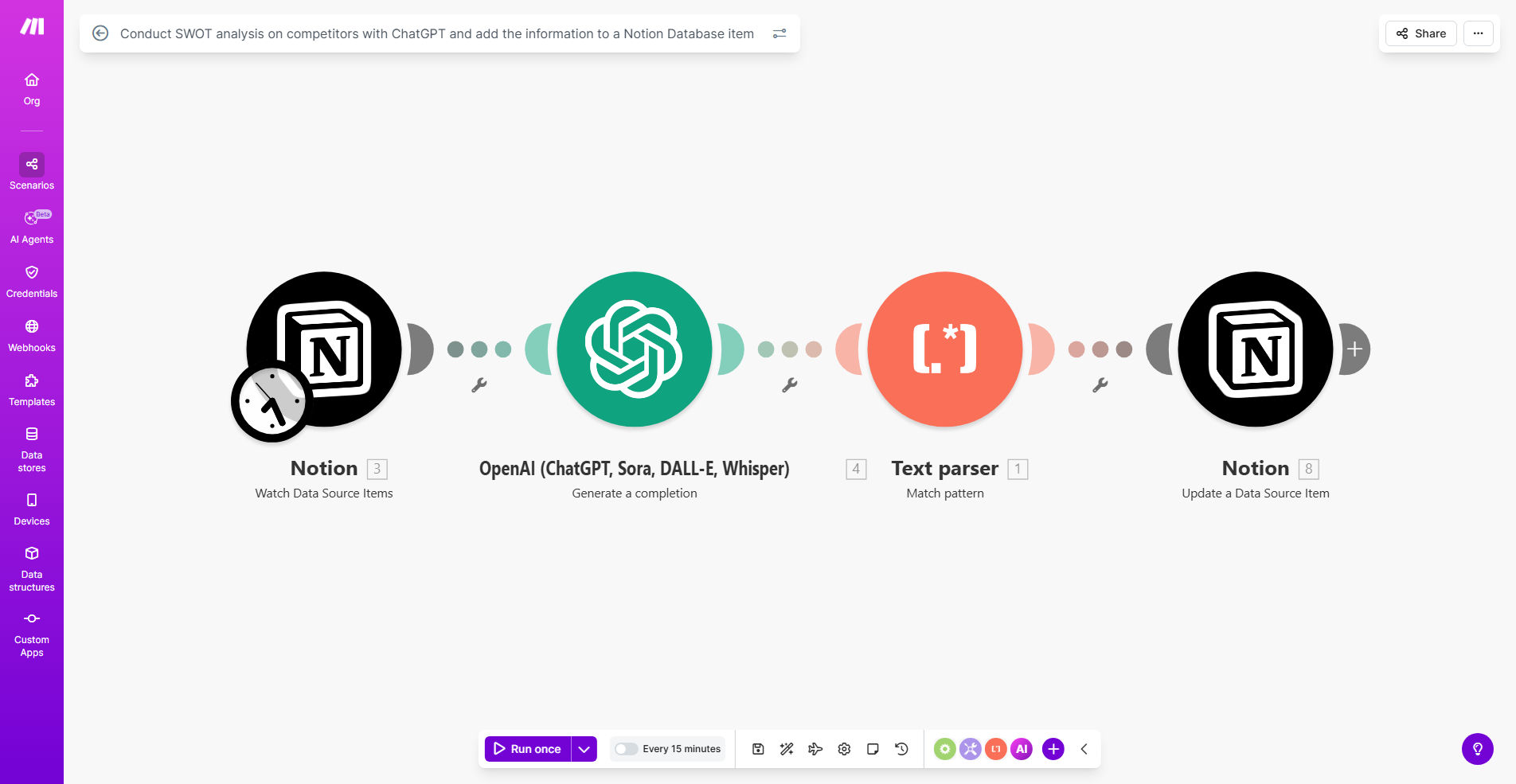
What This Workflow Does
Staying ahead of your competition requires constant vigilance, but manually researching and analyzing each competitor is a massive time sink. This automation solves that by turning a tedious, periodic task into a seamless, ongoing process. It uses the power of ChatGPT (or another AI model) to perform a structured SWOT analysis on any competitor you specify.
The workflow takes a competitor's name or website as input, prompts AI to research and evaluate their Strengths, Weaknesses, Opportunities, and Threats, and then automatically creates or updates a dedicated item in your Notion database. This centralizes all competitive intelligence in a single, searchable, and collaborative hub that your entire team can access.
The business value is immense: you move from reactive, ad-hoc research to a proactive intelligence system. Instead of spending 4-5 hours per competitor every quarter, you get an updated analysis in minutes, allowing you to spot market shifts faster and make strategic decisions with confidence.
How It Works
The automation follows a clear, logical sequence to transform a simple trigger into rich, actionable insights.
Step 1: Trigger the Analysis
The workflow can be started manually by you entering a competitor's name, or it can be scheduled to run automatically (e.g., monthly). It can also be triggered by other events, like a news alert about a competitor receiving funding.
Step 2: AI Conducts the SWOT Research
The competitor name is sent to ChatGPT via the OpenAI module. A carefully crafted prompt instructs the AI to act as a strategic analyst, gathering publicly available information and structuring its findings into the four SWOT categories. The AI provides reasoned, concise points for each quadrant.
Pro tip: Tailor your AI prompt to focus on aspects most relevant to your industry, such as "evaluate their technology stack" for SaaS or "analyze their supply chain transparency" for retail.
Step 3: Format and Update Notion
The structured SWOT output from ChatGPT is then formatted and sent to Notion. The workflow finds or creates a database entry for that specific competitor and updates the relevant properties—like "Last Analyzed Date," "Strengths," "Weaknesses," etc.—with the fresh analysis. This keeps your competitive database always current.
Who This Is For
This template is designed for business leaders, strategists, and marketing teams who need to understand their competitive landscape without dedicating excessive manual labor.
- Startup Founders & Product Managers: To identify market gaps and competitor vulnerabilities for your next feature launch.
- Marketing & Sales Teams: To craft more targeted messaging and counter competitor claims effectively.
- Business Strategists & Consultants: To maintain an up-to-date repository of competitive intelligence for client reports and strategic planning.
- VCs & Investors: To quickly assess the competitive positioning of companies within a portfolio or a sector being evaluated.
What You'll Need
- A Make.com account (free tier is sufficient to start).
- An OpenAI API key (or access to another AI model integrated with Make) to power the ChatGPT analysis.
- A Notion account and a pre-built database with properties to hold the SWOT data (e.g., Competitor Name, Strengths, Weaknesses, Opportunities, Threats, Analysis Date).
- A basic understanding of how to connect these apps in Make.com (the template provides the blueprint).
Quick Setup Guide
You can have this intelligence system running in under 30 minutes.
- Clone the Template: Click "Get This Workflow" and duplicate the scenario into your Make.com account.
- Connect Your Apps: In the Make scenario, authorize your OpenAI and Notion accounts. This establishes the secure connections.
- Configure Your Notion Database: Update the "Create a Database Item" module to point to your specific Notion database and map the AI's SWOT output to the correct database properties.
- Test the Flow: Run the scenario once manually with a competitor's name. Check that a well-formatted SWOT analysis appears in your Notion database.
- Set a Schedule (Optional): Add a "Schedule" module at the beginning to run this analysis automatically for a list of key competitors every month or quarter.
Key Benefits
Save 10+ hours per month on manual competitor research. Automating the data gathering and initial analysis frees up strategic minds for higher-value tasks like interpreting insights and planning actions.
Make data-driven decisions with up-to-the-minute intelligence. Your strategic plans are based on current analysis, not a quarterly report that's already outdated, allowing you to pivot quickly in response to competitor moves.
Create a single source of truth for your entire team. By centralizing SWOT analyses in Notion, you eliminate scattered spreadsheets and documents, ensuring marketing, sales, and product teams are aligned with the same competitive facts.
Scale your analysis effortlessly. Tracking 5 competitors is as easy as tracking 50. Once the automation is set, adding a new competitor to the list requires minimal additional effort.
Gain unbiased, structured insights. AI provides a consistent analytical framework, reducing individual bias and ensuring every competitor is evaluated against the same criteria for fair comparison.