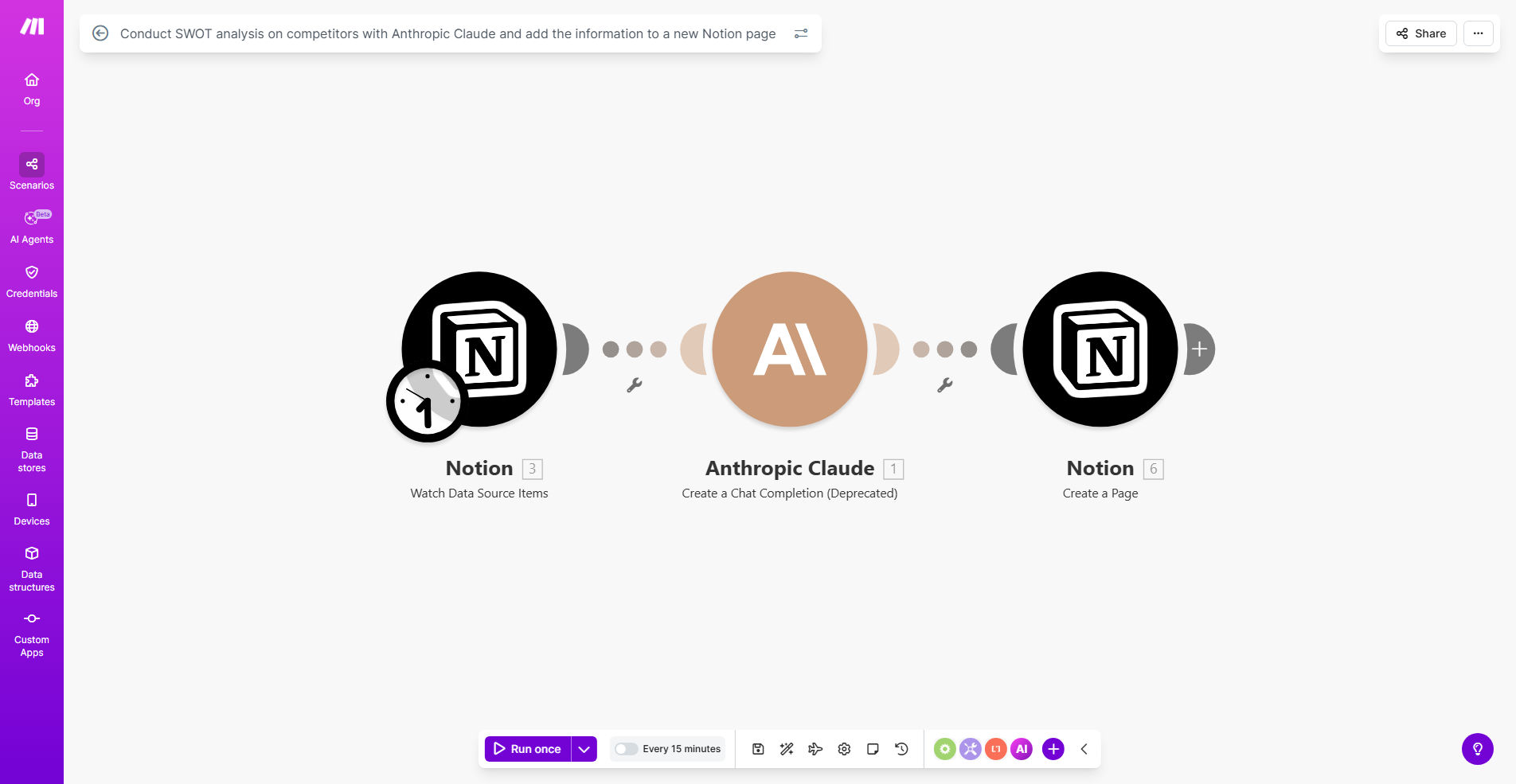
What This Workflow Does
Keeping a pulse on your competitors is vital, but manually researching and compiling SWOT (Strengths, Weaknesses, Opportunities, Threats) analyses is a tedious, time-consuming task. Marketing and strategy teams often spend days gathering data from websites, reports, and news, then formatting insights into documents that quickly become outdated and inaccessible.
This automation workflow solves that by turning competitor analysis into a seamless, automated process. It uses Anthropic Claude, a powerful AI, to digest any competitor information you provide and generate a structured, insightful SWOT analysis. Then, it instantly creates a new, well-organized page in your Notion database, making those insights immediately available for your entire team.
The result is a living, centralized intelligence hub. Instead of sporadic manual reports, you get consistent, data-driven competitor profiles updated automatically, saving dozens of hours per month and ensuring your strategic decisions are based on current, comprehensive information.
How It Works
Step 1: Trigger the Analysis
The workflow can be triggered manually by you entering a competitor's name and relevant data sources (like their website URL, a recent press release, or a product description). It can also be automated to run on a schedule or triggered by an event, such as a new competitor entry in your CRM or a news alert about a rival company.
Step 2: AI-Powered SWOT Generation
The provided data is sent to Anthropic Claude via the Make.com module. Claude acts as your strategic analyst, parsing the information to identify key strengths (e.g., brand loyalty, patented technology), weaknesses (e.g., poor customer service, limited distribution), opportunities (e.g., emerging markets, partnership potential), and threats (e.g., new regulations, aggressive competitors).
Pro tip: You can customize Claude's prompt to focus on specific aspects relevant to your industry, such as pricing strategy, digital presence, or supply chain resilience.
Step 3: Structured Output to Notion
Make.com receives Claude's analysis—typically a clear text breakdown—and formats it into the structured blocks of a new Notion page. It creates the page within your specified database, populating fields like competitor name, date of analysis, and the detailed SWOT sections. The page is instantly ready for viewing, sharing, and commenting by your team.
Who This Is For
This template is ideal for business strategists, marketing teams, product managers, and startup founders who need to maintain competitive awareness without dedicating excessive manual effort.
Marketing Agencies managing multiple client competitors can use this to generate rapid reports. Product Teams can analyze rival features before planning new releases. VCs and Investors can automate due diligence on companies within a portfolio. Any business that relies on strategic market intelligence will find this automation transforms a cumbersome chore into a reliable, scalable system.
What You'll Need
- A Make.com account (free or paid) to host and run the automation scenario.
- Access to the Anthropic Claude API. You'll need an API key from Anthropic to connect the AI module.
- A Notion account and a pre-existing database where you want the SWOT pages to be created. You'll need your Notion API integration token and the database ID.
- Source data for competitors. This could be text you manually input, URLs scraped from a list, or data pulled from other apps like Airtable or Google Sheets.
Quick Setup Guide
1. Clone the Template: Use the "Get This Workflow" button to copy the template into your Make.com account.
2. Configure API Connections: In the Make.com scenario, connect the Anthropic module with your Claude API key, and connect the Notion module with your integration token and database ID.
3. Define Your Trigger: Set up how the workflow starts. You can use a simple manual "Run once" module, schedule it weekly, or connect it to a webhook from another app.
4. Customize the AI Prompt: Review the text sent to Claude. You may want to adjust it to ask for more specific insights or to format the output in a particular way.
5. Map Notion Fields: Ensure the data from Claude's response is correctly mapped to the properties (columns) in your Notion database—like "Competitor Name," "SWOT Strengths," etc.
6. Test and Run: Perform a test run with a sample competitor. Check that the Notion page is created correctly with all SWOT sections populated. Once verified, activate the scenario.
Key Benefits
Save 10–15 hours per competitor analysis. Manual SWOT creation can take a full day of work. This automation compresses it into minutes, freeing your team for higher-value strategic thinking.
Ensure consistency and eliminate bias. AI provides a standardized, objective framework for every analysis, reducing human error and subjective interpretation across different team members.
Create a centralized, actionable knowledge base. By auto-populating Notion, insights are never lost in emails or local files. Your entire organization has immediate access to up-to-date competitor intelligence.
Scale intelligence efforts effortlessly. You can analyze dozens of competitors just as easily as one, enabling comprehensive market landscape monitoring without linear increases in workload.
Enable proactive strategy. With fresh, automated insights always available, your business can anticipate market moves, identify opportunities faster, and mitigate threats before they impact you.