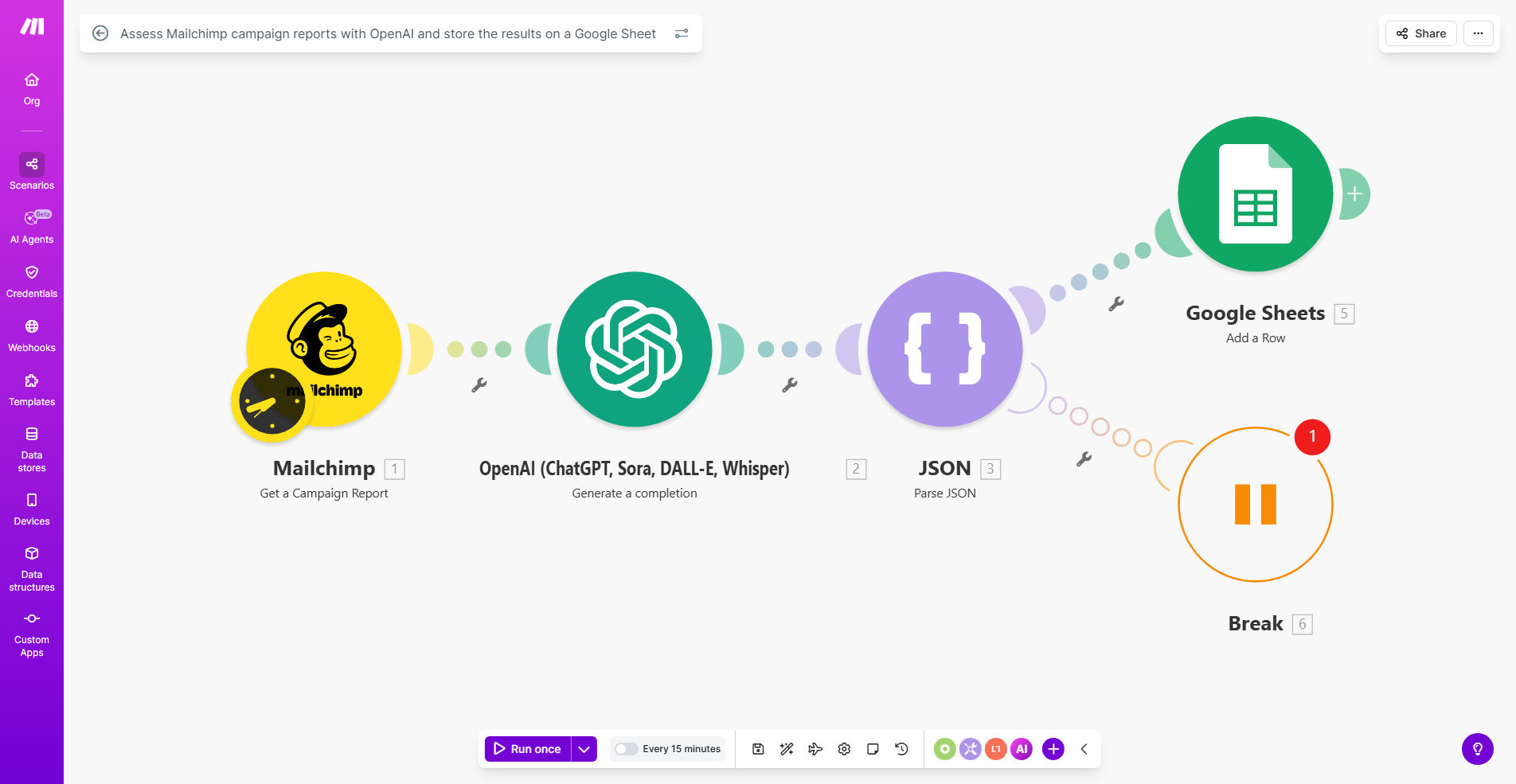
What This Workflow Does
For marketing teams, understanding email campaign performance is critical, but manually sifting through Mailchimp reports is time-consuming and often superficial. You might see open rates dipped, but not understand why, or miss subtle trends across multiple campaigns that could inform your entire strategy. This creates a reactive marketing cycle where insights arrive too late to be useful.
This automated workflow solves that by turning raw Mailchimp data into intelligent, actionable business intelligence. It connects your Mailchimp account to OpenAI's powerful analysis capabilities and systematically logs every insight into a centralized Google Sheet. Instead of just collecting data, you build a living knowledge base of what works and what doesn't in your email marketing, enabling truly data-driven decisions.
How It Works
The automation acts as your personal email marketing analyst, working silently in the background after each campaign.
Step 1: Trigger & Data Collection
The workflow is triggered on a schedule (e.g., every Monday) or immediately after a campaign is marked as "Sent" in Mailchimp. It connects to the Mailchimp API and pulls the full performance report for the specified campaign, including opens, clicks, unsubscribes, bounces, and geographic/device data.
Step 2: AI-Powered Analysis
The raw campaign data is sent to OpenAI (like ChatGPT) with a pre-configured prompt designed for marketing analysis. The AI assesses the numbers, compares them to your historical averages if available, and generates plain-English insights. It identifies strengths, potential weaknesses, and most importantly, provides concrete suggestions for improvement.
Pro tip: Customize the AI prompt in the workflow to focus on your specific KPIs, like lead generation, product sales, or content engagement, for even more relevant insights.
Step 3: Structured Logging in Google Sheets
The workflow then takes the AI's output—summary, key metrics, and suggestions—and formats it into a clean, consistent row in a designated Google Sheet. Each campaign gets its own entry with a timestamp, campaign name, and all generated insights, creating a permanent, searchable record of your marketing performance.
Who This Is For
This template is ideal for marketing managers, small business owners, solopreneurs, and agencies who use Mailchimp and want to elevate their email strategy beyond basic analytics. It's perfect for anyone who lacks the time for deep-dive analysis but understands the value of learning from every send. If you're running regular campaigns and want to ensure no insight is lost, this automation becomes an essential part of your tech stack.
What You'll Need
- A Make.com account (free tier available).
- A Mailchimp account with campaigns sent and API access enabled.
- An OpenAI API key (requires a paid account with available credits).
- A Google Sheets document set up with appropriate column headers (Campaign Name, Date, Insights, Suggestions, etc.).
- Basic familiarity with connecting apps in Make.com (guided connections make this simple).
Quick Setup Guide
- Clone the Template: Click "Get This Workflow" and duplicate the scenario into your Make.com account.
- Connect Your Apps: In the Make.com scenario, update the connection modules for Mailchimp, OpenAI, and Google Sheets with your own accounts and API credentials.
- Configure the Trigger: Set the schedule module to run weekly, or modify it to trigger based on a new campaign event in Mailchimp.
- Customize the AI Prompt: Review the OpenAI module's prompt. Adjust it to ask for the specific type of analysis and suggestions most valuable to your business.
- Set Your Google Sheet: Point the Google Sheets "Add a Row" module to your specific spreadsheet and map the AI output to the correct columns.
- Test & Activate: Run a single execution with a past campaign to verify data flows correctly, then turn the scenario on. Your automated marketing analyst is now live.
Key Benefits
Save 2-3 hours per campaign on manual report analysis. Eliminate the tedious process of logging into Mailchimp, exporting data, and trying to interpret what the numbers mean. The AI does the heavy lifting in seconds.
Build an institutional knowledge base that prevents repeated mistakes. By storing insights in Sheets, you create a searchable history. Before planning a new campaign, you can quickly review what worked for similar audiences or products in the past.
Move from descriptive to prescriptive analytics. Instead of just knowing "opens were low," you get actionable suggestions like "Try A/B testing subject lines with more urgency for this segment," driving continuous improvement.
Enable seamless team collaboration and reporting. With all insights in a shared Google Sheet, it's easy to share performance trends with stakeholders, include data in quarterly reports, or brief copywriters with proven strategies.
Scale your marketing intelligence without scaling your team. As you run more campaigns, the system scales effortlessly, providing consistent, high-quality analysis without additional human workload.