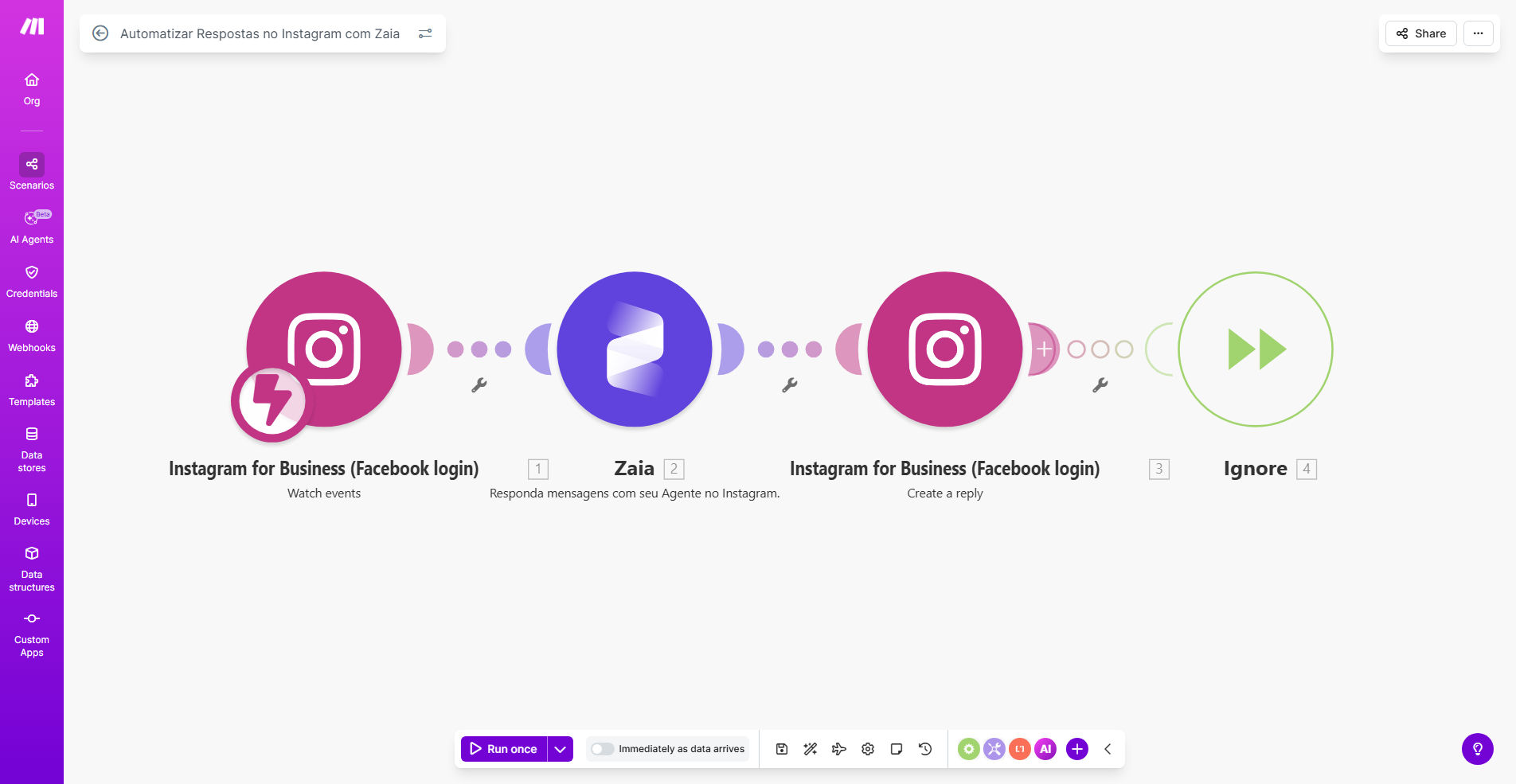
What This Workflow Does
For any business on Instagram, comments are a goldmine of opportunity—and a potential source of frustration. Manually replying to every question, compliment, or query is incredibly time-consuming, and failing to respond quickly can make your brand seem unresponsive. This automation solves that by connecting your Instagram account to Zaia, an AI assistant, through Make.com.
The workflow automatically detects new comments on your posts, analyzes them using AI, and posts a thoughtful, context-aware reply instantly. This ensures your audience feels heard and valued around the clock, dramatically increasing engagement rates and freeing your social media manager to focus on strategy and community building instead of repetitive typing.
Beyond just saving time, this system transforms your comment section into an active, 24/7 customer service channel. It can answer FAQs, provide support links, thank customers for compliments, and even qualify leads by asking follow-up questions—all without you lifting a finger.
How It Works
The automation acts as a bridge between Instagram and Zaia AI, creating a seamless loop of detection, analysis, and response.
Step 1: Monitor Instagram for New Comments
The Make.com scenario uses the Instagram module to watch your specified account for new comments on your posts. It can be set to trigger instantly or at regular intervals, ensuring no interaction slips through the cracks.
Step 2: Send Comment to Zaia for AI Analysis
When a new comment is detected, its text is sent to the Zaia AI module. Here, Zaia evaluates the comment's intent, sentiment, and content. You pre-configure Zaia with guidelines on your brand voice, types of responses, and how to handle different queries (e.g., pricing questions vs. compliments).
Step 3: Generate & Post the AI-Crafted Reply
Zaia generates a personalized, natural-sounding reply. The workflow then takes this AI-generated text and posts it back as a reply to the original comment on Instagram, closing the loop. The entire process happens in seconds, making your brand presence feel incredibly responsive.
Pro tip: Set up filters in Make.com to exclude comments with specific keywords (like profanity) or from certain users from automation. This ensures the AI only handles appropriate interactions, while sensitive comments are flagged for your manual review.
Who This Is For
This template is a game-changer for businesses and creators who rely on Instagram for growth and customer connection.
- E-commerce Brands: Instantly answer product questions, shipping inquiries, and size guides, reducing pre-purchase friction.
- Service Providers & Agencies: Respond to potential clients asking about your services, pricing, or portfolio, capturing leads the moment they express interest.
- Content Creators & Influencers: Maintain vibrant engagement with your community by thanking followers for compliments and answering common questions about your content.
- Local Businesses: Automatically reply to comments asking about business hours, location, or special offers, providing excellent local customer service.
- Social Media Managers: Scale your efforts by automating the bulk of repetitive comment responses, allowing you to manage more accounts or focus on creative strategy.
What You'll Need
To implement this automation, you'll need access to a few key services. Don't worry—all have accessible pricing tiers to get started.
- A Make.com Account: The free tier is sufficient to build and run this basic automation.
- An Instagram Business or Creator Account: Personal accounts have API limitations. You'll need to connect your professional Instagram account to Make.com.
- A Zaia AI Account: Sign up for Zaia to get an API key. This powers the intelligent response generation.
- Basic Understanding of Your Brand Voice: To train Zaia effectively, have a clear idea of how you want to sound—friendly, professional, witty, etc.
Quick Setup Guide
You can have this automation live in under 30 minutes by following these steps.
- Clone the Template: Click the "Get This Workflow" button above to open the template in your Make.com account and create a copy.
- Connect Your Apps: In the Make.com scenario, click on the Instagram module and authenticate your account. Then, do the same for the Zaia module, entering your API key.
- Configure the Trigger: Set the Instagram module to watch for "New Comments" on your profile or specific posts. Choose your polling interval.
- Program Zaia: In the Zaia module settings, provide initial instructions. Example: "You are [Brand Name]'s friendly social media assistant. Answer questions about our products politely. For compliments, reply with gratitude. Direct complex issues to our DM."
- Test & Activate: Use the "Run once" feature in Make.com to test with a real comment. Verify the reply is appropriate. Then, turn the scenario "ON" to let it run automatically.
Pro tip: Start by automating replies to only a specific, high-engagement post. This lets you monitor the AI's performance in a controlled environment before scaling to all posts.
Key Benefits
Save 5–10 hours per week on community management. What used to be a daily chore of scrolling and replying becomes a fully automated process, freeing up significant time for content creation, strategy, or other business tasks.
Increase comment engagement rates by up to 300%. Instant replies keep conversations alive, encourage more comments from other users, and signal to the Instagram algorithm that your post is highly engaging, boosting its reach.
Provide 24/7 customer service without staffing costs. Even when your team is asleep or offline, your Instagram audience receives immediate, helpful responses, dramatically improving perceived brand reliability and customer satisfaction.
Qualify leads instantly and automatically. When someone comments "How much?" or "DM me details," the AI can immediately respond with a call-to-action, capturing the lead at the peak of their interest and routing them to your sales funnel.
Ensure consistent brand voice across thousands of interactions. Unlike multiple human responders, the AI applies your brand guidelines uniformly to every single reply, building a cohesive and professional brand identity.