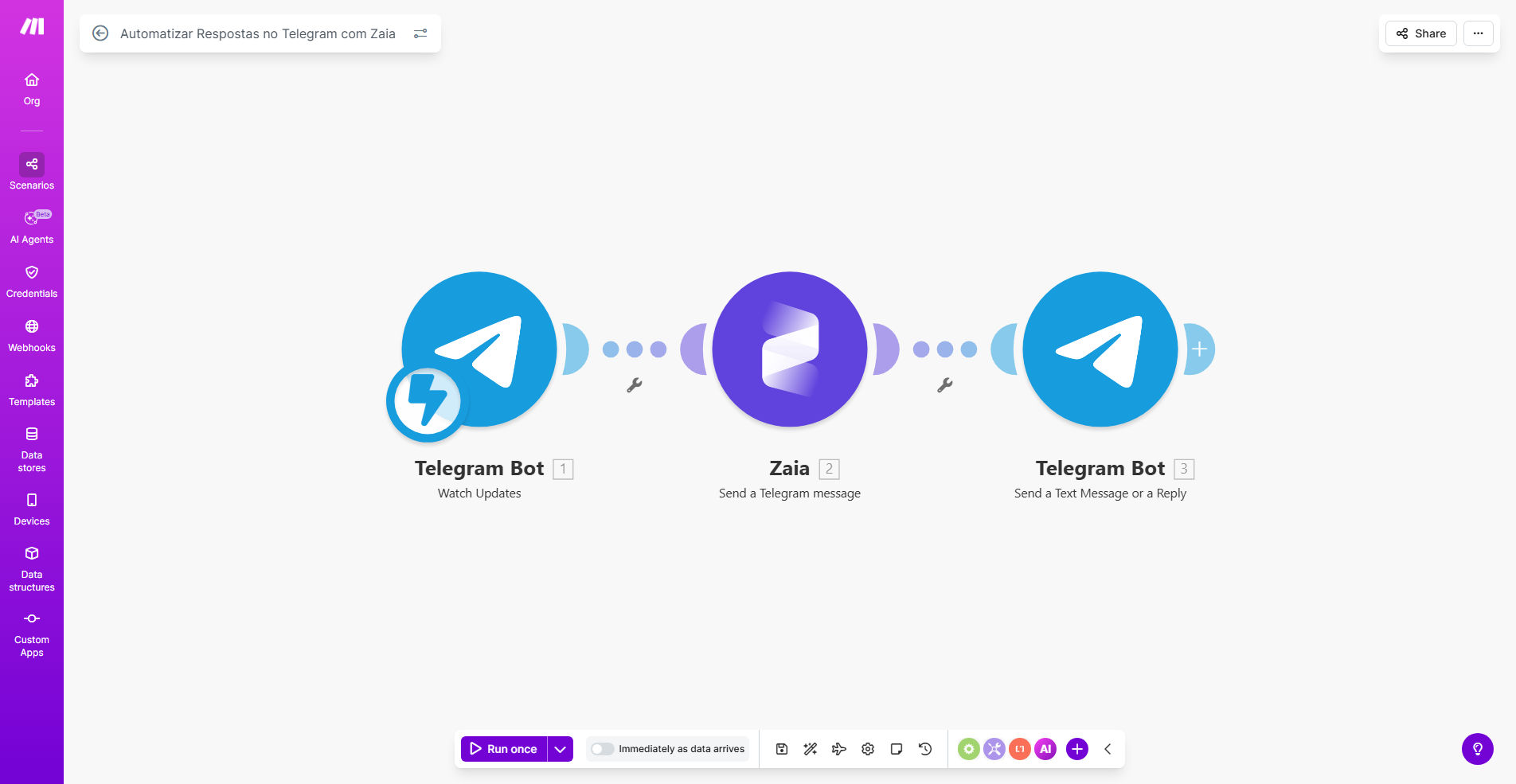
What This Workflow Does
Managing a busy Telegram channel or group can be overwhelming. Questions pour in at all hours, leads ask for information when your team is offline, and repetitive support queries consume valuable time. This manual process creates bottlenecks, delays responses, and risks losing potential customers due to slow engagement.
This Make.com workflow solves that by connecting Telegram directly to Zaia, an AI assistant. It automatically listens for new messages in your Telegram chats or channels and uses Zaia to generate intelligent, context-aware replies instantly. Whether it's answering FAQs, qualifying a sales lead, or providing basic support, the automation ensures every user receives a prompt and helpful response, 24/7. It transforms your Telegram presence from a reactive channel into a proactive engagement engine.
The business value is clear: improved customer satisfaction, captured leads that would otherwise be missed, and significant time savings for your team. You maintain a high level of service and responsiveness without requiring constant human monitoring, allowing you to scale your community or support operations efficiently.
How It Works
The automation acts as a bridge between Telegram's messaging platform and Zaia's AI capabilities, orchestrating a seamless conversation flow.
Step 1: Trigger on New Telegram Message
The workflow is activated whenever a new message arrives in a specified Telegram chat, group, or channel via the Telegram Bot. Make.com captures the message content, sender details, and chat ID instantly.
Step 2: Process & Route with Zaia AI
The captured message is sent to the Zaia module. Zaia analyzes the text using natural language processing, understands the user's intent (e.g., asking for pricing, seeking support, making a general inquiry), and generates a relevant, human-like response based on your pre-configured knowledge and guidelines.
Pro tip: You can train Zaia on your specific FAQ documents, product catalogs, or support scripts to ensure its replies are accurate and on-brand.
Step 3: Send Automated Reply Back to Telegram
Once Zaia crafts the perfect reply, the workflow uses the Telegram Bot API to send that response back to the original chat. The user receives an instant answer, often within seconds, creating a smooth and satisfying interactive experience.
Step 4: Log & Optional Escalation (Advanced)
Optionally, the workflow can log the conversation to a Google Sheet or database for record-keeping and analysis. It can also be configured to escalate complex issues by notifying a human agent via Slack or email if Zaia detects a query it cannot handle confidently.
Who This Is For
This template is ideal for any business or creator using Telegram as a key communication channel. It's perfect for:
- Community Managers: For Telegram groups with hundreds or thousands of members who need constant moderation and engagement.
- Customer Support Teams: Businesses offering support via Telegram who want to provide instant first-line answers to common questions.
- Marketers & Sales Teams: Professionals using Telegram for lead generation who need to instantly qualify inbound inquiries and capture contact information.
- Content Creators & Influencers: Individuals managing subscriber channels who want to automatically engage with their audience, answer frequent questions, and collect feedback.
- Startups & Small Businesses: Teams with limited staff that need to maintain a professional, responsive presence 24/7 without hiring a full-time chat operator.
What You'll Need
To implement this automation, you will need the following accounts and assets set up and ready:
- A Make.com account (free tier available).
- A Telegram Bot Token. Create one via @BotFather on Telegram and note the API token.
- An Zaia AI account and API key to power the automated responses.
- Admin access to the Telegram chat, group, or channel where you want to deploy the bot.
- (Optional) A Google Sheet or database if you wish to log conversations.
- (Optional) A Slack or email setup for human escalation alerts.
Quick Setup Guide
Follow these steps to get your automated Telegram responder live in under 30 minutes:
- Clone the Template: Click "Get This Workflow" to copy the template into your Make.com account.
- Configure Telegram Module: In the first module, add your Telegram Bot Token and select the specific chat or group you want to monitor.
- Set Up Zaia: In the Zaia module, input your API key and configure the AI's instructions. Define its role (e.g., "Friendly Support Agent") and provide key information about your business for accurate replies.
- Test the Flow: Send a test message to your Telegram chat. Verify that the workflow triggers and that Zaia sends back a coherent, appropriate reply.
- Activate & Monitor: Turn on the scenario. Monitor the initial conversations to ensure the AI's responses meet your quality standards. Tweak Zaia's instructions as needed based on real interactions.
Key Benefits
24/7 Instant Engagement: Respond to customer inquiries and leads instantly, any time of day or night, dramatically improving user experience and conversion opportunities.
Massive Time Savings: Free your team from the tedium of answering the same questions repeatedly. This automation can handle 80% of routine queries, allowing staff to focus on high-value tasks.
Scalable Community Management: As your Telegram audience grows from dozens to thousands, this system scales effortlessly without adding more human moderators, keeping engagement high and manageable.
Consistent Brand Voice: Zaia can be trained to communicate in your brand's specific tone and style, ensuring every automated interaction reinforces your brand identity.
Valuable Lead Capture: Automatically identify and qualify sales leads from casual chats, capturing their information and notifying your sales team instantly for follow-up.