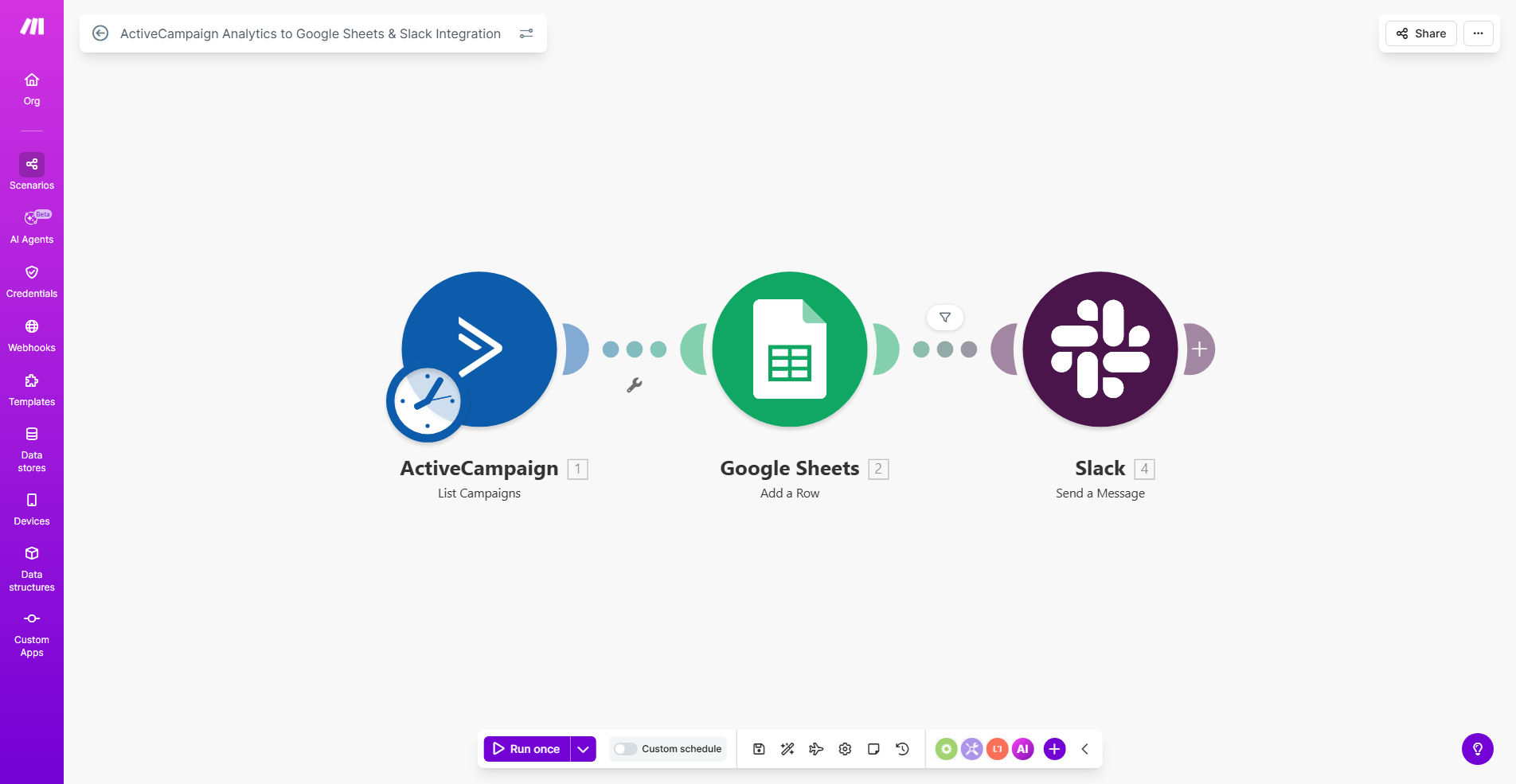
What This Workflow Does
Manual marketing reporting is a silent productivity killer. Every week, marketers waste hours logging into ActiveCampaign, exporting data, cleaning spreadsheets, and crafting update emails. This process is not only tedious but also prone to human error and delays, leaving your team without timely insights to make data-driven decisions.
This automated workflow solves that problem entirely. It acts as your personal data assistant, running on a schedule (like every Friday) to connect to your ActiveCampaign account, extract key analytics—such as open rates, clicks, and list growth—and seamlessly transfer this data into a structured Google Sheet. Once the data is logged, it then sends a concise, formatted summary directly to a designated Slack channel or team member. The result is a consistent, accurate, and instantly accessible performance report that keeps everyone aligned.
How It Works
The automation follows a logical, three-stage process to transform raw data into actionable team insights.
Step 1: Scheduled Data Fetch from ActiveCampaign
A scheduler module triggers the workflow at your chosen time. It authenticates with your ActiveCampaign account via API and requests the analytics data for a specified date range (e.g., the past week). The system retrieves a clean dataset of your campaign performance metrics.
Pro tip: Configure the scheduler to run after your major weekly campaigns have concluded, ensuring you capture complete data for reporting.
Step 2: Data Structuring & Export to Google Sheets
The raw data from ActiveCampaign is then processed and formatted. The workflow maps each metric to a specific column in your pre-formatted Google Sheet. It appends a new row with the fresh data, automatically creating a running historical log. This turns your Google Sheet into a living dashboard of marketing performance over time.
Step 3: Team Notification via Slack
Finally, the workflow takes key highlights from the newly added data—like top-performing campaign or a significant change in click-through rate—and composes a readable message. This message is posted to a Slack channel of your choice, providing your marketing, sales, or leadership team with an instant, digestible snapshot of the week's results, right where they already communicate.
Who This Is For
This automation is a game-changer for marketing teams, agencies, and solo entrepreneurs who rely on email marketing. It's perfect for Marketing Directors who need to report on ROI, Digital Agencies that manage client campaigns and require transparent reporting, and Growth Hackers who iterate quickly based on weekly data. If you spend more than 30 minutes a week compiling email stats, this workflow is for you.
What You'll Need
- An active ActiveCampaign account with API access enabled.
- A Google Sheets document set up with headers for the data you want to track (e.g., Date, Campaign Name, Opens, Clicks).
- A Slack workspace and a channel (or user) where you want to receive notifications.
- A Make.com account (free tier is sufficient to run this workflow).
- The API keys or OAuth credentials for connecting Make.com to ActiveCampaign, Google Sheets, and Slack.
Quick Setup Guide
You can have this automation running in under 15 minutes by following these steps.
- Clone the Template: Click "Get This Workflow" and duplicate the provided Make.com scenario into your own account.
- Connect Your Apps: In the Make.com editor, update the connection modules for ActiveCampaign, Google Sheets, and Slack with your own account credentials.
- Configure the Data Points: Point the ActiveCampaign module to the specific campaigns or lists you want to report on. Map the data fields to the correct columns in your Google Sheet.
- Set the Schedule: Adjust the scheduler module to run on your preferred day and time (e.g., Every Friday at 9 AM).
- Customize the Slack Message: Edit the Slack message template to include the metrics and commentary most relevant to your team.
- Test and Activate: Run the workflow once in test mode to ensure data flows correctly into your Sheet and Slack. Then, turn it on and let it run automatically.
Key Benefits
Save 2–4 hours every week previously spent on manual data collection, spreadsheet formatting, and report distribution. This time can be reinvested into strategic marketing activities.
Eliminate human error in data entry by having a reliable system pull numbers directly from the source API, ensuring your reports and decisions are based on accurate information.
Improve team alignment and accountability by delivering consistent performance snapshots directly into team communication channels, keeping marketing goals visible and top-of-mind.
Build a valuable historical dataset in Google Sheets automatically, enabling easy year-over-year comparisons, trend analysis, and more informed forecasting for future campaigns.
Scale your reporting effortlessly as you launch more campaigns or add new team members. The automated system handles the increased data load without requiring additional manual work from you.