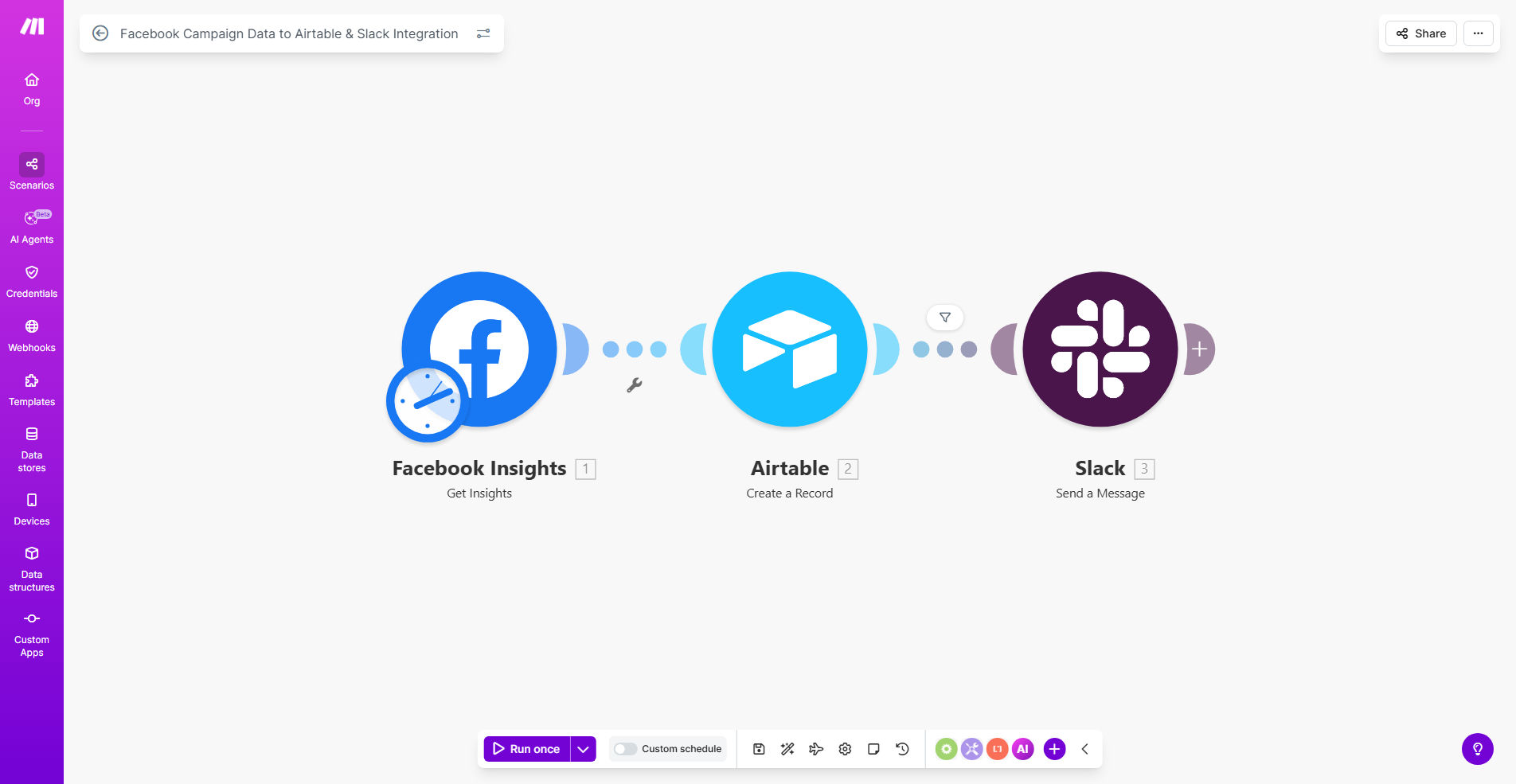
What This Workflow Does
For marketing teams, reporting on Facebook Ads performance is a weekly chore that consumes valuable time. Manually downloading CSV files from Ads Manager, copying numbers into spreadsheets, and then formatting updates for team meetings can easily take half a day. This process is error-prone, delays insights, and keeps data siloed away from the people who need it.
This automated workflow solves that problem entirely. It acts as your dedicated reporting assistant, connecting directly to the Facebook Marketing API on a schedule you set (e.g., every Monday at 9 AM). It fetches key campaign metrics—like spend, impressions, clicks, and conversions—and performs two critical actions simultaneously. First, it structures and pushes this data into designated tables within Airtable, building a live, historical database of all your ad performance. Second, it formats a concise summary of the top insights and posts it directly to a chosen Slack channel, ensuring your entire team is immediately informed.
The result is a closed-loop system where data collection, storage, and dissemination happen automatically. Marketers gain back hours each week, strategists access clean data for analysis, and the whole team stays aligned with real-time performance updates, enabling quicker pivots and more collaborative optimization.
How It Works
The workflow is built on Make.com and follows a logical, reliable sequence. Once set up, it runs hands-free according to your chosen timetable.
Step 1: Scheduled Trigger & Data Fetch
The automation begins on a pre-defined schedule using Make.com's "Schedule" module. At the appointed time, it activates and connects to your Facebook Ads account via the official Facebook connector. It authenticates securely and requests performance data for the specified date range (e.g., "last 7 days") and for the campaigns, ad sets, or ads you want to track.
Step 2: Data Processing in Airtable
The raw data from Facebook is then sent to Airtable. The workflow maps each data point—campaign name, amount spent, results, cost per result, etc.—to the correct field in your Airtable base. It can either add new rows for the latest period or update existing records. This builds a searchable, filterable database of all your historical ad performance, perfect for creating dashboards and calculating ROI over time.
Pro tip: Structure your Airtable base with separate tables for Campaigns, Ad Sets, and Ads, linked together. This allows for incredibly granular analysis, like seeing which specific ad creative is driving the lowest cost per lead within a top-performing campaign.
Step 3: Insight Sharing on Slack
In parallel, the workflow takes the newly fetched data and applies simple logic to highlight what matters. It can identify the campaign with the highest ROAS, flag any ad set where costs have spiked, or calculate week-over-week growth. It then formats these insights into a clear, readable message and posts it to a designated Slack channel using the Slack webhook or bot. This instantly notifies your marketing, sales, and leadership teams.
Who This Is For
This automation is a game-changer for any business investing in Facebook and Instagram advertising. It's ideal for digital marketing agencies that need to report to multiple clients efficiently, saving countless hours per client. E-commerce brands running dynamic catalog ads will benefit from having daily performance automatically logged to analyze product-level profitability.
In-house marketing teams at SaaS companies or lead-generation businesses can use it to keep sales aligned on which campaigns are delivering the hottest leads. Even solopreneurs and consultants who manage their own ads can use this to eliminate manual tracking and ensure they're always on top of their advertising ROI without getting bogged down in data entry.
What You'll Need
- A Make.com account (free tier available) to host and run the automation.
- A Facebook Business Manager account with Ads Manager access and the campaigns you wish to track.
- An Airtable account and a base set up with a table to receive the ad data. You'll need your Airtable API key and base ID.
- A Slack workspace and permission to create an incoming webhook in the channel where you want updates posted.
Quick Setup Guide
You can have this workflow live in under 30 minutes. Follow these steps after cloning the template on Make.com.
- Connect Your Accounts: In the Make.com scenario, click on each module (Facebook, Airtable, Slack) and authenticate or enter your API credentials. This establishes the secure connections.
- Configure the Facebook Trigger: Select the specific Ad Account, and define the date range and level of detail (campaign, ad set, or ad) for the data you want to pull.
- Map to Your Airtable Base: Point the Airtable module to your specific base and table. Map the incoming Facebook data fields (like "Campaign Name," "Amount Spent") to the corresponding column names in your Airtable.
- Set Up the Slack Alert: Create an incoming webhook in your Slack channel and paste the URL into the Make.com Slack module. Customize the message template to highlight the metrics your team cares about most.
- Set the Schedule & Activate: Finally, configure the Schedule module to run at your desired frequency (e.g., weekly, daily). Turn the scenario on, and it will execute automatically from that point forward.
Key Benefits
Eliminate 5-10 hours of manual reporting work every single week. This automation completely removes the need for anyone on your team to manually export, compile, or format Facebook Ads data, freeing them for high-value strategic work.
Make data-driven decisions faster with real-time Airtable dashboards. By having all campaign data flow automatically into Airtable, you can build live dashboards that show ROAS, CPA trends, and channel performance at a glance, enabling immediate budget adjustments.
Improve cross-team alignment with automatic Slack notifications. When wins happen or issues arise, everyone from marketing to sales to leadership sees the same update in Slack simultaneously, fostering transparency and enabling quick, collaborative responses.
Reduce human error and ensure data consistency. Automated data transfer from source to database removes typos, forgotten updates, and version control issues, guaranteeing your performance records are accurate and reliable.
Gain a scalable reporting foundation for future growth. This workflow is a template you can duplicate and modify for other ad platforms (like Google Ads or LinkedIn) or to create more complex, triggered alerts based on performance thresholds.