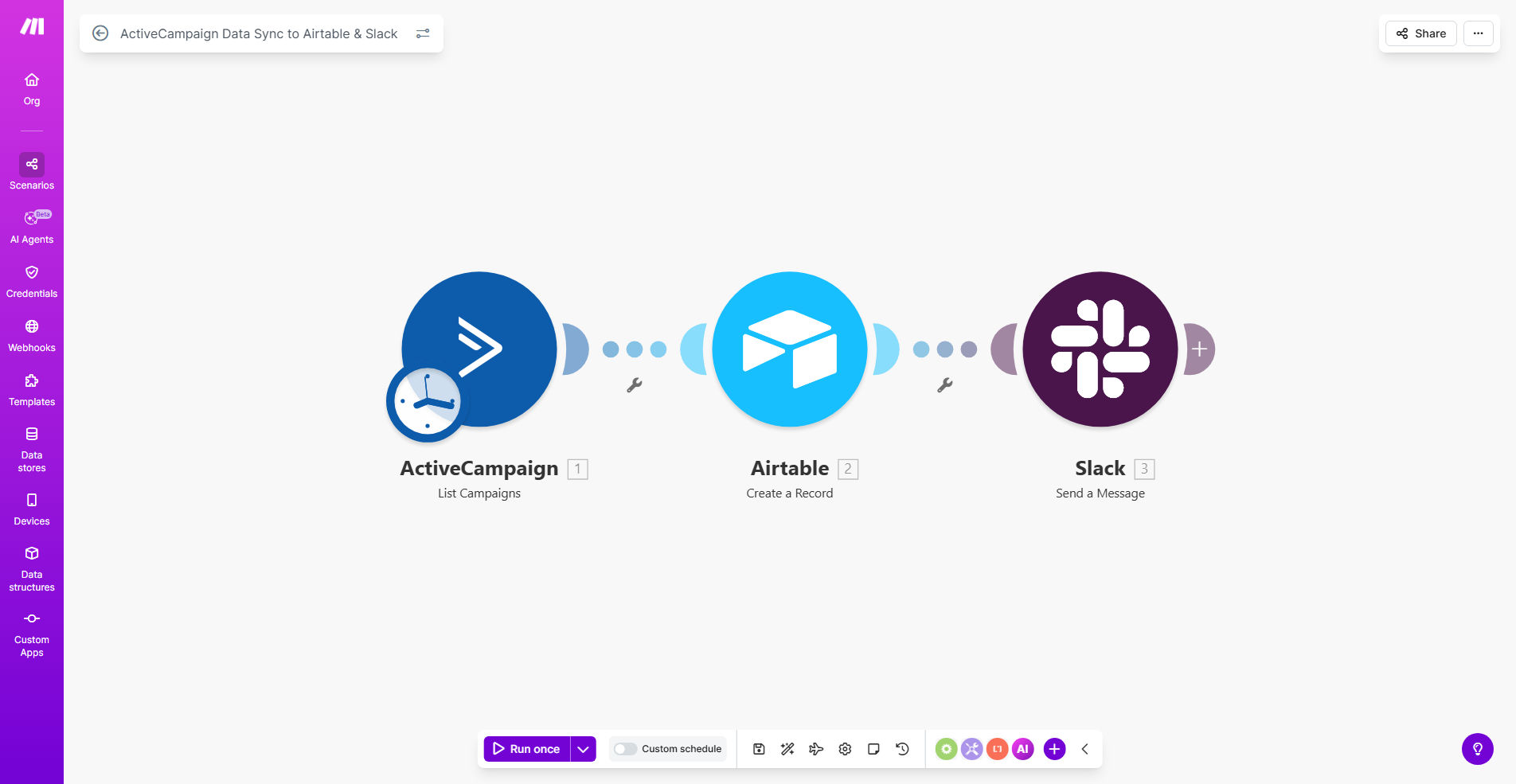
What This Workflow Does
Marketing teams often struggle with data silos. Campaign performance data lives in ActiveCampaign, project notes are in Airtable, and team discussions happen on Slack. Manually compiling reports to share insights across these platforms is time-consuming, error-prone, and delays critical decisions. This disconnect can lead to missed opportunities and inefficient spending.
This automated workflow solves that by creating a seamless bridge between your marketing data and your team's collaboration tools. It periodically fetches key analytics from ActiveCampaign—such as campaign opens, clicks, and conversions—and syncs them directly into a structured Airtable base. Simultaneously, it posts a digestible summary or key alerts to a designated Slack channel. This ensures everyone, from strategists to executives, has immediate access to the same performance insights, enabling faster, more informed adjustments to maximize campaign ROI.
By automating this flow, you eliminate the weekly reporting grind. The data moves on a schedule you set, keeping your Airtable dashboard perpetually updated and your Slack channel buzzing with actionable intelligence, not manual update requests.
How It Works
The workflow acts as an intelligent data router, operating on a schedule you define to keep information flowing without manual intervention.
Step 1: Scheduled Trigger
The automation is initiated by a Schedule module in Make.com. You can set it to run weekly, daily, or at any interval that suits your review cycle (e.g., every Monday at 9 AM). This trigger is the starting pistol, ensuring consistent and timely data updates.
Step 2: Fetch Data from ActiveCampaign
Once triggered, the workflow connects to your ActiveCampaign account via the Make.com ActiveCampaign module. It retrieves pre-defined analytics for your recent campaigns. This could include metrics like send count, open rate, click-through rate, unsubscribe count, and any goal completions you track.
Pro tip: Start by syncing 3-5 key metrics. You can easily expand the data points later once the basic flow is running smoothly.
Step 3: Update Records in Airtable
The fetched data is then mapped and sent to your Airtable base. The workflow finds or creates a record for each campaign and updates its fields with the latest metrics. This transforms your Airtable base into a live, historical database of all campaign performance, perfect for creating dashboards and tracking trends.
Step 4: Notify the Team on Slack
Finally, the workflow crafts a concise message summarizing the key findings—for example, highlighting the top-performing campaign of the period or flagging a campaign with a low open rate. This message is posted automatically to a Slack channel of your choice (like #marketing-analytics), prompting immediate discussion and action.
Who This Is For
This automation is a game-changer for marketing teams, agencies, and growth-focused businesses that rely on data to drive decisions.
Marketing Managers & Directors: Get a consolidated, real-time view of all campaign performance without logging into multiple platforms or waiting for manual reports.
Digital Agencies: Streamline client reporting by automatically populating client-facing Airtable dashboards and sending scheduled Slack updates to shared channels, enhancing transparency and value.
Startups & SMBs: Operate with the data sophistication of a larger company without the overhead. Keep small, agile teams perfectly aligned on what's working and what's not.
Sales Teams: Benefit from seeing which marketing campaigns are generating the hottest leads, allowing for quicker follow-up and better sales-marketing alignment.
What You'll Need
To implement this workflow, you'll need the following accounts and basic setup:
- A Make.com account (free tier may suffice for low-volume use).
- An ActiveCampaign account with API access enabled (check your plan's API permissions).
- An Airtable account and a base with a table structured to receive campaign data (e.g., columns for Campaign Name, Date, Opens, Clicks, etc.).
- A Slack workspace where you have permission to create incoming webhooks or use a Slack bot for posting to a channel.
- (Recommended) A basic understanding of the key metrics you want to track from ActiveCampaign.
Quick Setup Guide
Follow these steps to get your automated data sync up and running:
- Clone the Template: Click the "Get This Workflow" button above to open the template in your Make.com account and create a copy.
- Connect Your Apps: In the Make.com scenario editor, establish connections (called "connections") between Make.com and your ActiveCampaign, Airtable, and Slack accounts. This authorizes data flow.
- Configure the Trigger: Set the Schedule module to your desired frequency (e.g., weekly).
- Map Your Data: In the ActiveCampaign module, select the specific campaign list or analytics endpoint you want to pull from. Then, map the resulting data fields to the corresponding columns in your Airtable base.
- Set Up Slack Message: Choose the Slack channel and format the notification message. You can use data from the workflow (like campaign name and top metric) to make the message dynamic and informative.
- Test & Activate: Run the scenario once in test mode to ensure data flows correctly into Airtable and Slack. Then, turn the scenario "ON" to let it run automatically on its schedule.
Key Benefits
Save 5-10 hours per month on manual reporting. Eliminate the tedious process of exporting CSV files from ActiveCampaign, formatting them, and sending update emails. This time is better spent on analysis and strategy.
Improve campaign responsiveness by 50% or more. With real-time alerts in Slack, your team can spot a underperforming campaign or a sudden spike in engagement immediately, allowing for rapid creative or targeting adjustments.
Create a single source of truth for marketing performance. Your Airtable base becomes the definitive historical record for all campaigns, making year-over-year comparisons, quarterly reporting, and budget justifications straightforward and data-backed.
Enhance cross-team alignment and transparency. When sales, leadership, and marketing all see the same numbers in Slack and Airtable, meetings become more focused on "what do we do next?" rather than "what are the numbers?"
Scale your marketing operations without adding headcount. As you launch more campaigns, the automation handles the increased data load effortlessly, providing consistent reporting quality regardless of volume.