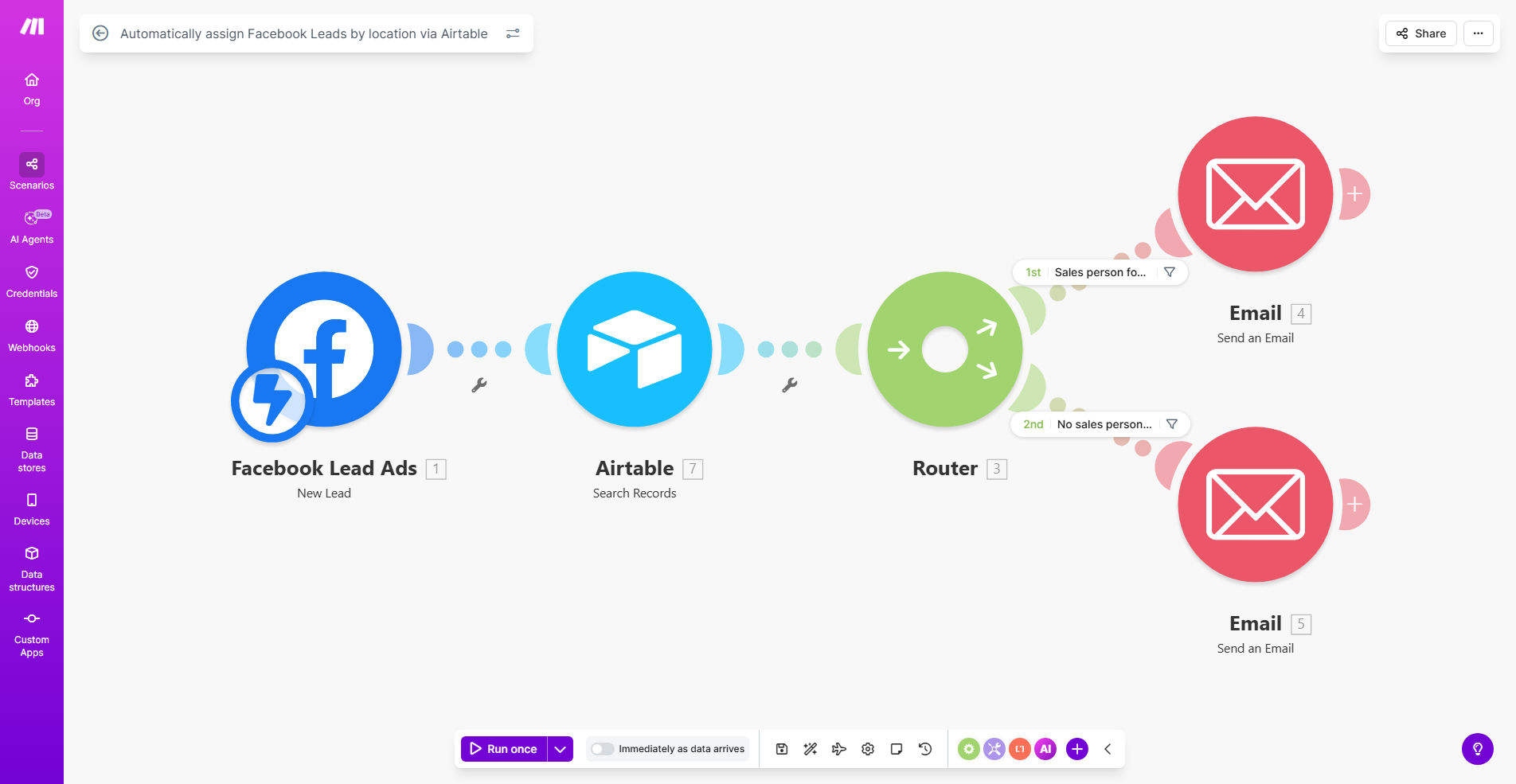
What This Workflow Does
For businesses running Facebook Lead Ads, a common bottleneck is the manual process of receiving, sorting, and assigning leads to the appropriate sales representative. This delay can cost you valuable leads as prospects lose interest or get contacted by competitors. This automated workflow solves that problem by creating a seamless, instant connection between your Facebook Lead Ads and your sales team via Airtable.
The system automatically captures new lead information, identifies their location from the form data, and matches it against a pre-defined list of sales territories in your Airtable base. It then assigns the lead to the correct sales rep and can immediately notify them via email, Slack, or SMS. This turns a multi-step, error-prone manual task into a background process that happens in seconds, 24/7.
The business value is clear: faster lead response times directly correlate with higher conversion rates. By ensuring the right person (the one closest to the lead geographically or by expertise) gets the information instantly, you significantly increase your chances of closing the sale. It also eliminates internal disputes over lead ownership and frees up managerial time previously spent on manual distribution.
How It Works
This workflow acts as an intelligent bridge between your lead generation and your sales execution team. Here’s a step-by-step look at the automation process.
Step 1: New Lead Capture from Facebook
The moment a user submits a lead form on your Facebook ad, Make.com instantly receives the webhook notification with all the lead data—name, email, phone number, and crucially, location details like city, state, or ZIP code.
Step 2: Territory Lookup in Airtable
The workflow then queries your Airtable base, which contains a "Sales Reps" table. This table lists each sales representative alongside the specific territories (cities, states, regions) they cover. The system compares the lead's location against this list to find the perfect match.
Step 3: Lead Assignment & Record Creation
Once a match is found, the workflow creates a new record in an "Assigned Leads" table within Airtable. This record includes all the lead's details and, most importantly, links it to the assigned sales rep. This creates a single source of truth for your sales pipeline.
Step 4: Instant Sales Rep Notification
Immediately after assignment, the automation triggers a notification to the sales rep. This can be configured as an email with the lead's details, a direct message in Slack or Teams, or even an SMS alert. The rep gets everything they need to make a personalized, timely first contact.
Pro tip: Enhance this workflow by adding a lead scoring module before assignment. You can analyze the lead's details (like budget mentioned or urgency) and route high-value leads to your top-performing reps automatically.
Who This Is For
This automation is ideal for any business with a distributed sales team that uses Facebook for lead generation. If your reps are assigned to specific geographic regions, industries, or product lines, this system ensures leads go directly to the person best equipped to handle them.
Marketing Agencies & SMBs: For small teams where the founder or manager is manually forwarding leads, this automation reclaims hours each week and ensures no lead slips through the cracks.
Real Estate Teams & Franchises: Perfect for businesses where agents cover specific neighborhoods or territories. A lead inquiring about a property in "North Austin" is instantly routed to the agent covering that area.
Service-Based Businesses (HVAC, Roofing, Legal): Companies that dispatch technicians or consultants based on location can use this to automate scheduling and dispatch from the initial lead inquiry.
Enterprise Sales Teams: Large organizations with complex territory structures can eliminate internal routing delays and ensure compliance with territory rules, improving both efficiency and team morale.
What You'll Need
To implement this workflow, you'll need access to the following tools and data. Setting these up is straightforward and a one-time task.
- A Facebook Business Account with active Lead Ads campaigns.
- A Make.com account (free tier available) to build and run the automation.
- An Airtable account (free plan works) with a base containing your sales team's territory information.
- A clear mapping of sales territories. This should be documented in your Airtable base, listing each sales rep and the cities, states, or ZIP codes they cover.
- A notification method for your sales team (e.g., a shared Slack channel, Microsoft Teams, or email distribution list).
Quick Setup Guide
Follow these steps to get your automated lead assignment system up and running in under an hour.
- Import the Template: Click the "Get This Workflow" button above to clone the ready-made template into your Make.com account.
- Connect Your Apps: Authorize the connections between Make.com, your Facebook Lead Ads, and your Airtable base.
- Configure Your Airtable Base: Ensure you have a "Sales Reps" table with columns for Rep Name, Email, and Territory (City/State). Create an "Assigned Leads" table to receive the new records.
- Map the Data Fields: In the Make.com scenario, map the location field from your Facebook lead (e.g., 'City') to the corresponding territory field in your Airtable table.
- Set Up Notifications: Add a module to send an email or Slack message to the assigned rep. Use the data from the newly created Airtable record to populate the alert.
- Test & Activate: Use Facebook's test lead feature to send a dummy lead through the system. Verify it appears correctly in Airtable and that the notification is sent. Then, turn the scenario on.
Key Benefits
Reduce Lead Response Time from Hours to Seconds. The average manual lead assignment can take hours or even days. This automation contacts the right salesperson the moment a lead submits a form, dramatically increasing your chance to connect while the prospect is still engaged.
Eliminate Manual Sorting Errors and Internal Disputes. Automated rules are objective and consistent. There's no human error in misreading a location or accidentally assigning a lead to the wrong rep, which removes a common source of team friction.
Free Up 5-10 Hours per Week of Managerial Time. Sales managers and business owners often spend significant time each week playing "traffic cop" with incoming leads. This system handles that distribution automatically, allowing leadership to focus on coaching and strategy.
Improve Conversion Rates by Ensuring Localized Follow-up. Leads are more likely to convert when contacted by someone familiar with their local market. This workflow guarantees that a lead in Boston goes to your Boston-based rep, who can speak to local specifics.
Gain Clear Visibility into Lead Distribution. With every assignment logged in Airtable, you have a complete audit trail. You can easily run reports to see lead volume per territory, rep performance, and identify any gaps in your coverage.