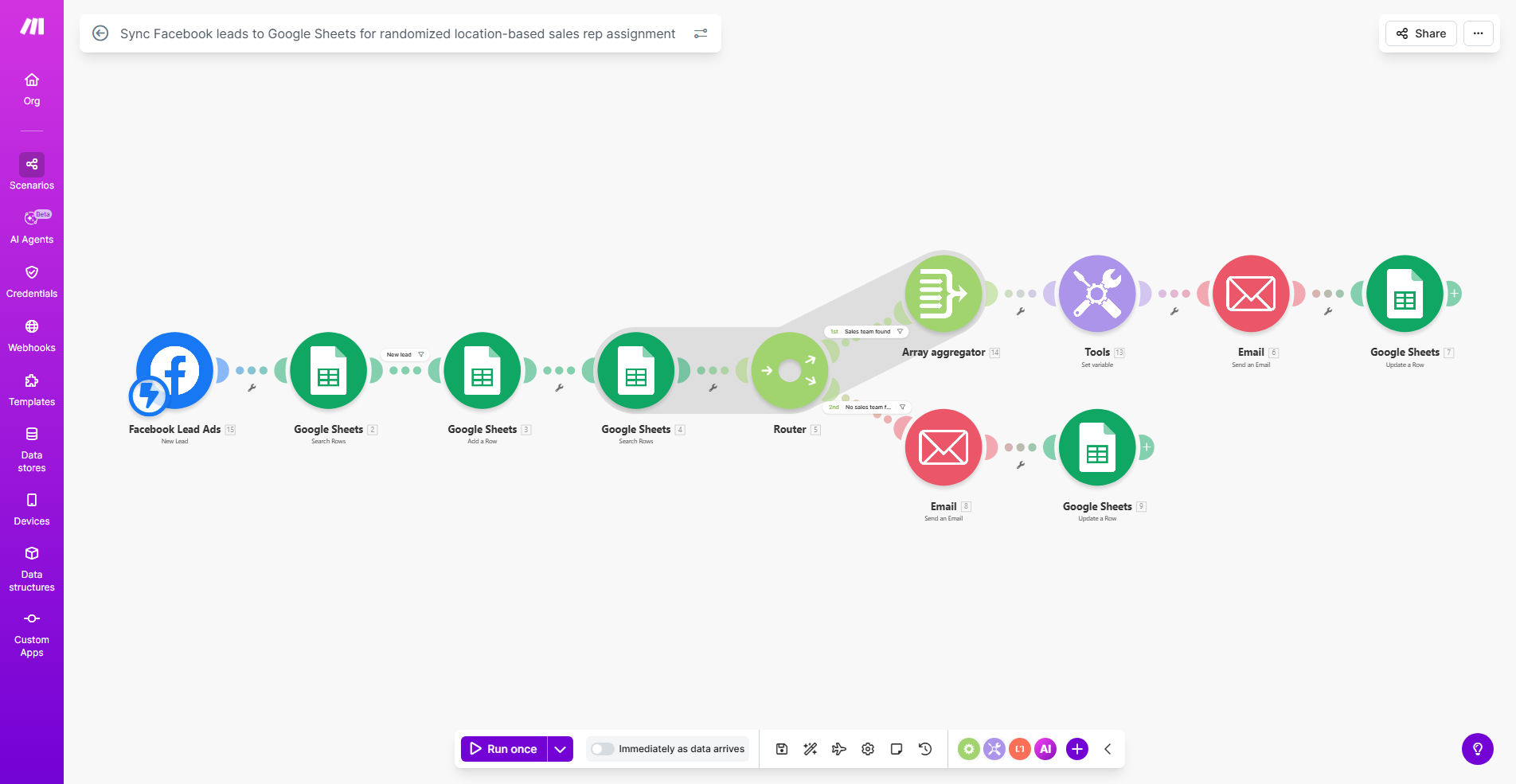
What This Workflow Does
If you run Facebook ads, you know the frustration: leads come in at all hours, and manually copying their details from Facebook Ads Manager into a spreadsheet is tedious and error-prone. Even worse is deciding which sales rep should follow up, especially if you have multiple reps covering the same city or region. This leads to delays, missed opportunities, and internal disputes over who gets the "hot" leads.
This automation solves both problems instantly. It acts as a 24/7 assistant that watches for new Facebook leads. The moment someone submits a form, it captures all their details—name, email, phone, location, and any custom answers—and posts them directly into a designated Google Sheet. Then, it intelligently looks at the lead's location, identifies which sales reps cover that area, and randomly selects one to assign the lead to. This entire process happens in seconds, ensuring immediate, fair, and organized lead distribution.
How It Works
The workflow is built on Make.com and connects your Facebook Lead Ads directly to Google Sheets with smart logic in between.
Step 1: Instant Lead Capture
The scenario is triggered the moment a new lead is generated from your Facebook ad. Make.com receives the webhook notification with the full lead data packet.
Step 2: Data Parsing & Enrichment
The workflow parses the incoming data, extracting key fields like contact information and geographic details (city, state, ZIP code). It structures this data for clean entry into your spreadsheet.
Step 3: Location-Based Rep Matching
This is the core intelligence. The automation references a pre-defined list in your Google Sheet that maps locations to specific sales reps. If multiple reps serve the same location, it uses a randomizer function to pick one fairly, eliminating any bias or pattern.
Step 4: Logging & Assignment in Google Sheets
The enriched lead data—now including the assigned rep's name and the timestamp—is appended as a new row in your master Google Sheet. This creates a real-time, searchable log of all leads and their status.
Pro tip: Use a separate tab in your Google Sheet as the "Rep Directory." List each rep's name, email, and the territories they cover. The automation will reference this list, making it easy to update your team structure without touching the workflow.
Who This Is For
This template is ideal for any business with a sales team that generates leads through Facebook Ads. It's particularly powerful for:
- Multi-location businesses: Companies with franchises or branches in different cities that need leads routed to the correct local office.
- Sales teams with regional territories: Teams where reps are responsible for specific geographic areas and need leads assigned accordingly.
- Companies with inside sales pools: Organizations where multiple reps cover the same broad region and need a fair, randomized system to distribute incoming leads to prevent cherry-picking.
- Marketing agencies managing client leads: Agencies that run Facebook ads for clients and need a transparent, automated way to deliver leads directly to the client's sales spreadsheet.
What You'll Need
- A Facebook Business Manager account with active Lead Ad forms.
- A Make.com account (free tier available).
- A Google Sheets document to serve as your lead database.
- A defined list of your sales representatives and the geographic locations (states, cities, or ZIP codes) they cover.
Quick Setup Guide
- Clone the Template: Click "Get This Workflow" to copy the scenario into your Make.com account.
- Connect Facebook Lead Ads: In the first module, authorize Make.com to access your Facebook Ads account and select the specific Lead Form you want to use.
- Configure Your Google Sheet: Connect your Google account and select the spreadsheet and worksheet where leads should be logged. Ensure you have columns for lead data, timestamp, and "Assigned Rep."
- Set Up Your Rep & Location Map: Create a separate sheet or table within your workbook that lists reps and their assigned territories. The workflow will reference this.
- Test the Flow: Use Make.com's testing mode to simulate a lead submission. Verify that a new row appears in your sheet with the correct data and a rep is assigned based on the test location.
- Activate & Monitor: Turn the scenario on. New leads will now flow in automatically. Check the sheet periodically to ensure everything is running smoothly.
Key Benefits
Eliminate manual data entry and save 5–10 hours per week. Your team will never have to copy-paste lead details from Facebook again, freeing them up for actual selling and customer conversations.
Speed up lead response time from hours to minutes. Instant assignment means reps can be notified and start their outreach while the lead is still warm, dramatically increasing conversion rates.
Ensure 100% fair and transparent lead distribution. The randomized, rule-based system removes human bias and internal conflict, boosting team morale and ensuring equitable opportunity.
Create a centralized, reliable lead database. All lead information lives in Google Sheets, making it easy to analyze campaign performance, track rep activity, and integrate with other tools.
Scale your lead generation effortlessly. As your Facebook ad spend and lead volume grow, this system handles the increased load without requiring additional administrative staff.