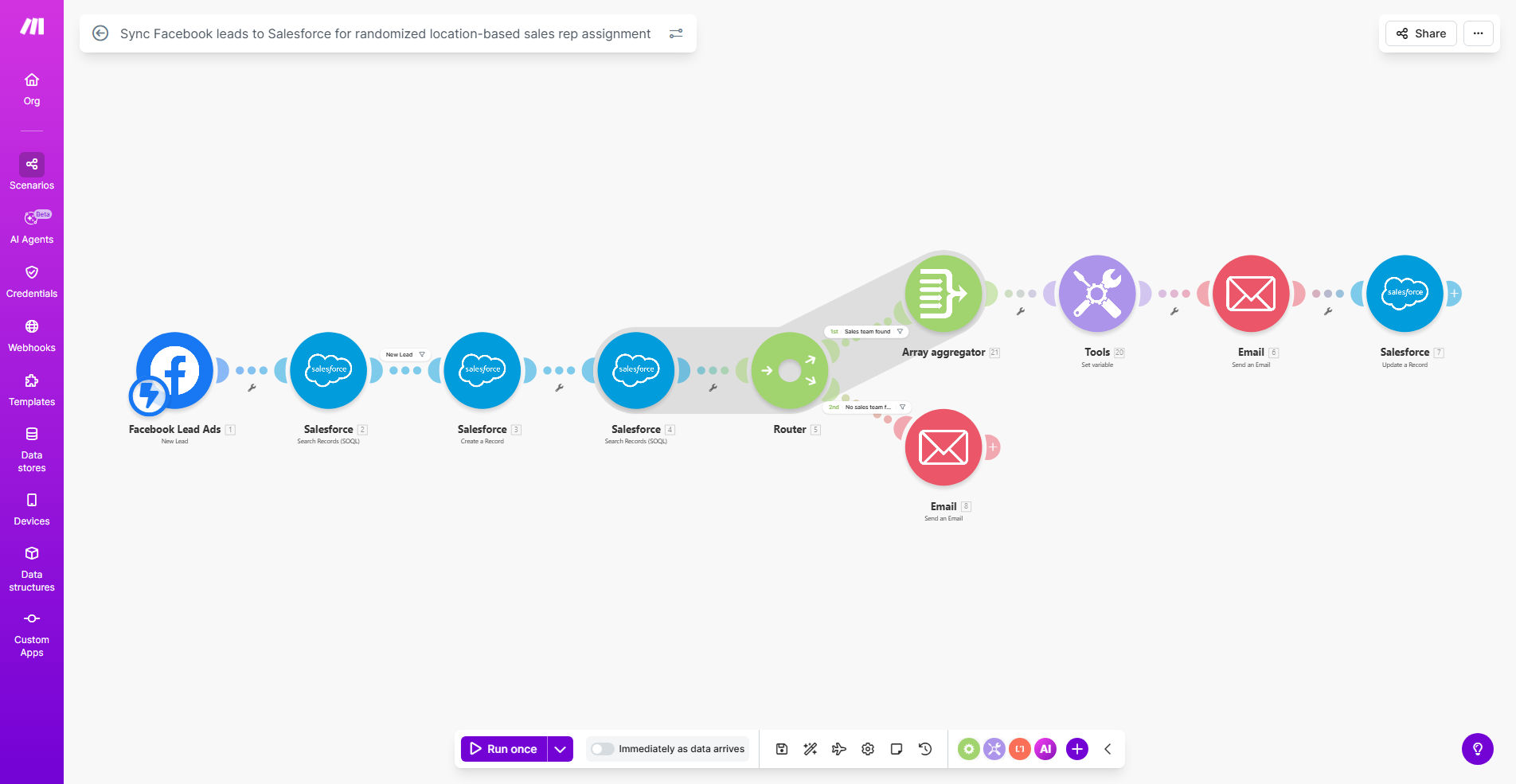
What This Workflow Does
For businesses running Facebook ad campaigns, a critical bottleneck often occurs after the lead is captured. Valuable prospect information gets stuck in Facebook or a spreadsheet, requiring manual entry into your CRM like Salesforce. This delay leads to missed opportunities, as leads go cold before a sales rep can make contact. Furthermore, manually assigning leads to reps can create unfair distribution, causing friction within the team and uneven workloads.
This automation solves both problems simultaneously. It acts as a real-time bridge between your Facebook Lead Ads and Salesforce. The moment someone submits their information on your ad, the workflow instantly creates a new lead or contact in Salesforce. But it doesn't stop there. It intelligently identifies the sales team responsible for the lead's geographic location and then randomly assigns the new lead to one rep within that local team. This ensures every lead is actioned immediately and distributed with fairness in mind.
The result is a fully automated lead routing system that maximizes the return on your ad spend. Leads are no longer lost in transit or stuck waiting for assignment. Your sales team receives hot, local leads directly in their Salesforce queue, empowering them to follow up while the prospect's interest is highest, significantly boosting conversion rates and team morale.
How It Works
The workflow follows a logical sequence to transform a raw Facebook lead into an assigned sales opportunity. Here’s the step-by-step process:
Step 1: Capture the New Lead from Facebook
The automation is triggered the instant a new form submission is received from your Facebook Lead Ad campaign. It retrieves all the prospect's data, such as name, email, phone number, and crucially, location information like city or state.
Step 2: Create or Update the Record in Salesforce
The captured data is then formatted and used to create a new Lead or Contact record in your Salesforce database. The workflow maps the Facebook form fields to the corresponding fields in Salesforce, ensuring a clean and complete record is created automatically, with zero manual typing.
Step 3: Identify the Local Sales Team
This is the intelligence layer. The workflow reads the lead's location data and checks it against a predefined mapping in your system (e.g., a list, a custom object, or team fields). It filters your entire sales team to find only those representatives or teams who are assigned to cover that specific geographic area.
Step 4: Randomly Select a Rep from the Local Pool
From the filtered list of reps in the correct location, the workflow uses a randomizer function to pick one salesperson. This random assignment within the qualified pool is key to ensuring long-term fairness and preventing any unconscious bias in lead distribution.
Step 5: Assign the Lead and Notify the Rep
The selected sales rep is then assigned as the lead owner on the newly created Salesforce record. The workflow can also trigger an immediate notification—via email, Slack, or a Salesforce alert—informing the rep that a new, local lead is waiting in their queue, prompting immediate follow-up.
Pro tip: For maximum effectiveness, ensure your Facebook Lead Ad form asks for specific location data (like City and State). The more precise the location, the more accurate your team filtering will be, leading to better-matched reps and higher conversion rates.
Who This Is For
This automation is a game-changer for any sales-driven organization that uses Facebook advertising and has a geographically structured sales team. It's ideal for:
- Marketing Agencies managing lead generation for clients with local salesforces.
- Home Services Companies (plumbers, HVAC, roofers) with multiple location-based franchises or teams.
- Real Estate Brokerages needing to distribute online buyer/seller inquiries to agents in specific territories.
- B2B Companies with regional sales managers who cover distinct states or territories.
- Any business with multiple sales reps per region that wants to eliminate manual lead sorting and ensure equitable distribution.
What You'll Need
To implement this workflow successfully, you will need the following set up in advance:
- An active Facebook Business Manager account with a running Lead Ad campaign.
- A Salesforce account (Sales Cloud) with administrative access to create automation and custom fields if needed.
- A Make.com account (free or paid) to host and run the automation scenario.
- Your sales team structure defined in Salesforce. This means having a clear way to identify which reps or teams are assigned to which geographic areas (e.g., using a custom "Territory" field on the User object).
- Facebook Lead Ad forms configured to capture location data (at minimum, City and State/Region).
Quick Setup Guide
Follow these steps to get your automated lead distribution up and running:
- Clone the Template: Click "Get This Workflow" to copy the template into your own Make.com account.
- Connect Your Apps: In the Make scenario, establish connections (called "connections") to your specific Facebook Lead Ads account and your Salesforce organization. Grant the necessary permissions.
- Map Your Data: Configure the modules to ensure the data from Facebook (name, email, phone, location) is correctly mapped to the corresponding fields in the Salesforce Lead or Contact object.
- Define Your Territories: Set up the logic for identifying local reps. This typically involves creating a list or using a Salesforce search to filter Users based on a custom field that matches the lead's location.
- Test the Flow: Use Facebook's test lead feature to submit a dummy lead. Watch the scenario run in Make.com and verify that a record is created in Salesforce and assigned to the correct, randomly selected rep from the appropriate location pool.
- Activate & Monitor: Turn on the scenario and let it run. Monitor it for the first few days to ensure all leads are processing smoothly and notifications are being sent correctly.
Key Benefits
Cut lead response time from hours to seconds. By eliminating manual data entry and assignment, reps can contact prospects within minutes of them expressing interest, dramatically increasing the likelihood of a conversion.
Ensure 100% fair lead distribution within regions. The random assignment algorithm prevents favoritism or uneven workloads, boosting team morale and ensuring all reps have an equal opportunity to succeed from the leads generated by marketing spend.
Eliminate human error in data transfer. Automated syncing means no more typos, missed fields, or lost leads that fall through the cracks between marketing and sales platforms.
Maximize your Facebook ad ROI. When every single lead is instantly routed and acted upon, you convert a higher percentage, improving your cost-per-acquisition and proving the value of your advertising efforts with clear data in Salesforce.
Scale your lead generation effortlessly. This system works just as efficiently for 10 leads a day as it does for 1,000. There's no additional manual overhead, allowing your sales process to grow seamlessly with your marketing success.