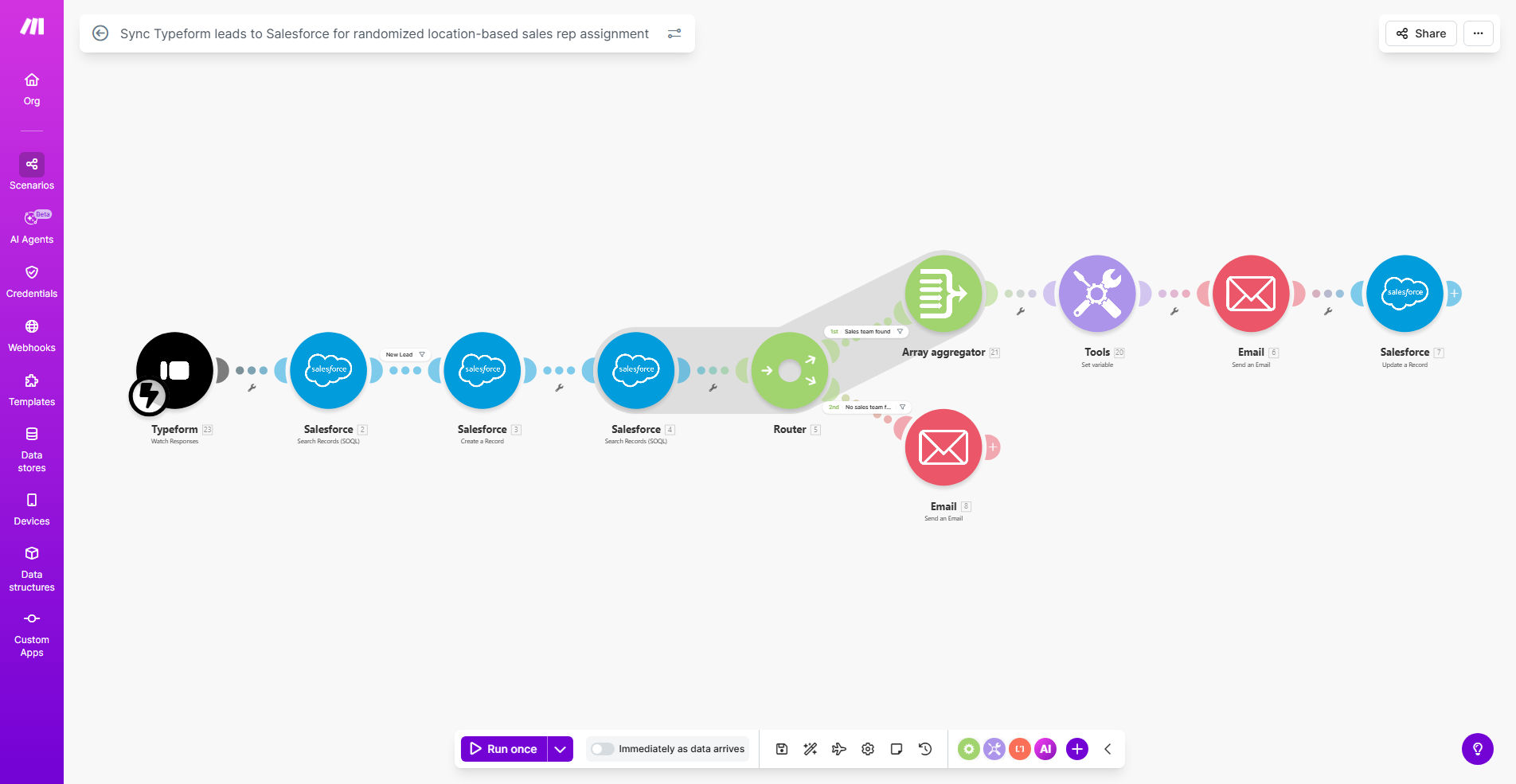
What This Workflow Does
For sales teams using Typeform for lead generation and Salesforce as their CRM, a major bottleneck is the manual process of transferring lead data and deciding who should follow up. This delay can cost conversions, and manual assignment often leads to unfair distribution—some reps get flooded while others are underutilized, especially in regions with multiple team members.
This automation solves both problems instantly. It acts as a smart bridge between your Typeform and Salesforce. Every time a new submission comes in, the workflow automatically creates a corresponding lead or contact record in Salesforce. But it doesn't stop there. It then intelligently assigns that lead to a sales representative based on the lead's geographic location (like state or city), and crucially, randomizes the selection if multiple reps are assigned to that same territory.
The result is a fully automated, fair, and immediate lead routing system. Leads are engaged faster by the most locally relevant rep, workload is balanced automatically, and your sales managers are freed from administrative tasks. This turns your lead capture form into a powerful, self-managing distribution engine.
How It Works
The workflow follows a logical sequence to ensure accuracy and fairness from the moment a lead submits a form to the moment they appear in a rep's Salesforce queue.
Step 1: Capture the New Typeform Submission
The automation is triggered the instant someone submits your Typeform. It immediately captures all the submitted data, such as name, email, company, and most importantly for this workflow, their location information (e.g., City, State, or Country fields).
Step 2: Route Based on Location
The system reads the lead's location data and matches it against a pre-defined list or database of your sales territories. This determines which pool of sales representatives is eligible to receive this lead.
Pro tip: Maintain a simple, up-to-date Google Sheet or Airtable base that maps locations to sales rep emails or Salesforce IDs. The automation references this as the single source of truth for assignment rules.
Step 3: Randomize Assignment Within the Group
If the matched location has more than one assigned sales rep, the workflow uses a randomizer function to pick one rep from that group. This is the core of ensuring equitable distribution and preventing any single rep from being favored or overloaded.
Step 4: Create the Lead in Salesforce
With the target rep identified, the automation creates a new Lead (or Contact) record in your Salesforce org. It maps all the Typeform field data to the corresponding Salesforce fields and, critically, populates the "Owner" field with the selected sales rep's Salesforce user ID. This automatically places the lead in that rep's list and notifications.
Step 5: Optional Notification & Logging
As a final step, the workflow can send a confirmation Slack message to a sales channel, log the action in a spreadsheet for auditing, or even trigger a welcome email to the lead—all ensuring the process is transparent and immediate follow-up is possible.
Who This Is For
This automation is a game-changer for specific business models and team structures:
- Sales Teams with Regional Territories: Companies that have sales reps assigned to specific states, countries, or regions.
- Teams with Multiple Reps per Territory: Organizations where more than one rep covers the same geographic area (e.g., three reps for the West Coast).
- Marketing & Sales Ops Managers: Professionals tired of manually exporting CSV files from Typeform and importing them into Salesforce or assigning leads via spreadsheets.
- Businesses Using Typeform for High-Intent Lead Generation: Such as event registrations, demo requests, quote forms, or consultation bookings where speed-to-lead is critical.
- Companies Prioritizing Fairness and Transparency: Leadership looking to eliminate bias in lead distribution and boost overall team morale and performance.
What You'll Need
To implement this template, you should have the following set up and ready:
- A Typeform account with an active form collecting lead information, including a field for location (e.g., "State", "Country").
- A Salesforce account with administrative access to create connected apps (for API access) and modify lead/contact objects.
- A Make.com account (formerly Integromat) to build and run the automation.
- A Territory Mapping List: A simple spreadsheet or database (like Google Sheets) that defines which sales rep(s) are assigned to each possible location value from your Typeform.
- The Salesforce User IDs (or exact email addresses) of your sales representatives for accurate owner assignment.
Quick Setup Guide
Follow these steps to configure your automated lead distribution system:
- Clone the Template: Click "Get This Workflow" and duplicate the provided Make.com scenario into your own account.
- Connect Typeform: In the first module, authorize Make.com to access your Typeform account and select the specific form you want to use as the trigger.
- Connect Salesforce: Authorize the connection to your Salesforce org. Ensure the connection has permissions to create and update Lead records.
- Map Your Territory Data: Update the part of the scenario that holds your location-to-rep mapping. This is typically a Google Sheets module or an array. Input your list of locations and the corresponding sales rep emails or IDs.
- Configure Field Mapping: In the "Create Lead" Salesforce module, map the Typeform response fields (like `answer_1`, `answer_2`) to the correct Salesforce Lead fields (like `FirstName`, `LastName`, `Company`, `State`).
- Test with a Dummy Submission: Use Typeform's preview mode to submit a test entry. Run the scenario once to ensure it correctly picks a rep based on location and creates the lead in Salesforce.
- Activate & Monitor: Turn the scenario on. New Typeform submissions will now flow automatically. Monitor the scenario history for the first few days to ensure smooth operation.
Key Benefits
Eliminate 100% of manual data entry and assignment work. Your team will never have to copy-paste from Typeform to Salesforce again or argue over who gets the next lead. This reclaims hours per week for higher-value sales activities.
Increase lead response time from hours/days to under 5 minutes. Speed is everything in sales. By automating the entire intake process, your reps can be notified and start engaging with a hot lead while their interest is at its peak, dramatically boosting conversion rates.
Ensure perfectly equitable workload distribution across your sales team. The randomized assignment within locations guarantees fairness. This improves team morale, reduces churn, and allows for more accurate performance comparisons, as no rep is advantaged or disadvantaged by the lead allocation process.
Gain flawless data consistency between systems. Automated mapping eliminates human typos and omissions. Every lead in Salesforce will have complete, accurate data exactly as it was submitted, improving reporting, segmentation, and nurturing campaigns.
Scale your lead generation efforts without adding overhead. Whether you receive 10 leads or 1,000 leads a day, the system operates with the same efficiency. This allows your business to grow its marketing initiatives without proportionally increasing sales operations staff.