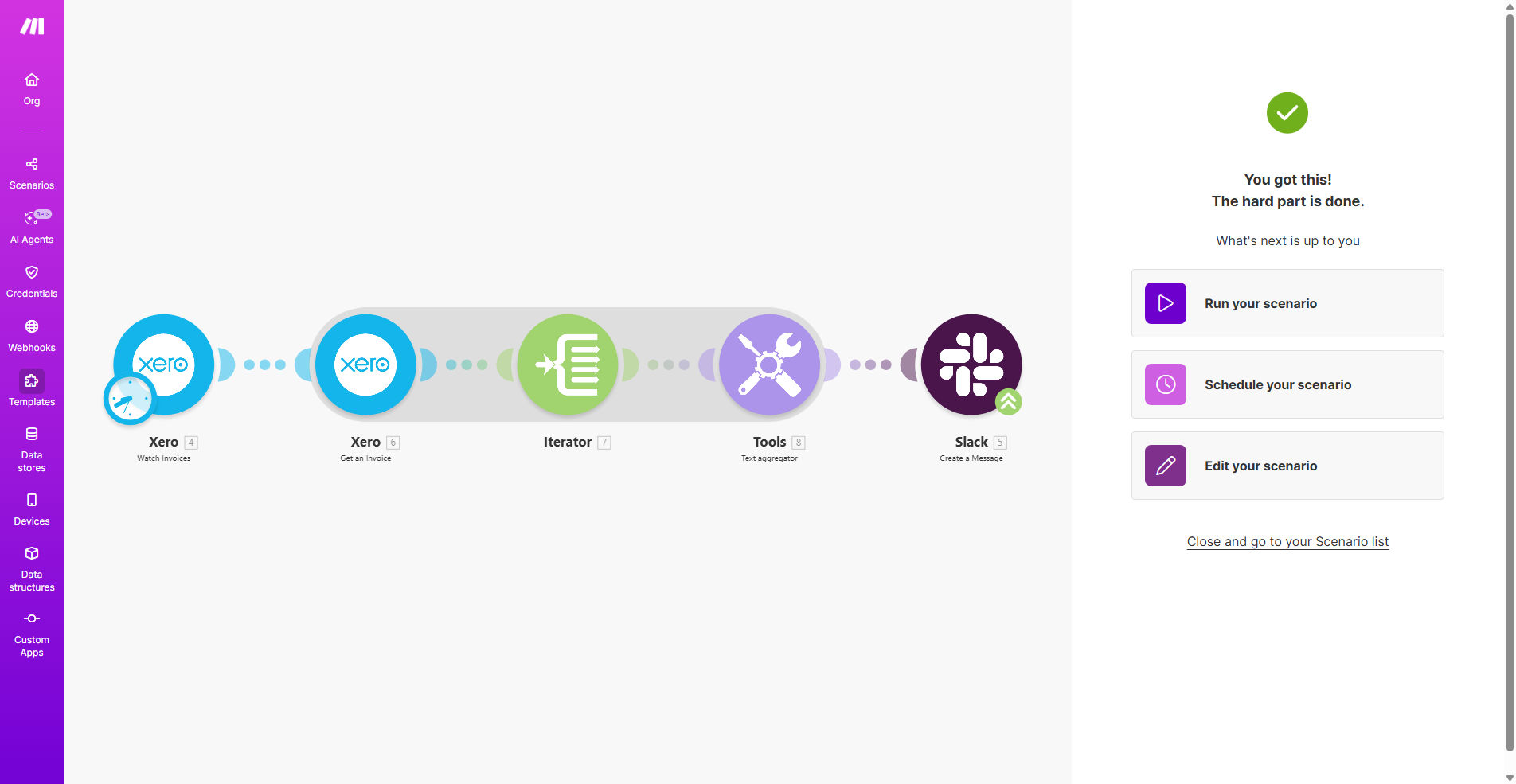
What This Workflow Does
For growing businesses, financial visibility is crucial but often delayed. When an invoice is created in Xero, key team members—like sales reps, account managers, or the finance lead—might not know about it for hours or even days. This delay can slow down follow-up, confuse customer communications, and create blind spots in cash flow management.
This automation solves that by creating an instant bridge between your accounting software and your team's communication hub. Every time a new invoice is saved in Xero, this Make.com workflow triggers and posts a formatted message directly into a designated Slack channel. It eliminates manual checking, reduces email clutter, and ensures everyone who needs to know is informed in real-time.
The result is a more proactive, aligned, and efficient financial operation. Your team can celebrate new sales immediately, support can provide better service knowing an invoice has been sent, and finance has a transparent record of billing activity shared with the wider team.
How It Works
The workflow is a straightforward, reliable automation with just a few key steps.
Step 1: Monitor Xero for New Invoices
The scenario starts with a Make.com webhook or the Xero module watching for new "Invoice Created" events. It acts as a silent sentinel, constantly checking your Xero organization for any new billing activity without requiring any manual login or refresh.
Step 2: Extract Key Invoice Details
Once a new invoice is detected, the workflow pulls essential information from Xero. This typically includes the invoice number, contact name, total amount, date, due date, and a public link to view the invoice directly. This data is structured and prepared for the notification.
Step 3: Format and Send the Slack Message
Make.com then connects to your Slack workspace and posts a message to your chosen channel. The message is formatted to be clear and actionable at a glance, often using Slack's block kit for better readability. It turns raw accounting data into a concise team update.
Pro tip: Create a dedicated #new-invoices channel in Slack for these alerts. This keeps the notifications organized, allows for easy searching, and lets team members mute or join the channel based on their role.
Who This Is For
This template is incredibly valuable for any business that uses Xero for invoicing and Slack for internal communication. It's particularly beneficial for:
- Service-Based Businesses & Agencies: Where project managers and account leads need to know immediately when a client has been billed for work completed.
- Sales Teams: To get real-time confirmation when a deal moves from "closed-won" to "invoiced," helping with commission tracking and customer handoff.
- Small Finance Teams: Where a single person manages the books but needs to keep founders or department heads in the loop without sending manual emails.
- Remote & Hybrid Teams: Where centralizing financial updates in a communication tool like Slack is essential for maintaining alignment across different locations.
What You'll Need
To set up this automation, you'll need just a few prerequisites:
- A Make.com account (free tier is sufficient to start).
- An active Xero organization with invoices being created.
- Admin or owner access to a Slack workspace to create an app and connection.
- The permission to create a dedicated Slack channel (e.g., #finance or #invoices) for the notifications.
Quick Setup Guide
You can have this workflow live in under 15 minutes by following these steps:
- Clone the Template: Click the "Get This Workflow" button above to open the template in your Make.com account and create a copy.
- Connect Xero: In the first module, authorize Make.com to access your Xero account. Select the correct Xero organization you want to monitor.
- Connect Slack: In the Slack module, authorize Make.com to post to your workspace. You'll need to create a Slack app (a simple process guided by Make).
- Choose Your Channel: Specify the exact Slack channel name (like #invoices) where you want the notifications to appear.
- Customize the Message (Optional): Adjust the text and format of the Slack message. You can add emojis, change wording, or include extra fields from Xero.
- Turn it On: Activate the scenario. Create a test invoice in Xero to trigger the workflow and verify the Slack message appears correctly.
Key Benefits
Eliminate Manual Checks and Save ~5 Hours Per Month: No more needing your team to log into Xero multiple times a day to check for new invoices. The information comes to them, freeing up significant time for higher-value tasks.
Improve Cash Flow Visibility Across the Company: When sales, delivery, and leadership all see invoices as they're issued, it creates a culture of financial awareness and shared responsibility for the company's revenue health.
Speed Up Customer Follow-Up by 80%: Account managers can see the moment an invoice is sent and proactively reach out to the client for confirmation or answer questions, dramatically improving the payment cycle time.
Reduce Communication Silos and Errors: Having a single, automated source of truth in Slack prevents miscommunication, forgotten emails, or team members working with outdated information about what has been billed.
Create a Searchable Audit Trail: All invoice notifications are stored in your Slack history, creating an easily searchable log of when every invoice was created, which is invaluable for resolving customer queries or internal reviews.