Make.com Jotform Intercom Form Automation Lead Management

Create Intercom Users from New Jotform Submissions

Automatically sync form responses to Intercom user profiles with this ready-to-use Make.com workflow

Get This Workflow → Make.com · Jotform · Free Template
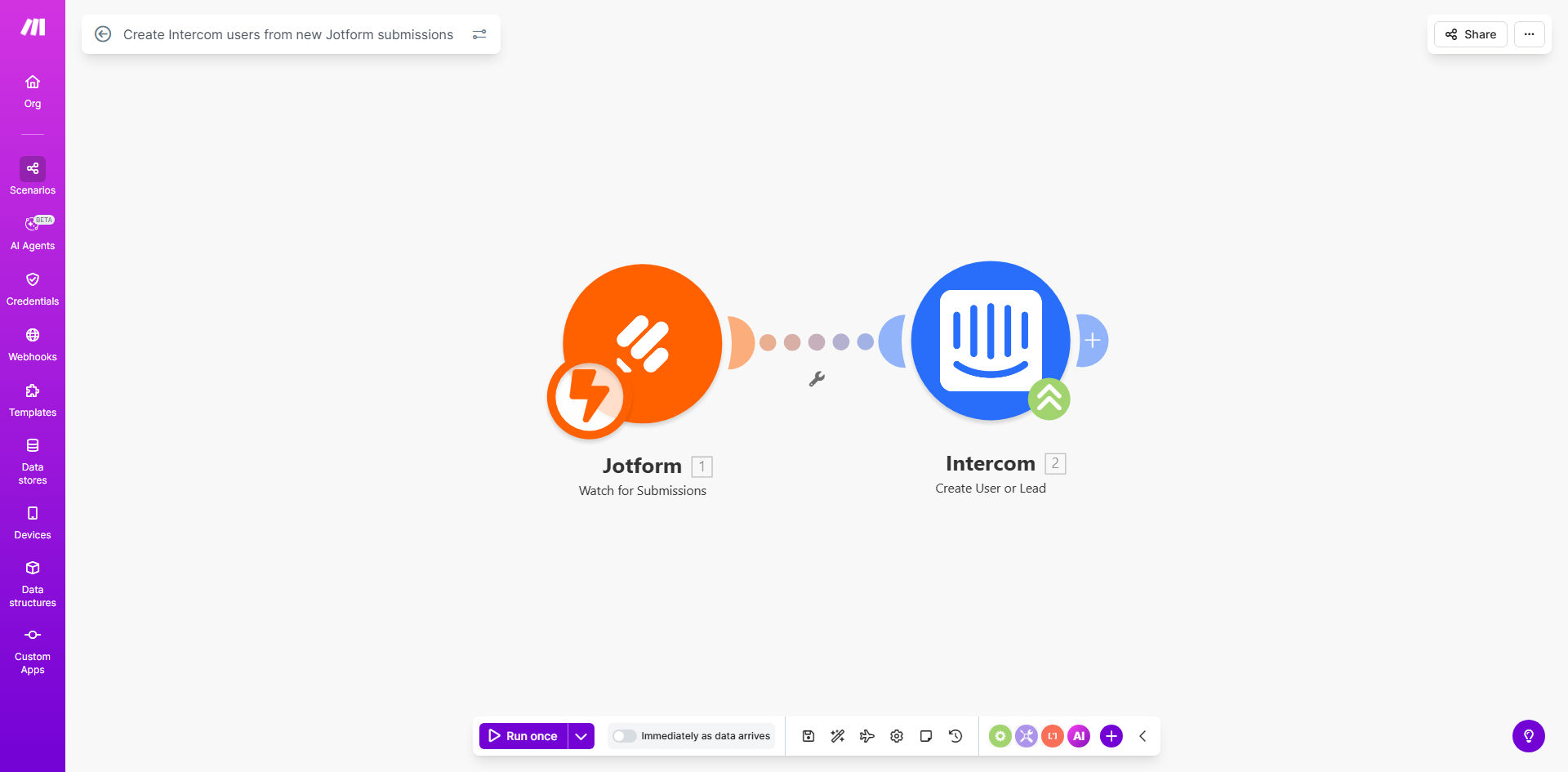
Make.com workflow diagram showing Jotform to Intercom integration

What This Workflow Does

This automation solves a common problem for businesses using Jotform for lead capture and Intercom for customer communication. Manually transferring form submissions to Intercom is time-consuming and prone to errors. This workflow eliminates that manual process by automatically creating Intercom user profiles whenever someone submits your Jotform.

The integration ensures your sales and support teams have immediate access to new leads in Intercom, where they can track conversations, send targeted messages, and monitor engagement - all without any manual data entry. This is particularly valuable for businesses with high-volume forms like contact requests, demo signups, or support inquiries.

How It Works

1. New Jotform Submission Trigger

The workflow starts whenever someone submits your Jotform. Make.com monitors your form for new responses in real-time.

2. Data Extraction

The system extracts all submitted form fields including name, email, and any custom questions you've included in your Jotform.

3. Intercom User Creation

Make.com then creates a new user profile in Intercom using the submitted information. You can customize which fields map to which Intercom attributes during setup.

4. Optional Data Enrichment

The workflow can optionally add tags, custom attributes, or notes to the Intercom user based on their form responses for better segmentation.

Pro tip: Add a hidden field in your Jotform to track the submission source (e.g. "Website Contact Form") that will automatically tag users in Intercom.

Who This Is For

This automation is ideal for:

  • SaaS companies using Intercom for customer communication
  • Marketing teams collecting leads via Jotform
  • Support teams handling customer inquiries
  • Businesses with high-volume forms that need automated processing
  • Companies wanting to eliminate manual data entry between systems

What You'll Need

  1. An active Jotform account with at least one form
  2. An Intercom account with admin access
  3. A Make.com account (free plan available)
  4. API keys for both Jotform and Intercom

Quick Setup Guide

  1. Click "Get This Workflow" to copy the template to your Make.com account
  2. Connect your Jotform account in the first module
  3. Connect your Intercom account in the second module
  4. Map your Jotform fields to the corresponding Intercom user attributes
  5. Test with a form submission and verify the user appears in Intercom
  6. Turn on the scenario to go live

Key Benefits

Eliminate manual data entry - Save 5-10 minutes per form submission that would otherwise be spent copying information between systems.

Faster response times - Your team can engage with leads immediately since their information appears in Intercom within seconds of form submission.

Reduce human error - Automated data transfer ensures 100% accuracy compared to manual copying which often introduces mistakes.

Better customer insights - All form responses are captured in Intercom where they can inform segmentation, messaging, and support strategies.

Scalable lead processing - Handle hundreds or thousands of form submissions without additional staffing requirements.

Frequently Asked Questions

Common questions about Jotform and Intercom integration

Connecting Jotform with Intercom ensures new leads from your forms are immediately available in your customer communication platform. This eliminates manual data entry and allows your sales/support teams to engage with prospects faster.

For example, when a potential customer fills out your "Request a Demo" form, they'll instantly appear in Intercom where your team can start a conversation while the lead is hottest.

The workflow transfers all form submission data including name, email, and custom fields. You can map any Jotform field to corresponding Intercom user attributes during setup.

Common mappings include: form name → Intercom tag, phone number → Intercom custom attribute, and submission notes → Intercom user notes. The flexibility allows you to tailor the integration to your specific form and business needs.

The workflow triggers instantly when a form is submitted, creating the Intercom user typically within 10-30 seconds depending on API response times.

In practical terms, this means by the time your sales rep opens Intercom after receiving a form submission notification, the user profile is already there with all their information populated.

Yes, you can configure the workflow to add tags or custom attributes in Intercom based on form responses, enabling targeted messaging and segmentation.

For instance, if your Jotform has a "Product Interest" dropdown, you could tag users accordingly in Intercom. This allows for automated follow-up sequences tailored to each product line.

  • Tag users by their selected interest
  • Create custom attributes for survey responses
  • Trigger different Intercom messages based on form answers

The workflow can be configured to either update existing user records or skip duplicates, depending on your preference during setup.

Most businesses choose to update records so customer information stays current. For example, if an existing customer submits a support form, their Intercom profile would refresh with the new contact details they provided.

Make.com's platform offers enterprise-grade reliability with automatic retries for failed API calls and detailed error logging for troubleshooting.

In the rare event of an API outage, the system will queue submissions and process them once connectivity is restored. You'll receive notifications about any issues requiring attention.

Yes, GrowwStacks specializes in building tailored form processing automations that connect Jotform (or other form tools) with Intercom, CRM systems, and marketing platforms.

Our team can create custom workflows that match your exact business processes, including conditional logic, multi-step approvals, and integration with additional systems beyond Intercom.

  • Custom field mapping for complex forms
  • Multi-system integrations (CRM + Intercom + internal tools)
  • Conditional logic based on form responses

Need a Custom Form Processing Automation?

This free template is a starting point. Our team builds fully tailored automation systems for your specific business needs.