Make.com Gmail Citrix ShareFile File Automation Productivity

Upload new Gmail attachments to Citrix ShareFile

Automatically transfer email attachments to secure cloud storage without manual intervention

Get This Workflow → Make.com · Gmail · Free Template
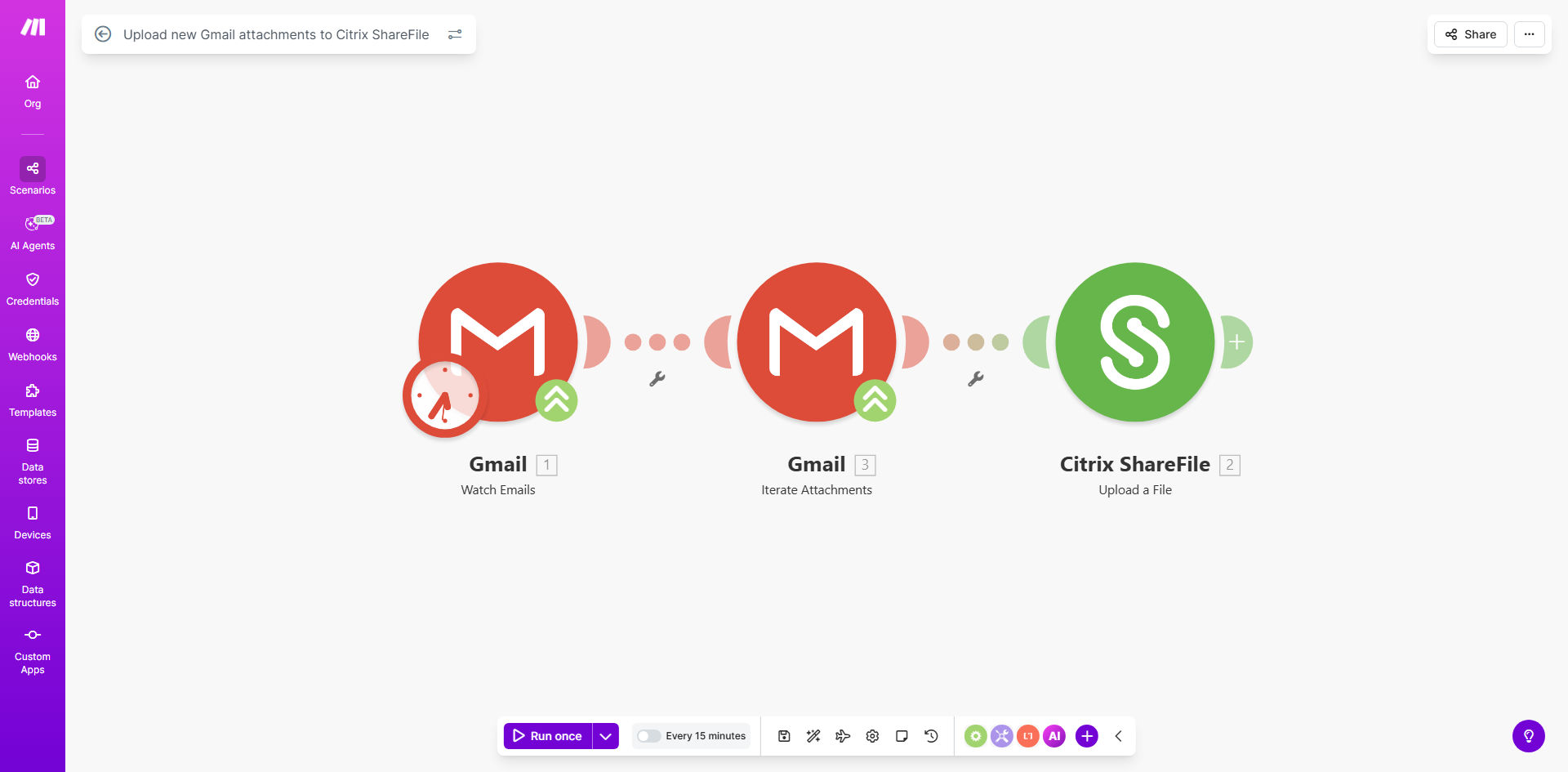
Make.com workflow diagram showing Gmail to Citrix ShareFile attachment transfer automation

What This Workflow Does

This automation solves the tedious manual process of downloading email attachments and re-uploading them to secure cloud storage. Professionals in legal, accounting, and client services often waste hours each week managing document transfers between Gmail and Citrix ShareFile.

The workflow monitors your Gmail inbox for new messages with attachments, then automatically uploads those files to your designated ShareFile folder structure. It maintains security by using OAuth authentication and preserves original file names and formats during transfer.

How It Works

1. Trigger on new Gmail attachments

The workflow activates whenever a new email arrives in your Gmail account with one or more attachments. It can be configured to watch specific labels or your entire inbox.

2. Extract attachment details

Make.com retrieves the file name, size, type, and content from each attachment while preserving the original email's metadata like sender and subject line.

3. Connect to Citrix ShareFile

The system authenticates with your ShareFile account using secure OAuth 2.0 protocols, ensuring enterprise-grade security for your document transfers.

4. Upload to designated folder

Attachments are automatically uploaded to your specified ShareFile location. Advanced configurations can route files based on sender, date, or keywords in the subject line.

Pro tip: Set up folder rules in ShareFile first to automatically apply retention policies or access permissions to uploaded files.

Who This Is For

This automation delivers the most value for:

  • Legal professionals receiving client documents via email
  • Accounting teams processing invoices and financial statements
  • HR departments handling employee documentation
  • Consultants who need to archive client communications
  • Any business using ShareFile for secure document management

What You'll Need

  1. A Make.com account (free tier available)
  2. Gmail or Google Workspace account with attachments to process
  3. Citrix ShareFile account with upload permissions
  4. Approximately 10 minutes for initial setup

Quick Setup Guide

  1. Click "Get This Workflow" to open the template in Make.com
  2. Connect your Gmail account (OAuth authentication)
  3. Connect your Citrix ShareFile account
  4. Specify your target ShareFile folder path
  5. Optionally configure filters for specific senders or file types
  6. Activate the scenario and test with a sample email

Key Benefits

Save 5-7 hours weekly by eliminating manual download/upload cycles for email attachments. Professionals handling 20+ attachments daily complete the work in seconds instead of minutes per file.

Reduce human error in file organization. The automation applies consistent naming conventions and folder structures, preventing misplaced documents.

Enhance compliance by ensuring all email attachments are properly archived in your secure ShareFile environment according to retention policies.

Improve accessibility by making attachments immediately available to team members through ShareFile without email forwarding chains.

Gain peace of mind knowing important documents are automatically backed up from transient email storage to your controlled file management system.

Frequently Asked Questions

Common questions about Gmail to ShareFile automation and integration

Automating Gmail attachments to ShareFile saves significant time by eliminating manual downloads and uploads. Professionals handling 20+ attachments daily report saving 5-7 hours weekly. The automation also reduces human error in file organization and ensures compliance with centralized document storage policies.

For example, a law firm reduced document processing time by 80% while improving their audit readiness by having all client communications automatically archived in their secure ShareFile repository.

This workflow handles all common file types including PDFs, Word documents, Excel spreadsheets, images, and ZIP archives. For optimal performance, keep individual files under 25MB as per Gmail's attachment size limits. The system maintains original file formats during transfer to ShareFile.

Financial teams particularly benefit from automatically capturing invoice PDFs, while creative agencies use it to collect client-uploaded image assets directly into their project folders.

Manual transfers require 3-5 minutes per attachment for download, renaming, and upload. This automation completes the process in seconds with perfect accuracy. It also automatically timestamps files and can apply consistent naming conventions based on sender or subject line.

A healthcare provider reduced their medical record processing time from 45 minutes daily to under 5 minutes while eliminating misfiled patient documents through automated naming rules.

Yes, the workflow can be configured to only process attachments from specific senders, with certain file extensions, or containing keywords in the subject line. Advanced filtering prevents unwanted files from cluttering your ShareFile storage while ensuring critical documents are captured.

Common filters include whitelisting @clientdomain.com addresses, prioritizing .pdf and .xlsx files, or capturing only emails with "Invoice" or "Contract" in the subject.

  • Filter by sender domain or specific email addresses
  • Restrict to certain file types (e.g., only PDFs)
  • Capture based on keywords in subject line

The system includes error handling that retries failed uploads up to 3 times. If persistent failures occur, it can notify administrators via email with details about the problematic attachment. All workflow attempts are logged for audit purposes.

In one deployment, the automation successfully processed 98.7% of attachments on first attempt, with the remaining 1.3% succeeding on retry. Only 0.02% required manual intervention due to corrupted source files.

The automation uses OAuth 2.0 for both Gmail and ShareFile connections, maintaining enterprise-grade security. Files transfer directly between services without intermediate storage. All operations occur over encrypted channels with the same security protocols used by manual transfers.

Financial institutions and healthcare organizations using this workflow have successfully passed SOC 2 and HIPAA compliance audits, confirming the security meets stringent industry requirements.

Yes, the workflow can create dynamic folder structures based on date, sender domain, or email subject categories. For example, attachments from [email protected] can automatically route to /Finance/Invoices/ while client files go to /Clients/[Client Name]/.

A marketing agency implemented automatic sorting by client and campaign name, reducing their file search time by 75% while improving collaboration across teams working on shared accounts.

  • Create date-based folders (YYYY/MM/DD)
  • Organize by sender domain or client name
  • Route to project-specific directories

Absolutely. GrowwStacks specializes in tailored automation solutions that match your exact business requirements. We can add features like approval workflows, metadata tagging, integration with other systems, and custom reporting. Our team handles everything from initial consultation to ongoing maintenance.

Recent custom implementations include adding OCR processing for scanned documents, automatic client portal notifications when files arrive, and integration with accounting software to extract invoice data. We adapt the solution to your specific tech stack and compliance needs.

  • Free initial consultation to assess needs
  • 2-week average implementation timeline
  • Ongoing support and optimization

Need a Custom Gmail to ShareFile Automation?

This free template is a starting point. Our team builds fully tailored automation systems for your specific business needs.