Make.com Ecommerce Order Tracking Google Sheets ShipStation

Save new ShipStation orders to a Google Sheets spreadsheet

Automatically sync order data without manual copying or CSV exports

Get This Workflow Make.com · ShipStation · Free Template
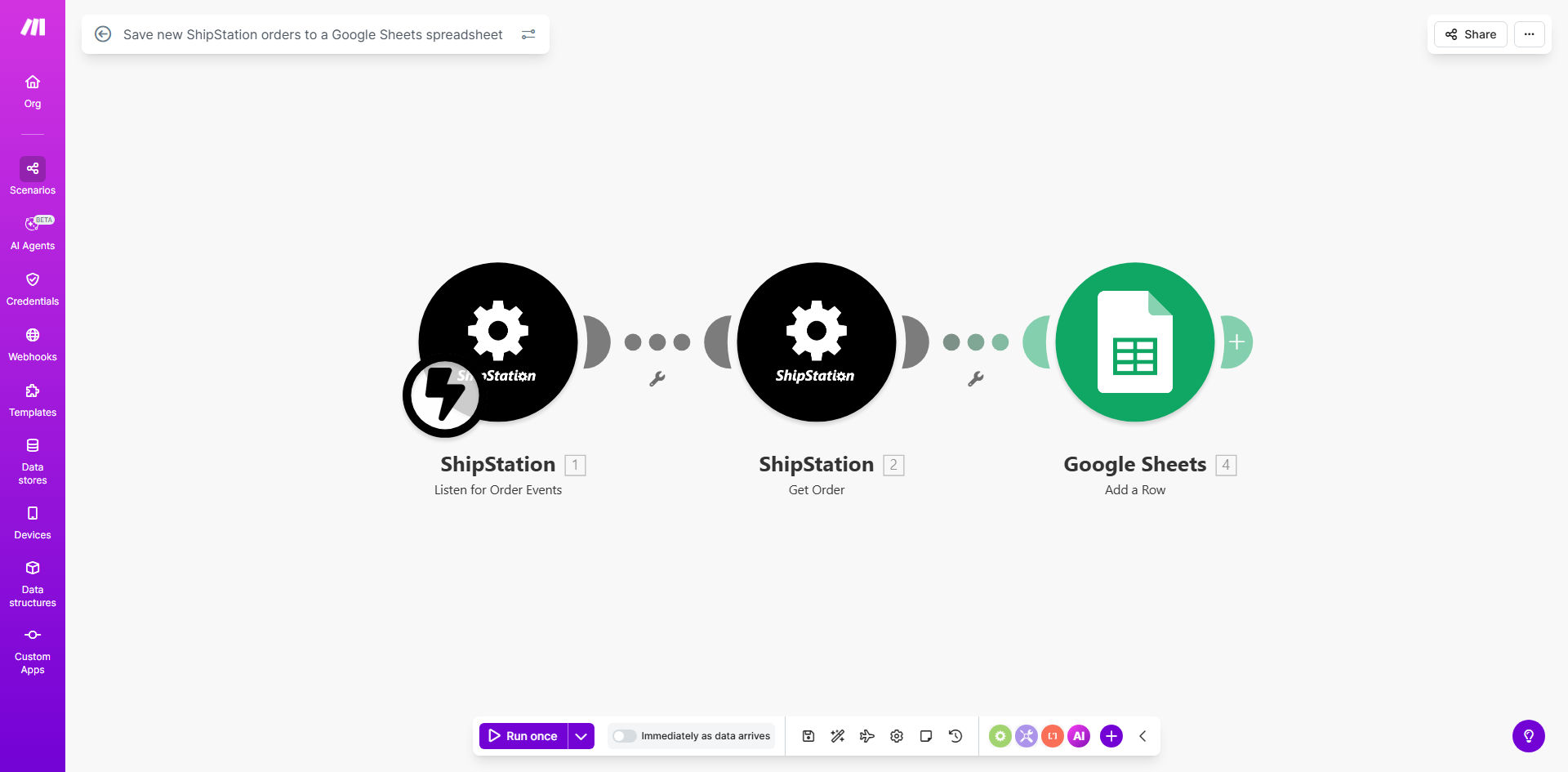
ShipStation orders being automatically added to Google Sheets spreadsheet

What This Workflow Does

This automation eliminates the tedious manual process of copying order data from ShipStation to spreadsheets. Ecommerce businesses often waste hours each week exporting CSV files and copy-pasting order details into Google Sheets for reporting, customer service, or inventory tracking.

The workflow automatically detects new orders in ShipStation and instantly adds them to your specified Google Sheet with all relevant details including customer information, products ordered, shipping method, and order totals. It runs continuously in the background, ensuring your spreadsheet always reflects the latest order data without any human intervention.

How It Works

1. New order detection

The workflow monitors ShipStation's API for newly created orders. Whenever a customer places an order through your connected sales channels, ShipStation creates a new order record which triggers this automation.

2. Data extraction

Make.com retrieves all available order details from ShipStation including order ID, customer name and email, shipping address, line items with SKUs and quantities, order total, and tracking information once available.

3. Google Sheets update

The workflow adds a new row to your designated Google Sheet with all the extracted order data. You can customize which fields get included and how they're formatted in the spreadsheet.

Pro tip: Add a timestamp column to track when each order was added to your sheet. This helps with auditing and troubleshooting.

Who This Is For

This automation is ideal for ecommerce businesses using ShipStation for order fulfillment that need to:

  • Maintain a centralized order log outside of ShipStation
  • Share order data with team members who don't have ShipStation access
  • Create custom reports combining order data with other business metrics
  • Track fulfillment KPIs over time
  • Preserve historical order records beyond ShipStation's data retention period

What You'll Need

  1. A ShipStation account with API access enabled
  2. A Google Sheets spreadsheet where orders should be saved
  3. A Make.com account (free tier works for basic usage)
  4. Approximately 15 minutes for initial setup

Quick Setup Guide

  1. Click "Get This Workflow" to copy the template to your Make.com account
  2. Connect your ShipStation account using API credentials
  3. Connect your Google account and select the destination spreadsheet
  4. Map the ShipStation order fields to your Google Sheets columns
  5. Test with a recent order to verify the data transfers correctly
  6. Turn on the workflow to begin automatic syncing

Key Benefits

Eliminate 5-10 hours per week of manual data entry typically spent exporting and reformatting ShipStation order reports.

100% data accuracy by removing human errors that occur during manual copying between systems.

Real-time visibility into new orders across your team without requiring ShipStation logins.

Custom reporting foundation - your Google Sheet becomes a living database for creating pivot tables, charts, and combining with other data sources.

Historical preservation of order records beyond ShipStation's built-in data retention limits.

Frequently Asked Questions

Common questions about ShipStation automation and integration

Automating ShipStation order tracking eliminates manual data entry errors and saves 5-10 hours per week for ecommerce teams. It ensures your Google Sheets always has the latest order data for reporting, customer service, and inventory management without any human intervention.

For example, a clothing retailer processing 200 orders daily was spending 2 hours each morning exporting and formatting ShipStation data. After automation, their team could focus on higher-value tasks while maintaining perfect order records.

This workflow can sync all ShipStation order fields including order ID, customer details, shipping info, product items, order totals, and tracking numbers. You can customize which fields get transferred based on your reporting needs.

Most businesses start with core fields like order date, customer name, items purchased, and order status. As needs evolve, you can easily add more fields like shipping carrier, promotional codes used, or custom ShipStation tags.

The workflow runs in real-time whenever a new order is created in ShipStation. There's no polling delay - as soon as ShipStation receives an order, Make.com instantly captures it and adds to your spreadsheet.

This immediate sync is particularly valuable for businesses with time-sensitive fulfillment processes or those needing to trigger downstream automations based on new orders.

Yes, you can add conditional logic to only sync orders meeting specific criteria like order value, shipping method, or customer tags. This prevents your sheet from getting cluttered with irrelevant orders.

A common use case is creating separate sheets for different order types - for example, wholesale vs retail orders, or domestic vs international shipments. The automation can route orders to different tabs based on your business rules.

The workflow can be modified to backfill existing ShipStation orders into your spreadsheet. We recommend running this as a separate one-time operation before enabling the real-time sync for new orders.

For large order histories, the backfill can be processed in batches to avoid overwhelming your systems. The historical data import typically includes the same fields as the real-time sync for consistency.

Make.com uses OAuth 2.0 authentication for both ShipStation and Google Sheets connections. All data is encrypted in transit, and you maintain control over which specific data fields get shared between systems.

The integration follows the principle of least privilege - your Google account only gets access to the specific spreadsheet you designate, and your ShipStation connection only has permission to read order data (not modify anything).

Absolutely. GrowwStacks specializes in custom ShipStation integrations tailored to your specific workflows. Our team can build advanced automations combining order processing, inventory updates, and customer notifications based on your unique business requirements.

We've created solutions for clients needing complex rules like splitting orders across multiple warehouses, triggering custom packaging workflows, or integrating ShipStation data with their proprietary ERP systems.

  • Free consultation to understand your needs
  • 2-week average implementation time
  • Ongoing support and optimization

Need a Custom ShipStation Automation?

This free template is a starting point. Our team builds fully tailored automation systems for your specific business needs.