Make.com Ecommerce Order Notifications ShipStation Slack

Send Slack messages for new ShipStation orders

Get instant team notifications whenever new orders arrive in your ShipStation account

Get This Workflow Make.com · ShipStation · Free Template
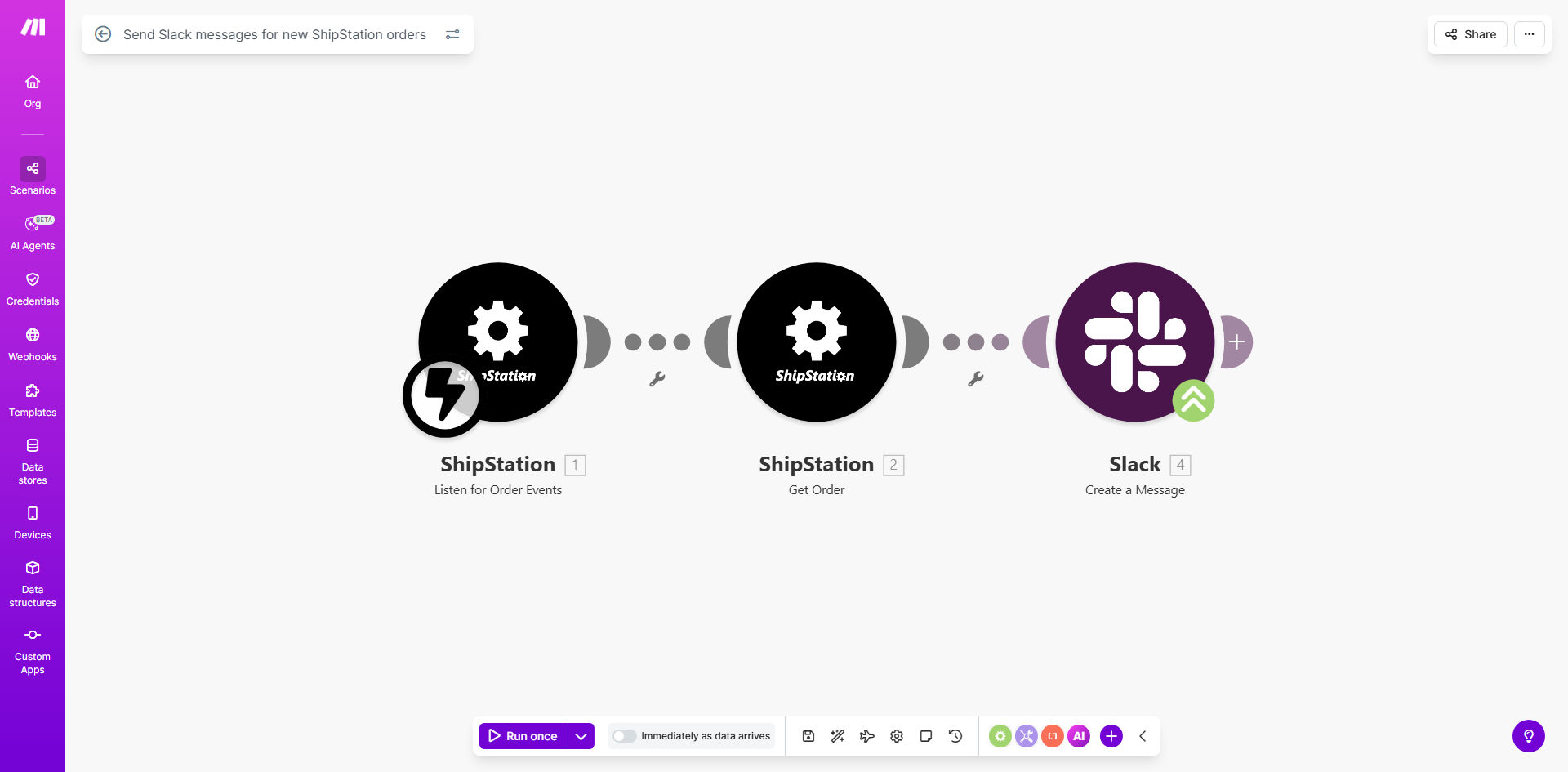
ShipStation to Slack automation workflow diagram

What This Workflow Does

This automation solves a critical communication gap for ecommerce businesses by instantly alerting your team whenever new orders arrive in ShipStation. Instead of requiring staff to constantly check ShipStation or wait for email notifications, this workflow pushes real-time updates directly to your Slack channels.

The integration ensures your fulfillment team, customer service reps, and management are immediately aware of new orders without manual monitoring. You can customize the Slack messages to include all relevant order details like customer information, items purchased, shipping method, and any special instructions.

How It Works

1. ShipStation detects new order

The workflow continuously monitors your ShipStation account for new orders through Make.com's polling mechanism. Each new order triggers the automation sequence.

2. Order data is processed

Make.com extracts all relevant order details from ShipStation including customer information, shipping address, line items, and order value. This data is formatted for Slack notification.

3. Custom Slack message is sent

The workflow posts a formatted message to your specified Slack channel with all key order details. You can customize the message template to include exactly what your team needs to see.

Pro tip: Add emoji reactions or @mentions in your Slack notifications to draw attention to high-priority orders or specific team members who need to take action.

Who This Is For

This automation is ideal for ecommerce businesses of all sizes that use ShipStation for order fulfillment and Slack for team communication. It's particularly valuable for:

  • Dropshipping businesses needing to forward orders quickly
  • Teams with multiple people involved in order processing
  • Companies wanting to reduce order processing time
  • Businesses that need to notify specific departments about new orders

What You'll Need

  1. A ShipStation account with API access enabled
  2. A Slack workspace where you have permission to create webhooks
  3. A Make.com account (free plan available)
  4. Basic understanding of how to connect apps in Make.com

Quick Setup Guide

  1. Copy this template to your Make.com account
  2. Connect your ShipStation account using API credentials
  3. Set up a Slack incoming webhook for your desired channel
  4. Customize the message template with the order details you want to include
  5. Activate the scenario and test with a new ShipStation order

Key Benefits

Reduce order processing time by 50-70% by eliminating delays between order receipt and team awareness. Immediate notifications mean faster fulfillment.

Eliminate manual order checking that consumes valuable staff time. Your team can focus on processing rather than monitoring.

Improve customer satisfaction with faster order processing and fewer missed orders. Customers get shipping notifications sooner.

Customizable notifications allow different departments to see exactly what they need - fulfillment sees shipping details while accounting sees order value.

Scalable solution that works whether you process 10 orders or 10,000 orders per month without additional staffing.

Frequently Asked Questions

Common questions about ShipStation-Slack automation and integration

Connecting ShipStation to Slack provides real-time order notifications to your entire team without requiring everyone to check ShipStation. This improves response times for fulfillment teams and keeps customer service informed about new orders immediately.

For example, a clothing retailer reduced their order-to-ship time from 24 hours to under 6 hours by implementing these instant notifications, as their warehouse team no longer had to wait for batch email reports.

You can customize notifications to include order details like customer name, shipping address, items purchased, order value, and any special instructions. The Make.com template lets you format messages exactly how your team needs them.

Most businesses include product thumbnails, shipping method, and order priority flags. Advanced setups can even pull in customer lifetime value or predicted shipping costs.

Notifications typically appear in Slack within 30-60 seconds of order creation in ShipStation. The automation runs continuously, ensuring no delays in order processing workflows.

This near-instant notification is significantly faster than email alerts which might take 15-30 minutes, giving your team valuable extra time to prepare for order fulfillment.

Yes, you can configure the workflow to send alerts to different channels based on order criteria. For example, high-value orders could go to a VIP channel while standard orders go to general fulfillment.

One client routes wholesale orders to their B2B team channel while DTC orders go to ecommerce fulfillment, with different message formats for each channel.

Absolutely. The integration works with all ShipStation orders regardless of origin or destination. You can even customize messages to highlight international orders for special handling.

Many businesses add country flags or customs documentation requirements to these notifications to prevent shipping delays.

The Make.com workflow can be easily paused during maintenance periods or holidays without affecting your ShipStation operations. Just toggle the automation off when needed.

Some businesses schedule regular pauses overnight or on weekends when their team isn't processing orders, then automatically resume notifications during business hours.

Our team specializes in building tailored ecommerce automations. We can create custom workflows that match your exact order processing requirements, including advanced filtering, multi-channel routing, and integration with other business systems.

Custom solutions might include:

  • Priority tagging based on order value or customer tier
  • Automatic assignment to specific fulfillment staff
  • Integration with inventory management systems

Need a Custom Order Notification Automation?

This free template is a starting point. Our team builds fully tailored automation systems for your specific business needs.