Make.com QuickBooks ShipStation Ecommerce Accounting

Automate QuickBooks Sales Receipts from ShipStation Orders

Eliminate manual data entry and ensure accurate financial records by automatically creating QuickBooks sales receipts for every new ShipStation order.

Get This Workflow → Make.com · QuickBooks · Free Template
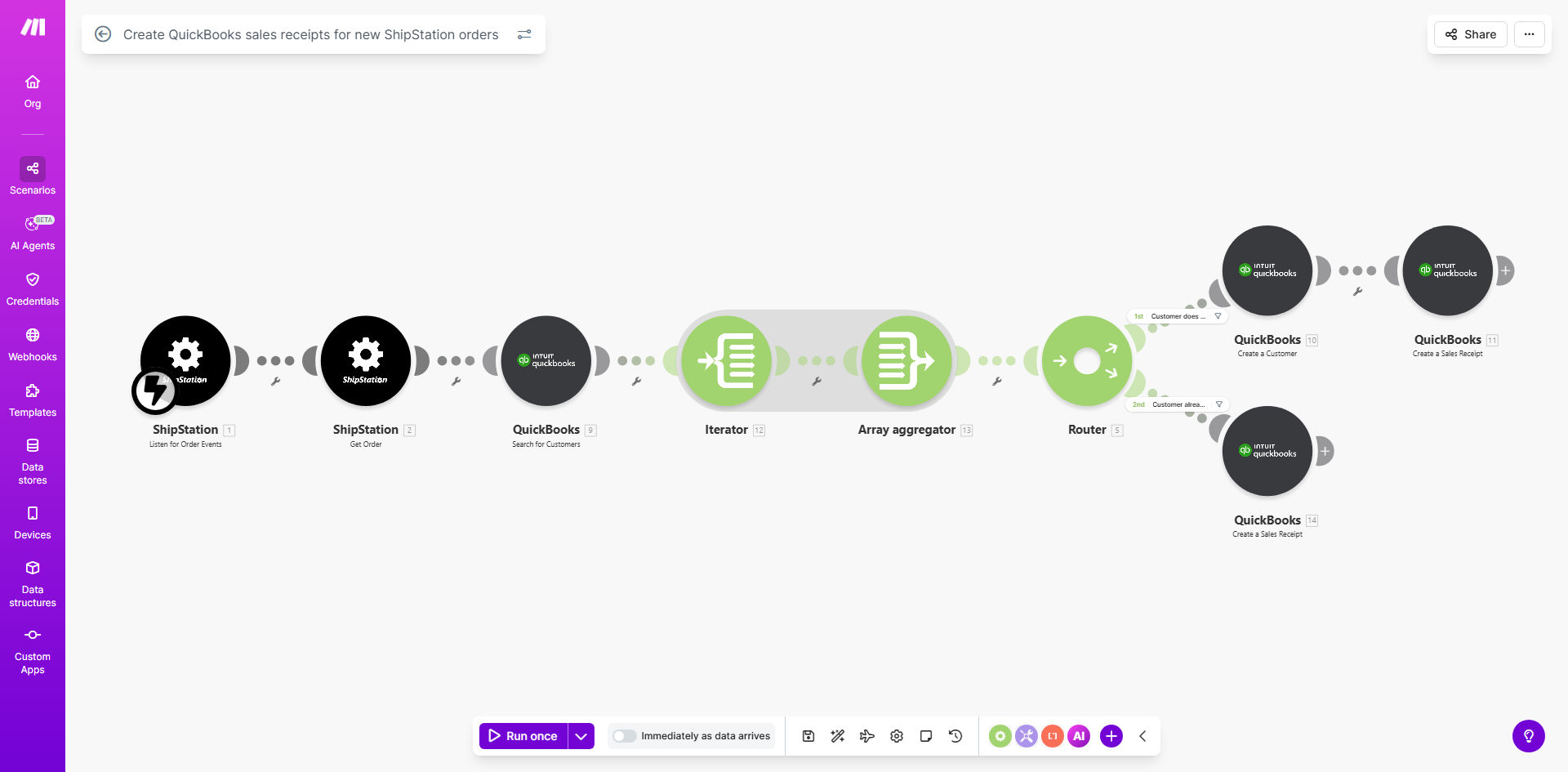
Make.com workflow diagram showing ShipStation to QuickBooks sales receipt automation

What This Workflow Does

This automation solves a critical pain point for ecommerce businesses using ShipStation for order fulfillment and QuickBooks for accounting. Every time an order is shipped, you need to create a corresponding sales receipt in QuickBooks to record the revenue and track customer payments. Doing this manually is time-consuming and prone to errors.

The workflow automatically detects new orders in ShipStation and creates perfectly formatted sales receipts in QuickBooks with all relevant details: customer information, items purchased, quantities, prices, taxes, shipping costs, and payment methods. It handles the entire process in seconds, eliminating hours of manual data entry each week.

How It Works

1. New order detection

The workflow constantly monitors your ShipStation account for new orders using Make.com's instant trigger. As soon as an order is created and ready for fulfillment, the automation begins processing it.

2. Data extraction

Key order details are extracted from ShipStation including customer name, email, shipping address, items ordered, quantities, prices, discounts, taxes, and shipping method. The system intelligently maps all this data to QuickBooks' required fields.

3. QuickBooks receipt creation

Using QuickBooks' API, the workflow creates a complete sales receipt with all line items, totals, and payment information. It matches exactly what you would create manually, but with perfect accuracy every time.

4. Error handling

If any issues occur (like missing customer info in QuickBooks), the workflow can send alerts to your team or retry the process after gathering missing data.

Who This Is For

This automation is ideal for:

  • Ecommerce stores processing 50+ orders per month
  • Businesses using ShipStation for order fulfillment
  • QuickBooks Online users who manually create sales receipts
  • Teams spending 5+ hours weekly on order-to-accounting tasks
  • Businesses needing real-time revenue visibility

What You'll Need

  1. An active Make.com account (formerly Integromat)
  2. ShipStation account with API access enabled
  3. QuickBooks Online subscription
  4. Admin access to both systems for connection setup

Quick Setup Guide

  1. Install the template from Make.com's template library
  2. Connect your ShipStation account in Make.com
  3. Connect your QuickBooks Online account
  4. Map any custom fields if needed (usually not required)
  5. Test with a recent ShipStation order to verify receipt creation
  6. Activate the scenario to begin automatic processing

Pro tip: Before going live, run the automation in test mode for a day to verify all data transfers correctly. Check that tax calculations, shipping costs, and discounts match between systems.

Key Benefits

Save 5-10 hours per week by eliminating manual data entry between ShipStation and QuickBooks. What used to be a daily chore now happens automatically.

100% accuracy in your books with no more typos, missed orders, or incorrect amounts. The automation transfers data exactly as recorded in ShipStation.

Real-time financial visibility with sales receipts created immediately when orders ship, rather than waiting for monthly reconciliations.

Scalable order processing that handles 10 or 10,000 orders with equal reliability, perfect for seasonal spikes or business growth.

Audit-ready records with complete documentation of every automated transaction, making tax time and financial reviews simpler.

Frequently Asked Questions

Common questions about ShipStation and QuickBooks automation

Automating sales receipts saves 5-10 hours per week by eliminating manual data entry between systems. It ensures 100% accuracy in your financial records and provides real-time visibility into your ecommerce revenue without waiting for monthly reconciliations.

Manual entry often leads to errors in amounts or missed orders, which create accounting discrepancies. Automation guarantees every shipped order is properly recorded in QuickBooks exactly as it left your warehouse.

The workflow transfers customer details, order numbers, item descriptions, quantities, prices, taxes, shipping costs, and payment methods. It creates complete sales receipts matching what you'd manually enter, including all line items and totals.

For businesses with complex products, the system can also transfer SKUs, variants, and custom attributes. The template includes mapping for standard fields but can be extended for specialized needs.

Receipts are created instantly when ShipStation registers a new order, typically within 1-2 minutes. This gives you real-time financial data rather than waiting for batch processing at month-end.

The speed depends on your Make.com plan - free accounts may have slight delays during peak times, while paid plans guarantee immediate processing. Even with delays, all receipts are created the same day.

Yes, you can add filters to only process orders meeting specific criteria like minimum value, customer type, or shipping method. The template includes examples of common filtering logic you can modify.

Popular customizations include excluding test orders, separating wholesale vs retail transactions, or handling international orders differently for tax purposes. The workflow is fully adaptable to your business rules.

The basic template creates receipts for new orders only. For returns, you would need to extend the workflow with additional modules that create credit memos in QuickBooks when return shipments are processed in ShipStation.

More advanced versions can track inventory adjustments, process partial refunds, and update customer records. These require custom development to match your specific return policies and accounting practices.

The template is optimized for QuickBooks Online, which has a modern API. QuickBooks Desktop requires additional configuration and may need third-party connector tools for reliable automation.

If using Desktop, we recommend either upgrading to QuickBooks Online or working with our team to build a custom solution using specialized middleware that bridges the API gap with Desktop versions.

Yes, our team at GrowwStacks specializes in building custom ecommerce accounting automations. We can create tailored solutions that handle complex scenarios like multi-channel sales, international taxes, inventory tracking, and custom reporting.

Custom solutions typically include additional features like:

  • Multi-store order consolidation
  • Automated COGS calculation
  • Custom revenue recognition rules
  • Advanced error handling and alerts

Need a Custom ShipStation-QuickBooks Automation?

This free template is a starting point. Our team builds fully tailored automation systems for your specific business needs.