Make.com QuickBooks Google Sheets Accounting Automation

Save QuickBooks Invoices to Google Sheets Automatically

Get real-time backups and custom reporting without manual exports

Get This Workflow Make.com · QuickBooks · Free Template
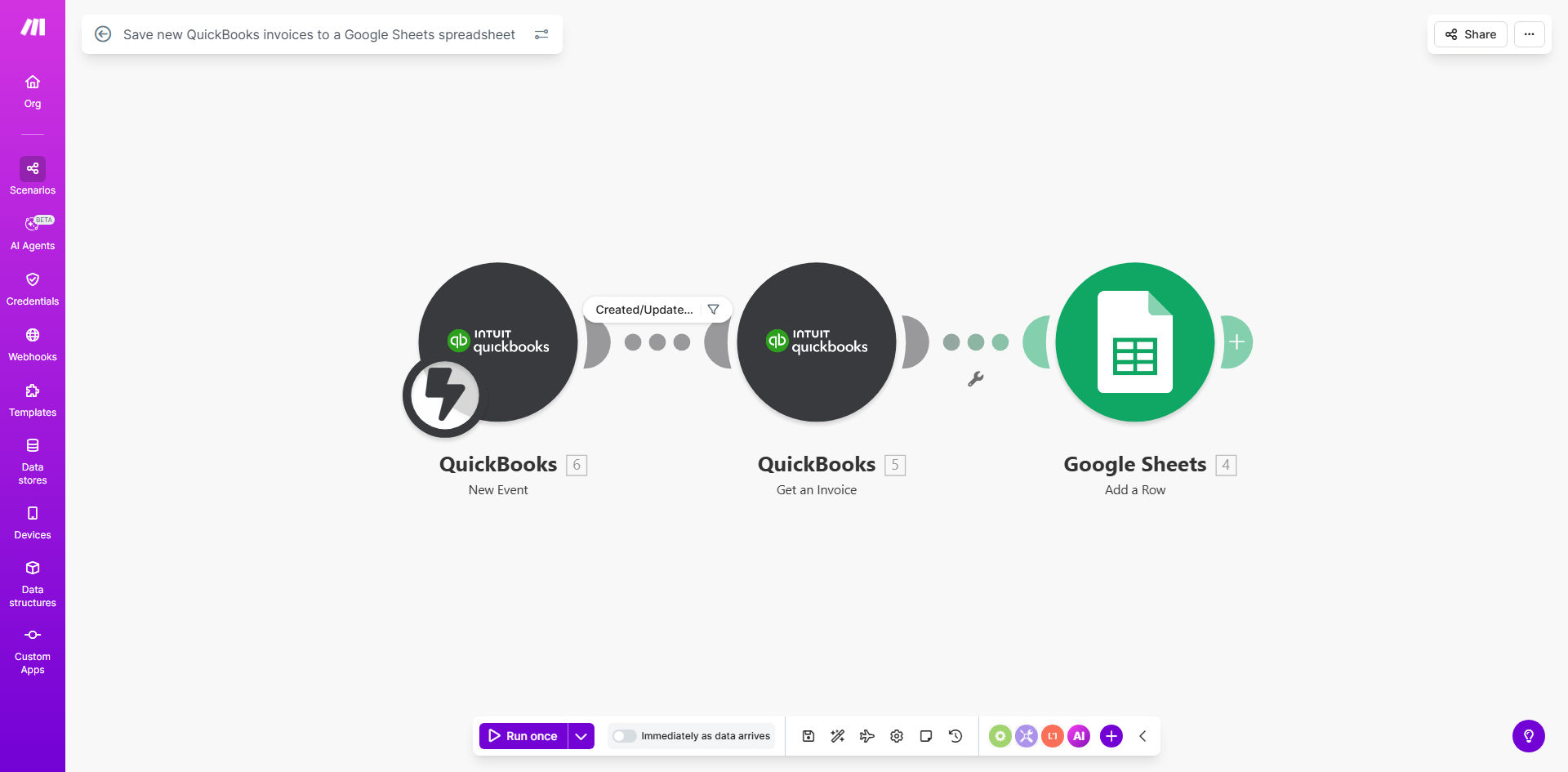
QuickBooks to Google Sheets invoice sync workflow diagram

What This Workflow Does

This automation solves the common problem of maintaining accessible backups and custom reports for QuickBooks invoices. Many businesses struggle with:

  • Manual exports wasting hours each month
  • Limited reporting options in QuickBooks
  • Risk of data loss if QuickBooks access is interrupted
  • Difficulty sharing invoice data with external stakeholders

The workflow automatically copies every new or updated QuickBooks invoice to a Google Sheet in real-time. This creates a searchable, shareable backup while enabling custom reporting, historical analysis, and integration with other business tools.

How It Works

1. QuickBooks Invoice Trigger

The workflow monitors your QuickBooks account for any new invoices or modifications to existing ones using Make.com's QuickBooks connector.

2. Data Extraction

When a change is detected, the workflow pulls all relevant invoice data including customer details, line items, taxes, and totals.

3. Google Sheets Update

The extracted data is formatted and appended to your designated Google Sheet, maintaining a complete historical record of all invoices.

Pro tip: Create separate tabs in your Google Sheet for different time periods (e.g., by quarter) to improve performance with large datasets.

Who This Is For

This automation is ideal for:

  • Small businesses using QuickBooks Online
  • Accounting firms managing multiple client books
  • E-commerce businesses needing invoice data for inventory reconciliation
  • Service businesses that share invoice reports with clients
  • Companies preparing for audits requiring invoice documentation

What You'll Need

  1. A QuickBooks Online account with admin access
  2. A Google account with Sheets access
  3. A Make.com free account (or higher)
  4. Approx. 10 minutes for initial setup

Quick Setup Guide

  1. Click "Get This Workflow" to copy the template to your Make.com account
  2. Connect your QuickBooks Online account following the OAuth prompts
  3. Specify which Google Sheet should receive the invoice data
  4. Customize which invoice fields to include (optional)
  5. Activate the scenario - it will run automatically going forward

Key Benefits

Eliminate manual data entry - Save 2-5 hours per month previously spent on invoice exports and reporting.

Enhanced data security - Maintain an automatic backup separate from QuickBooks with version history.

Custom reporting flexibility - Create pivot tables, charts, and dashboards that QuickBooks doesn't offer.

Improved collaboration - Securely share invoice data with accountants, auditors, or team members without giving QuickBooks access.

Future-proof records - Maintain complete invoice history even if you change accounting systems later.

Frequently Asked Questions

Common questions about QuickBooks and Google Sheets integration

Syncing QuickBooks invoices to Google Sheets creates an automatic backup of your financial data while enabling custom reporting and analysis. Unlike QuickBooks' native reporting, Google Sheets lets you create fully customized dashboards, share data securely with accountants, and maintain historical records beyond QuickBooks' retention periods.

Many businesses use this integration to build client-facing reports, track payment trends over time, or combine invoice data with information from other systems like their CRM or inventory management.

The workflow updates in real-time whenever a new invoice is created or modified in QuickBooks. Make.com monitors QuickBooks continuously and instantly pushes any changes to your designated Google Sheet, ensuring your backup is always current without manual exports.

You can adjust the polling frequency in Make.com if needed, though we recommend keeping it real-time for most accounting needs.

The workflow captures all key invoice fields including customer details, invoice number, date, due date, line items, quantities, rates, taxes, discounts, and totals. You can customize which fields to include during setup to match your reporting needs.

Common customizations include adding custom QuickBooks fields, excluding certain line item details for simplicity, or adding calculated columns like days-to-payment.

This template works with QuickBooks Online. For QuickBooks Desktop, you would need additional middleware to connect to Make.com. The workflow supports all QuickBooks Online editions including Simple Start, Essentials, and Advanced.

If you're using QuickBooks Desktop but want cloud automation, consider QuickBooks' built-in export options or third-party connectors that can bridge the gap between Desktop and web services.

Make.com uses OAuth 2.0 for secure connections to both QuickBooks and Google Sheets. Your financial data is encrypted in transit and access tokens are securely stored. The integration only has permission to read invoices (not modify them) and write to your specified Google Sheet.

For added security, we recommend:

  • Using a dedicated Google account for the sync
  • Restricting access to the destination Sheet
  • Reviewing connected apps periodically

The workflow automatically processes new invoices going forward. For historical data, you can run a one-time export from QuickBooks and import to Google Sheets, then use this automation for ongoing syncs. We recommend keeping historical imports separate from the automated sheet.

For large historical datasets, consider breaking the export into batches by date range to avoid timeout issues. The Make.com template can be modified to handle bulk historical imports if needed.

Yes! Our team at GrowwStacks specializes in custom financial automations. We can build tailored solutions that sync specific invoice fields, add approval workflows, trigger payment reminders, or integrate with additional systems like your CRM or inventory management.

Custom automations typically deliver the most value when they're designed around your specific business processes. For example, we've built solutions that:

  • Auto-flag unpaid invoices after 30 days
  • Sync invoice data to client portals
  • Generate custom PDF reports with your branding

Need a Custom Invoice Automation?

This free template is a starting point. Our team builds fully tailored automation systems for your specific business needs.