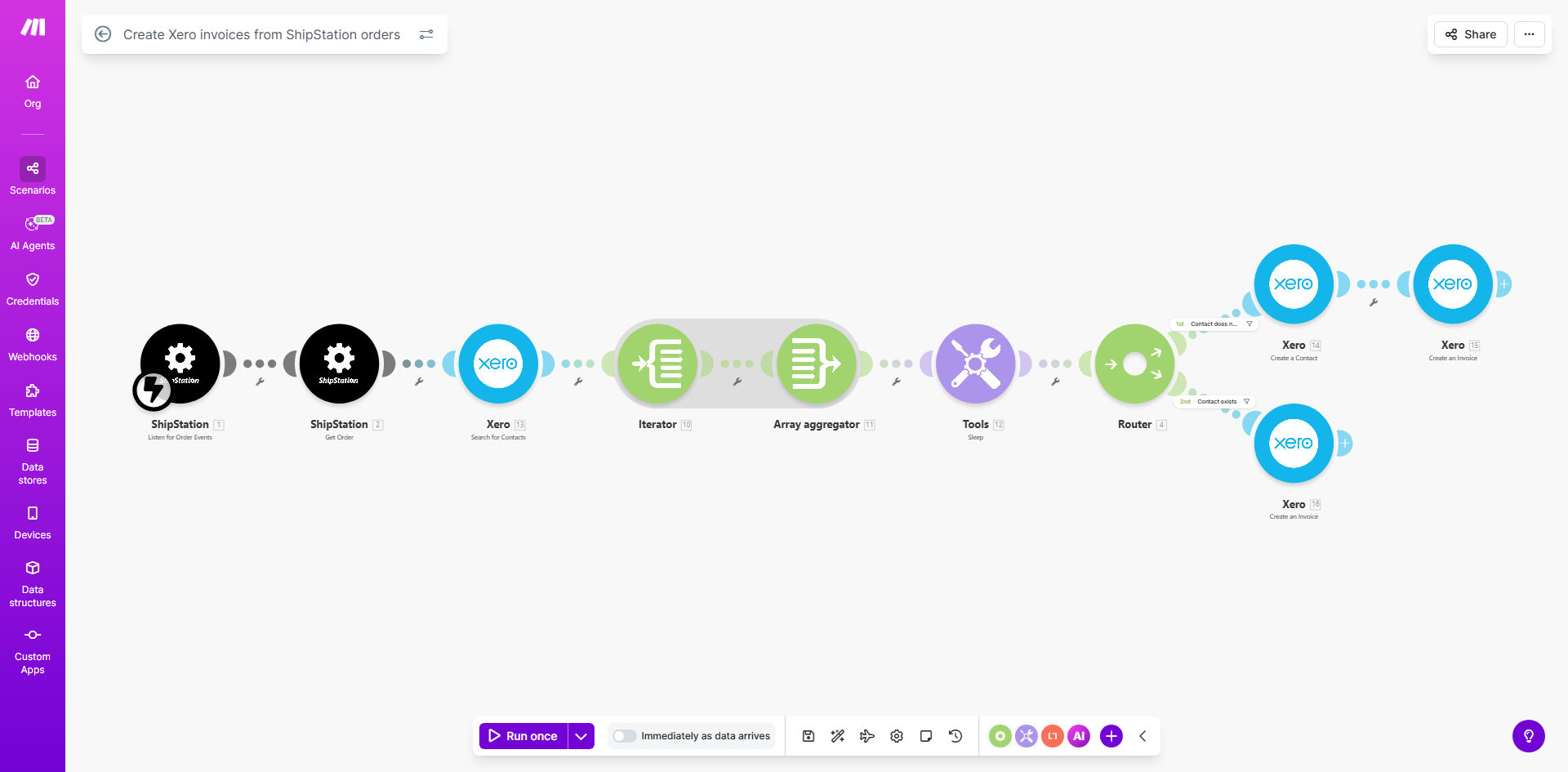
What This Workflow Does
This automation solves the tedious manual process of transferring ecommerce order data from ShipStation to Xero for invoicing. Every time a new order is created in ShipStation, the workflow automatically generates a corresponding invoice in Xero with all relevant details including customer information, products, quantities, prices, taxes, and shipping costs.
For ecommerce businesses processing dozens or hundreds of orders daily, this eliminates hours of repetitive data entry while ensuring 100% accuracy in financial records. The real-time sync means invoices are created immediately when orders are received, improving cash flow by accelerating billing cycles.
How It Works
1. New Order Trigger
The workflow monitors ShipStation for new orders, either through webhooks or periodic polling depending on your configuration.
2. Data Extraction
Key order details are extracted including customer details, line items, pricing, taxes, shipping information, and any custom fields.
3. Xero Invoice Creation
The workflow maps ShipStation data to Xero's invoice structure, creating a draft or approved invoice based on your settings.
4. Error Handling
Built-in error checking ensures data quality, with options to retry failed operations or notify administrators of issues.
Who This Is For
This workflow is ideal for:
- Ecommerce businesses using ShipStation for order fulfillment
- Xero users who manually create invoices from sales data
- Operations teams overwhelmed by order-to-accounting paperwork
- Businesses selling across multiple channels that need consolidated financials
What You'll Need
- Active ShipStation account with API access
- Xero subscription with invoicing permissions
- Make.com account (free tier available)
- Basic understanding of your product SKUs and Xero item codes
Quick Setup Guide
- Install the template from Make.com
- Connect your ShipStation and Xero accounts
- Configure field mappings between systems
- Set your invoice numbering and status preferences
- Test with sample orders before going live
Key Benefits
Time savings: Reduce order-to-invoice processing from minutes to seconds, saving 10+ hours weekly for businesses with 50+ daily orders.
Accuracy: Eliminate human error in transferring order details, ensuring financial records match actual sales.
Real-time visibility: See revenue from new orders immediately in Xero rather than waiting for manual processing.
Scalability: Handle order volume spikes without additional accounting staff.
Pro tip: Configure your workflow to tag invoices in Xero by sales channel (Shopify, Amazon, etc.) for granular revenue reporting.