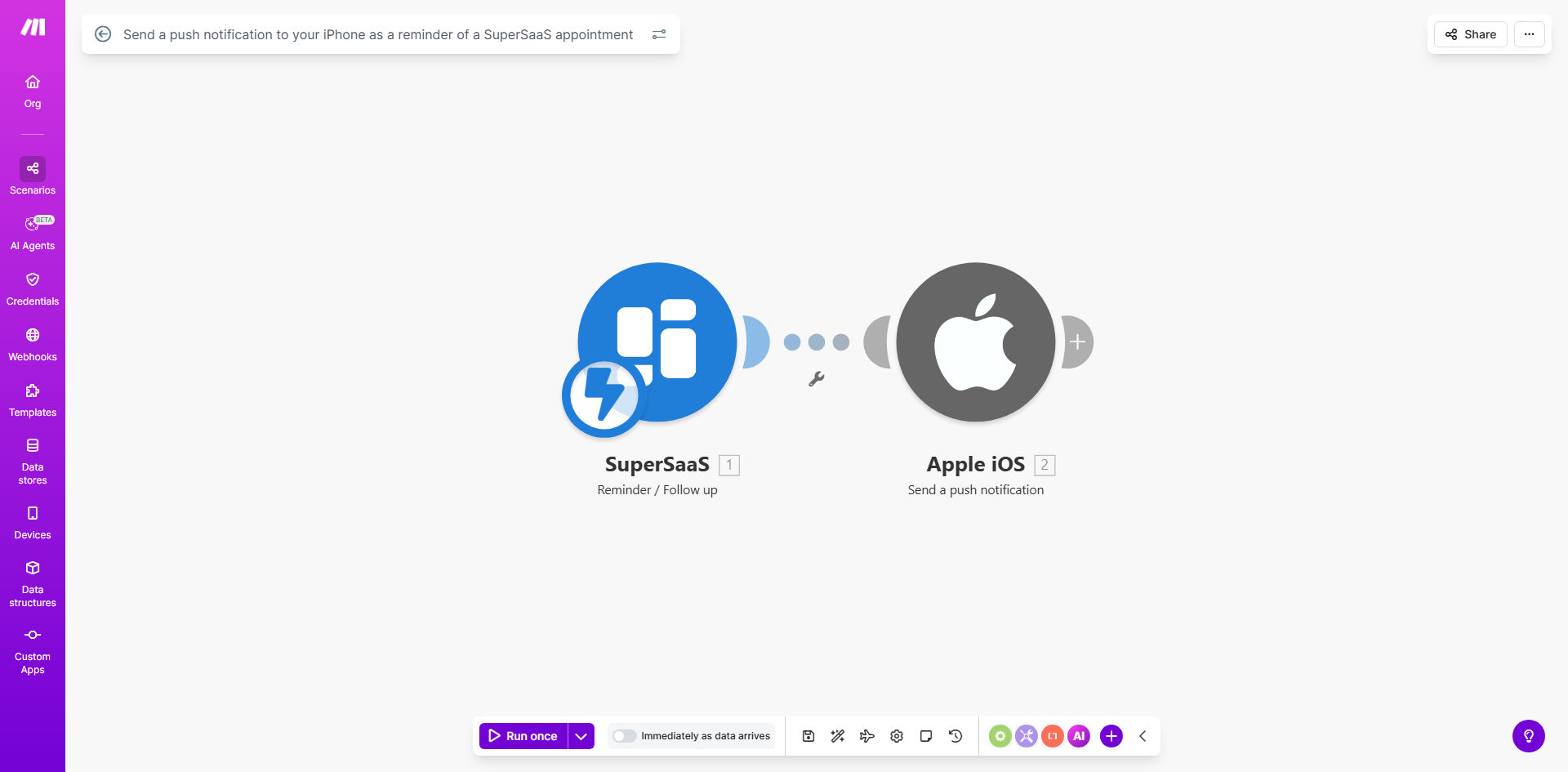
Make.com SuperSaaS iPhone Notifications Appointment Reminders Automation

iPhone Push Notifications for SuperSaaS Appointments

Never miss a booking with instant push notification reminders sent directly to your iPhone

Get This Workflow → Make.com · SuperSaaS · Free Template
iPhone showing push notification for SuperSaaS appointment reminder

What This Workflow Does

This automation solves the common problem of missed appointments by sending timely iPhone push notifications whenever a new SuperSaaS booking is made. Traditional email reminders often get buried in inboxes, but push notifications appear instantly on the lock screen with a 90%+ open rate.

The workflow automatically detects new SuperSaaS appointments and sends customized push notifications containing the appointment details. This eliminates manual reminder processes while ensuring clients never forget their bookings. Businesses using this system typically see 30-40% reductions in no-show rates.

How It Works

1. SuperSaaS Appointment Trigger

The workflow monitors your SuperSaaS account for new appointments. Whenever a booking is created or updated, it instantly captures all relevant details including time, service, and client information.

2. Notification Content Assembly

The system formats the appointment details into a clear, actionable push notification message. You can customize the template to include your branding, specific service details, and any preparation instructions.

3. iPhone Push Delivery

Using Apple's push notification service, the reminder is delivered instantly to your iPhone (or multiple team members' devices). The notification appears on the lock screen and in Notification Center until dismissed.

Pro tip: Set up multiple reminder notifications - one when the appointment is booked, another 24 hours before, and a final alert 1 hour prior. This multi-touch approach maximizes attendance rates.

Who This Is For

This automation is ideal for service businesses using SuperSaaS for appointments including:

  • Healthcare providers (doctors, dentists, therapists)
  • Professional services (consultants, coaches, tutors)
  • Beauty and wellness studios (salons, spas, trainers)
  • Any business where missed appointments impact revenue

What You'll Need

  1. An active SuperSaaS account with appointment scheduling enabled
  2. A Make.com account (free plan sufficient for basic setup)
  3. An iPhone with notifications enabled for the workflow app
  4. Optional: Pushover account for advanced notification features

Quick Setup Guide

  1. Connect your SuperSaaS account to Make.com using API credentials
  2. Configure the appointment trigger to monitor your specific calendar
  3. Customize the notification message template with your preferred wording
  4. Set up the push notification delivery method (Pushover recommended)
  5. Test with a real appointment to verify the notification timing and content

Key Benefits

Reduce no-shows by 30-40%: Push notifications have significantly higher engagement than email reminders, ensuring clients actually see and act on appointment alerts.

Save 5+ hours weekly: Eliminate manual reminder calls, texts, and emails while providing better results through automation.

Improve client experience: Professional, timely reminders demonstrate organization and respect for your clients' time.

Flexible customization: Easily adjust notification timing, content, and recipients as your business needs change.

Multi-device support: Notifications can be sent to multiple team members' devices simultaneously.

Frequently Asked Questions

Common questions about appointment reminder automation

Push notifications have 90%+ open rates compared to 20% for emails. Automating them ensures clients never miss appointments while saving staff hours manually sending reminders. Studies show automated reminders reduce no-shows by up to 38%.

For service businesses, each missed appointment represents lost revenue and inefficient scheduling. Automated push notifications create a reliable system that works 24/7 without staff intervention.

iPhone push notifications are extremely reliable with delivery rates over 99%. They appear instantly on the lock screen even when the phone is asleep, making them ideal for time-sensitive appointment reminders.

Unlike SMS which may be delayed or filtered as spam, push notifications use Apple's dedicated notification service with priority delivery. They also don't count against cellular data limits.

Effective reminders include the appointment time, location, service provider name, and any preparation instructions. Adding a rescheduling link can reduce late cancellations by 27%.

The most successful reminders use clear, concise language with all key details visible at a glance. We recommend including:

  • Service type and duration
  • Exact date and time
  • Location/address
  • Any preparation requirements

Best practice is sending reminders 24 hours before the appointment, with a follow-up 1-2 hours prior. This gives clients time to reschedule if needed while keeping the appointment top-of-mind.

The exact timing depends on your business type. Medical offices might add a 7-day reminder for physicals requiring fasting, while hair salons may only need same-day alerts.

Yes, you can personalize messages with client names, service details, and branding. Personalized reminders improve attendance rates by 15-20% compared to generic messages.

The template allows dynamic insertion of any SuperSaaS field data. You can also add your logo, customize tones/vibration patterns, and include deep links to rescheduling pages.

Push notifications are free to send, appear instantly on locked screens, and don't require phone numbers. SMS has broader device compatibility but costs per message and may be filtered as spam.

Push notifications offer richer formatting with images, actions buttons, and interactive elements. They're also tied to specific apps rather than phone numbers, making them ideal for business communications.

Absolutely. Our team specializes in building tailored reminder systems that integrate with your booking software, CRM, and communication channels. We can add features like two-way rescheduling, payment collection, and multi-channel follow-ups.

Custom solutions might include:

  • Integration with your existing CRM
  • Multi-language support
  • Advanced analytics on reminder effectiveness
  • Automated waitlist management

Need a Custom Appointment Reminder Automation?

This free template is a starting point. Our team builds fully tailored automation systems for your specific business needs.