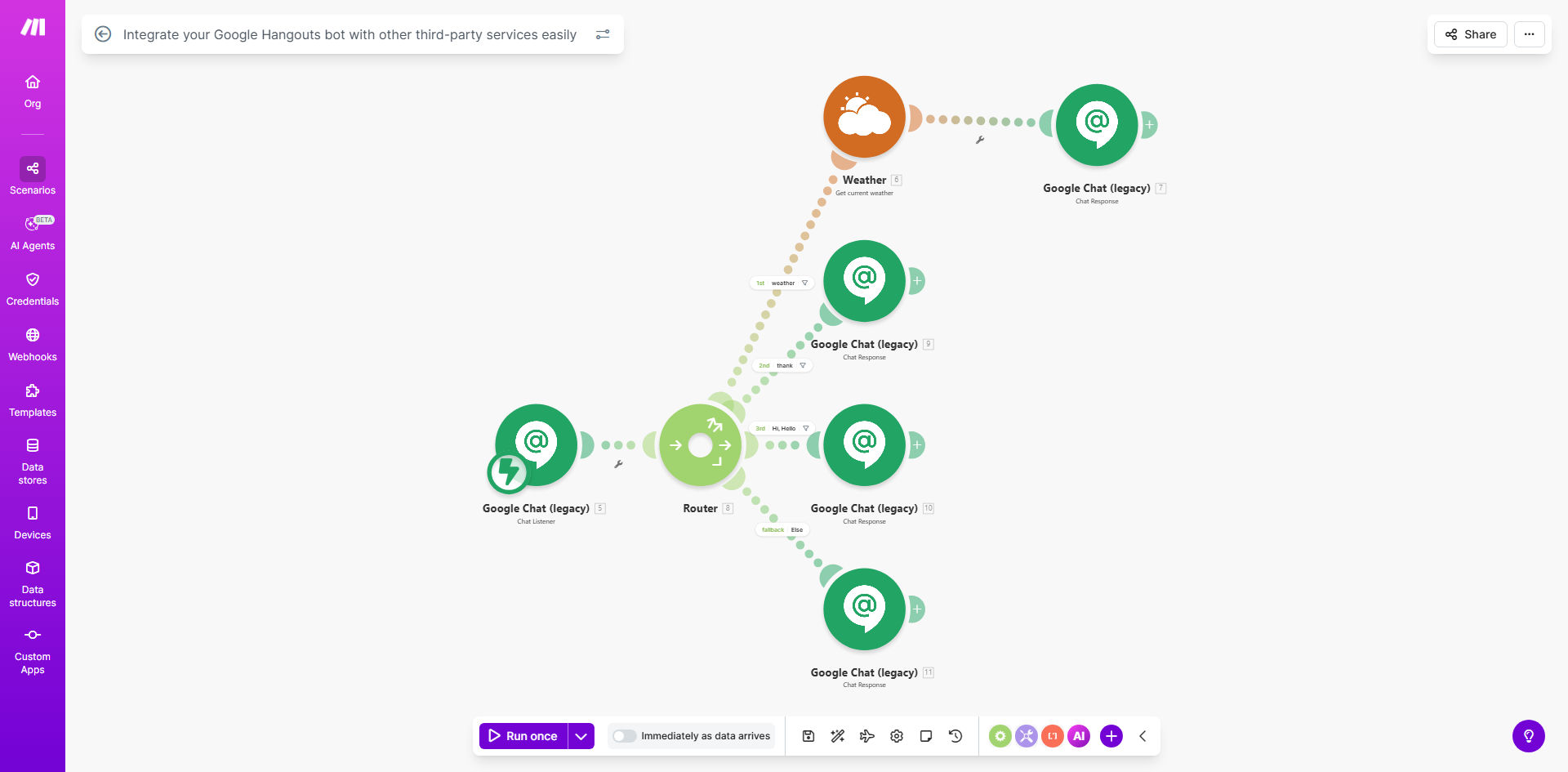
What This Workflow Does
This automation bridges the gap between your Google Hangouts chatbot and the business tools your team uses daily. Instead of having conversations trapped in chat silos, the workflow automatically syncs messages with your CRM, creates support tickets from inquiries, and triggers backend processes - all without writing code.
For customer-facing teams, this means no more copying chat transcripts or manually updating records. The bot can check order status, log customer issues, and even route conversations to the right department based on keywords - while maintaining a complete interaction history across all your systems.
How It Works
1. Message Capture
The workflow monitors your Google Hangouts space for new messages, capturing the full conversation context including sender details, timestamps, and message content.
2. Intent Detection
Using simple keyword matching or more advanced NLP (depending on configuration), the system identifies the purpose of each message - whether it's a support request, sales inquiry, or specific action trigger.
3. System Integration
Based on the detected intent, the workflow pushes data to connected services. This could create a Salesforce case, update a HubSpot contact record, or post a Slack alert to your operations team.
4. Response Handling
The bot can pull information from connected systems to respond immediately (like order status) or acknowledge receipt while humans prepare a detailed response.
Who This Is For
This solution benefits any business using Google Hangouts for customer or internal communications:
- Support teams needing to convert chats into trackable tickets
- Sales teams who want leads from chats in their CRM
- Operations teams receiving alerts or requests via chat
- E-commerce businesses handling order inquiries
- IT teams managing internal help requests
What You'll Need
- A Google Workspace account with Hangouts access
- Make.com account (free tier available)
- Accounts for any services you want to connect (CRM, helpdesk, etc.)
- Basic understanding of your business workflows
Pro tip: Start with 2-3 key integrations rather than connecting everything at once. Focus on processes where manual data entry currently creates bottlenecks.
Quick Setup Guide
- Clone the template from Make.com
- Connect your Google Hangouts account
- Authenticate your target services (CRM, helpdesk, etc.)
- Map message fields to corresponding records in each system
- Set up keyword triggers for different actions
- Test with sample conversations before going live
Key Benefits
Eliminate manual data entry - Chat conversations automatically update your business systems, saving 5-15 minutes per customer interaction.
Faster response times - With customer context readily available, agents can resolve issues 40-60% faster according to industry benchmarks.
Complete customer history - All interactions are logged across channels, giving teams full visibility into each customer's journey.
24/7 basic support - The bot handles routine inquiries outside business hours, reducing staffing needs for simple questions.
Scalable communications - Handle growing chat volumes without proportionally increasing support staff.