Make.com CRM Automation Google Sheets Freshsales Lead Management

Automatically Create Freshsales Leads from Google Sheets

Eliminate manual data entry by instantly converting new spreadsheet rows into CRM leads

Get This Workflow → Make.com · CRM · Free Template
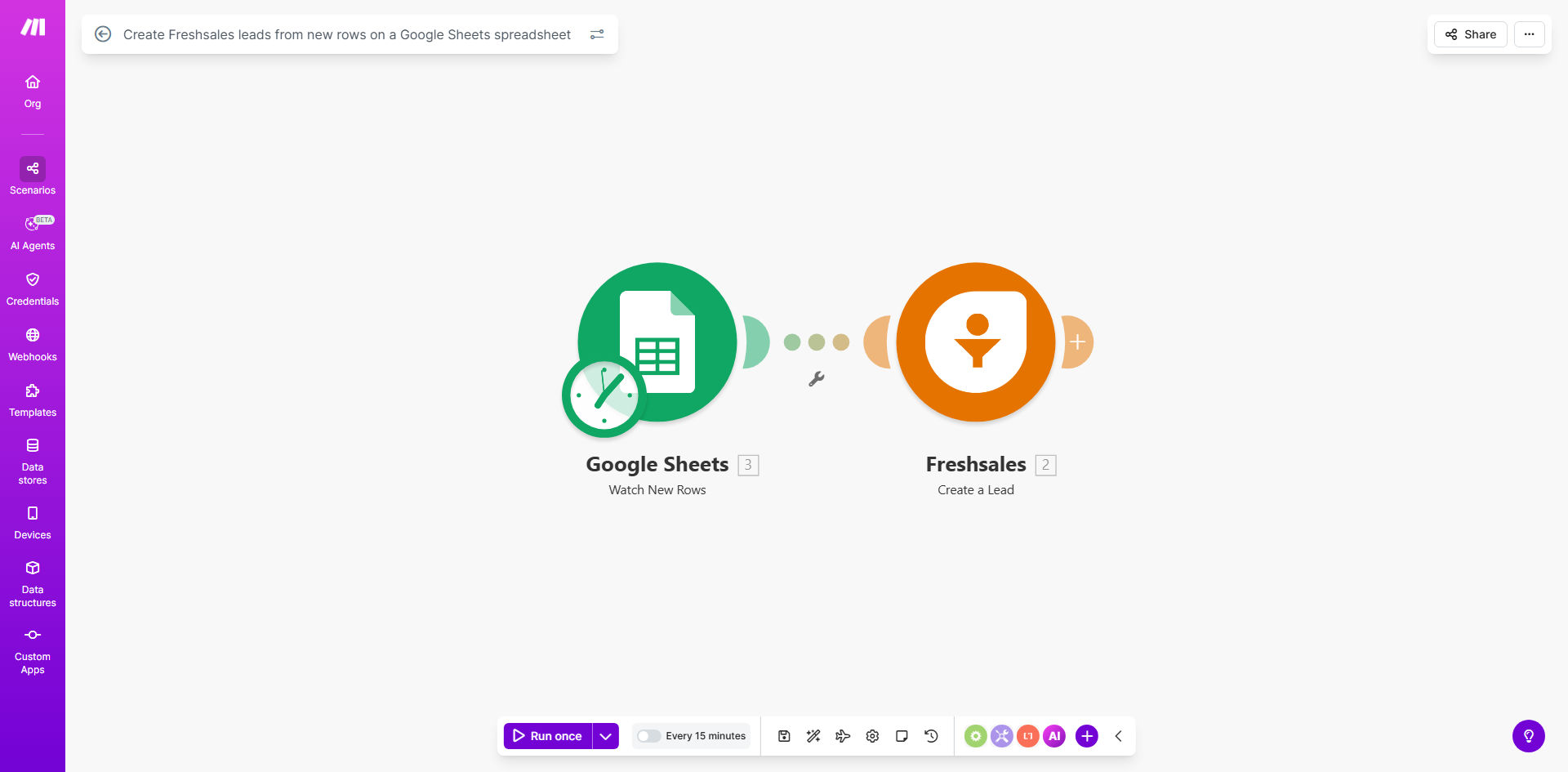
Make.com workflow diagram showing Google Sheets to Freshsales lead automation

What This Workflow Does

This automation solves a common pain point for sales teams: manually transferring lead information from spreadsheets into your CRM. Every time you or your team adds a new row to your designated Google Sheet, this Make.com workflow instantly creates a corresponding lead in Freshsales with all the contact details properly mapped.

The template handles all the field mapping between your spreadsheet columns and Freshsales lead fields. You can customize which columns correspond to which CRM fields during setup. This eliminates repetitive data entry while ensuring your sales team always has the most current lead information in your central CRM system.

How It Works

1. New row detection

The workflow continuously monitors your Google Sheet for new rows being added. You can configure how frequently it checks for updates (typically every 5-15 minutes).

2. Data extraction

When a new row appears, Make.com extracts all the cell values and prepares them for transfer to Freshsales. The template includes default field mappings for common lead attributes.

3. Lead creation

The system creates a new lead in Freshsales using the extracted data. All contact details, company information, and custom fields are properly mapped to their corresponding CRM fields.

4. Error handling

If any required fields are missing or data formatting issues occur, the workflow can notify your team via email while skipping that particular record to prevent CRM pollution.

Who This Is For

This automation is ideal for:

  • Sales teams collecting leads through Google Forms or shared spreadsheets
  • Marketing teams running campaigns that generate lead lists in Sheets
  • Businesses transitioning from spreadsheet-based lead tracking to Freshsales
  • Distributed teams where multiple people add leads to a shared spreadsheet
  • Companies running events or webinars that produce spreadsheet-based attendee lists

Pro tip: Use this workflow with a Google Form that feeds into your Sheet to create a complete no-code lead capture and CRM entry system.

What You'll Need

  1. A Make.com account (free plan available)
  2. Freshsales account with API access
  3. Google Sheet with lead data (or a template you can copy)
  4. Basic understanding of your Freshsales lead fields

Quick Setup Guide

  1. Copy the template to your Make.com account
  2. Connect your Google Sheets and Freshsales accounts
  3. Select your source spreadsheet and worksheet
  4. Map your spreadsheet columns to Freshsales lead fields
  5. Set your preferred polling interval for new rows
  6. Test with a sample row to verify field mappings
  7. Activate the scenario to begin automatic lead creation

Key Benefits

Eliminate 2-3 hours per week of manual data entry that sales teams typically spend copying information between spreadsheets and CRMs.

Reduce lead entry errors by 90% by removing human transcription mistakes and ensuring consistent field formatting.

Get leads into your CRM 10x faster - new spreadsheet entries appear in Freshsales within minutes rather than waiting for manual processing.

Maintain data hygiene with built-in error checking that prevents incomplete or malformed records from entering your CRM.

Scale your lead capture without adding administrative staff as your business grows.

Frequently Asked Questions

Common questions about CRM automation and integration

Automating lead creation saves hours of manual data entry while eliminating human errors. Studies show sales teams waste 17% of their time on data entry tasks. This workflow ensures every lead from your spreadsheet instantly appears in Freshsales with all contact details preserved.

Beyond time savings, automation improves data accuracy and lets your team focus on selling rather than administrative work. You'll also get leads into your sales pipeline faster, reducing response times to new inquiries.

You can map any spreadsheet columns to Freshsales lead fields - contact details, company information, lead source, custom tags, and notes. The template includes common field mappings but you can customize it for your specific CRM fields.

For example, you might map columns for: First Name, Last Name, Email, Phone, Company, Job Title, Lead Source, Interest Level, and custom fields like Product Interest or Budget Range.

Leads typically appear in Freshsales within 30-60 seconds of adding them to your Google Sheet. The automation runs continuously in the background, checking for new rows at regular intervals you configure.

You can adjust the polling frequency based on your needs - from real-time (every minute) to hourly checks for less time-sensitive lead sources. Most businesses find 5-15 minute intervals provide the right balance of responsiveness and system efficiency.

Yes, the workflow works with any Google Sheet containing lead data. You'll just need to map your existing column headers to the corresponding Freshsales fields during setup. No spreadsheet restructuring required.

If your current sheet has inconsistent formatting, we recommend creating a standardized template for future data entry. This ensures all required fields are captured consistently for smooth automation.

The workflow includes error handling to skip incomplete records and notify you via email about any rows that couldn't be processed. You can then review and fix the missing data before resubmitting.

For critical fields like email or phone number, you can configure the workflow to require those values. Less essential fields can be marked as optional to prevent the entire record from being rejected.

Make.com offers more advanced mapping options, error handling, and the ability to trigger additional actions after lead creation (like sending welcome emails or assigning tasks). The native integration only handles basic field transfers.

With Make.com, you can also: add conditional logic (only create leads meeting certain criteria), enrich data from other sources before CRM entry, and create multi-step workflows that go beyond simple data transfer.

Absolutely! Our team specializes in building tailored CRM automations that match your exact sales processes. We can integrate multiple data sources, add conditional logic, and create custom dashboards to track performance.

For example, we've built systems that: automatically score leads based on spreadsheet data, trigger personalized email sequences based on lead attributes, and sync deal stages between spreadsheets and CRM pipelines.

  • Free consultation to understand your workflow
  • Custom field mapping for your CRM structure
  • Ongoing support and optimization

Need a Custom CRM Automation?

This free template is a starting point. Our team builds fully tailored automation systems for your specific business needs.