Make.com SendGrid Google Sheets Email Marketing Automation

Save new SendGrip recipients to Google Sheets

Automatically sync your email marketing contacts to a spreadsheet for better tracking and analysis

Get This Workflow Make.com · SendGrid · Free Template
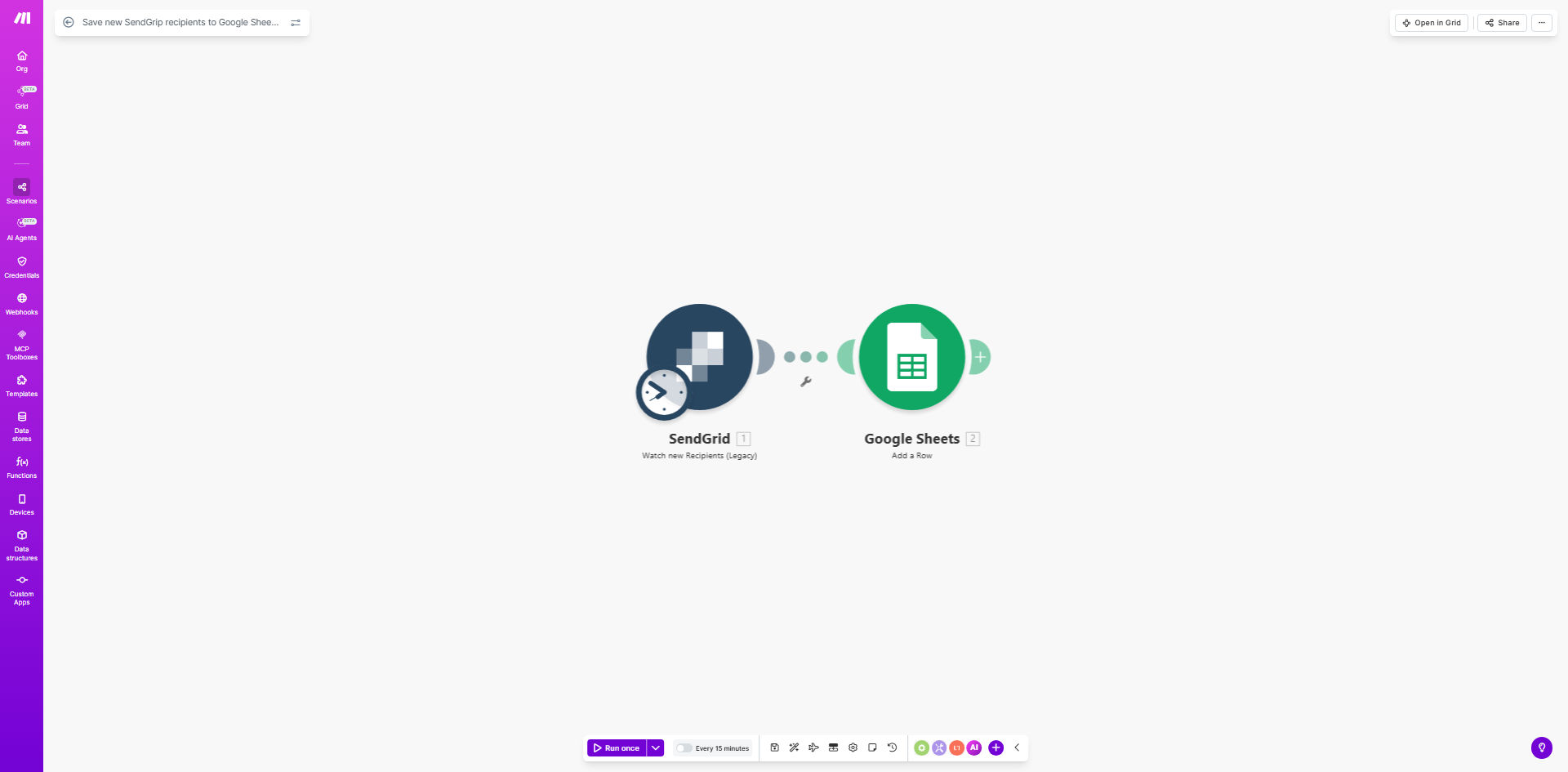
SendGrid to Google Sheets automation workflow diagram

What This Workflow Does

This automation solves the common challenge of manually tracking email marketing subscribers. Every time someone signs up through your SendGrid forms or API, their details automatically appear in your Google Sheets spreadsheet. No more exporting CSV files or copying data between systems.

The workflow creates a living database of your email recipients that updates in real-time. You'll see exactly when new contacts join your lists, with timestamps for accurate record-keeping. This gives you better visibility into your subscriber growth and makes it easier to analyze trends over time.

How It Works

1. New recipient triggers the workflow

When SendGrid receives a new email recipient through any channel (web forms, API, manual imports), it sends an instant notification to Make.com.

2. Data is formatted for Google Sheets

The workflow extracts relevant contact information including email address, name fields, subscription status, and timestamps. It structures this data to match your spreadsheet columns.

3. Row is added to your spreadsheet

Make.com connects to your specified Google Sheet and appends the new recipient information as a fresh row. The template includes error handling to prevent duplicates.

Pro tip: Customize the template to include additional recipient metadata like signup source, location data, or custom fields from your SendGrid account.

Who This Is For

This workflow benefits any business using SendGrid for email marketing that wants to:

  • Maintain backup records of subscribers outside SendGrid
  • Analyze subscriber growth patterns over time
  • Share contact lists with team members who don't have SendGrid access
  • Integrate email lists with other tools that connect to Google Sheets

What You'll Need

  1. A SendGrid account with API access enabled
  2. A Google Sheets spreadsheet ready to receive data
  3. A Make.com account (formerly Integromat)
  4. Approximately 10 minutes to set up the connections

Quick Setup Guide

  1. Clone the template from the Make.com template library
  2. Connect your SendGrid account in the first module
  3. Connect your Google account and select your target spreadsheet
  4. Map the SendGrid fields to your desired spreadsheet columns
  5. Test with a new recipient and verify the data appears correctly
  6. Turn on the schedule to run continuously

Key Benefits

Eliminates manual data entry - Save 2-5 hours per month that would normally be spent exporting and importing contact lists between systems.

Creates audit-ready records - Timestamped entries provide documentation of when contacts joined your lists, important for compliance.

Enables deeper analysis - Spreadsheet data can be used with pivot tables, charts, and other analysis tools that aren't available in SendGrid.

Reduces human error - Automated transfers prevent mistakes that happen when manually copying contact information.

Supports team collaboration - Multiple team members can access and work with the spreadsheet without needing SendGrid logins.

Frequently Asked Questions

Common questions about email list automation and integration

Syncing email recipients to Google Sheets creates a centralized database for your marketing contacts. This allows you to track subscriber growth over time, segment audiences for future campaigns, and integrate with other tools that analyze spreadsheet data.

Many businesses use this method to create backup contact lists separate from their email service provider. For example, an ecommerce store might track which products prompted signups by adding custom fields to their SendGrid forms.

  • Creates a secondary backup of your contacts
  • Enables custom reporting beyond SendGrid's analytics
  • Simplifies integration with other marketing tools

The automation runs in real-time whenever a new recipient is added to SendGrid. Each new contact triggers an immediate update to your Google Sheet, ensuring your records are always current without manual data entry delays.

In testing, we've seen updates appear in Google Sheets within 2-5 seconds of the SendGrid event. The speed depends on your internet connection and the current load on both platforms' APIs.

By default, the workflow captures essential contact information including email address, name fields, subscription status, and timestamps. You can customize the template to include additional metadata like signup source, location data, or custom fields from your SendGrid account.

A fitness studio might track which class locations generate the most email signups, while a SaaS company could record which free trial users opted into newsletters.

  • Basic template includes core contact fields
  • Easy to add custom fields for your needs
  • Data appears in columns you specify

Yes, you can configure the automation to add recipients to different spreadsheets based on criteria like signup date, email list, or geographic location. Advanced users can modify the template to create separate tabs or sheets for different contact segments.

For instance, a regional business might route subscribers to different sheets based on their state, while an online educator could separate students by course interest.

Maintaining a spreadsheet record provides an audit trail of when contacts were added to your lists. This helps demonstrate compliance with regulations like GDPR by showing when and how subscribers opted in. The timestamped records can serve as proof of consent if needed.

One client used these records to successfully respond to a subscriber complaint, showing the exact date and opt-in method for their registration.

The template focuses on new contacts, but you can modify it to import existing SendGrid contacts by using their API export features. For large lists, consider running a one-time export and import before activating the ongoing automation for new signups.

We recommend processing historical contacts in batches of 5,000-10,000 to avoid API rate limits. The spreadsheet will maintain all records chronologically once imported.

Absolutely! GrowwStacks specializes in building tailored email marketing automations that connect SendGrid, Google Sheets, and other tools in your tech stack. We can create custom workflows that match your specific data collection needs, reporting requirements, and integration with CRM systems.

Our clients typically see a 3-5x return on their automation investment through saved labor hours and improved marketing insights. Recent projects include custom segmentation rules, automated welcome sequences triggered by spreadsheet updates, and integration with customer support systems.

  • Free consultation to assess your needs
  • Custom solutions for complex requirements
  • Ongoing support and optimization

Need a Custom Email List Automation?

This free template is a starting point. Our team builds fully tailored automation systems for your specific business needs.