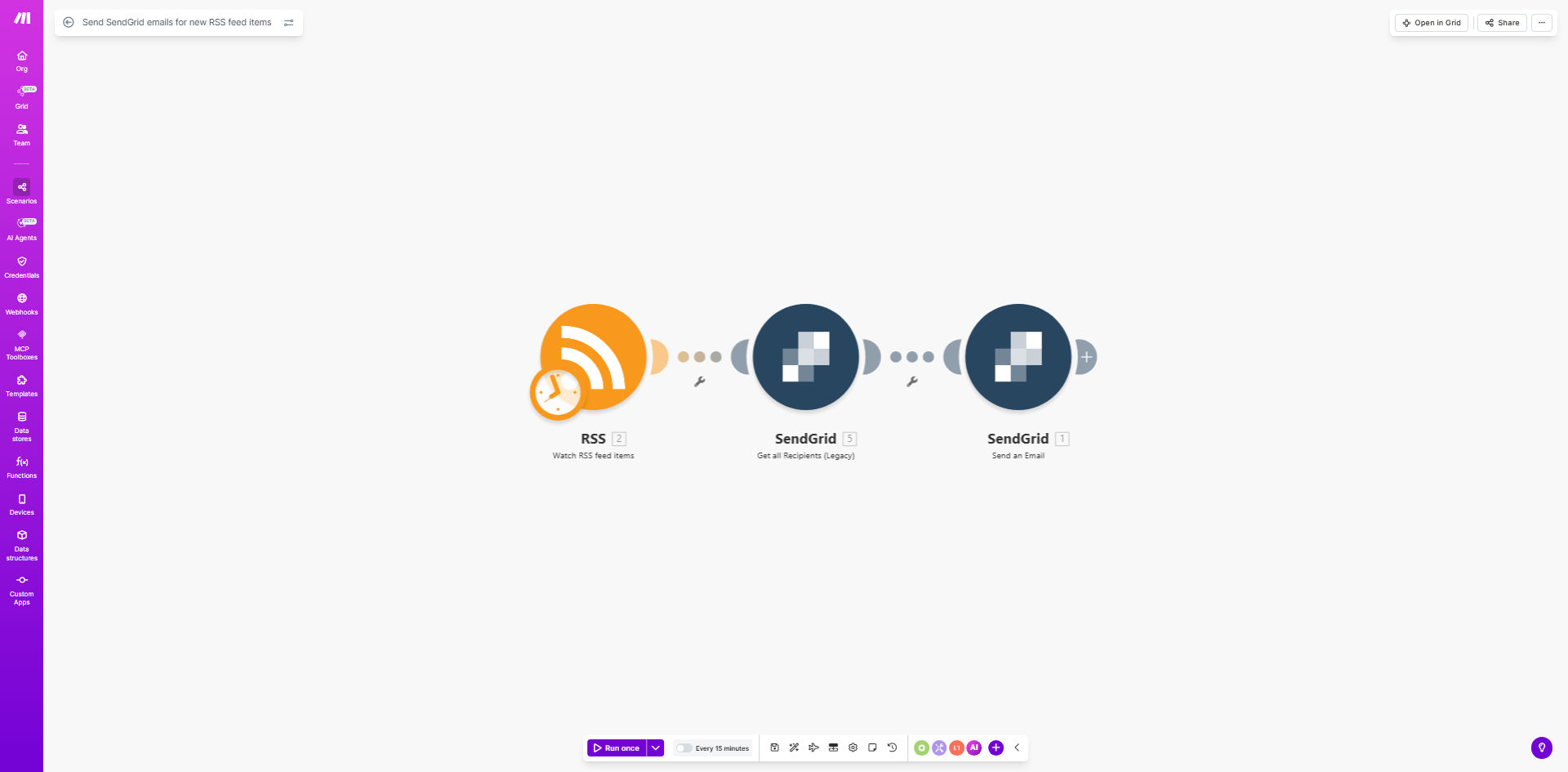
What This Workflow Does
This automation solves the time-consuming process of manually monitoring RSS feeds and sending email updates to your audience. It automatically detects new content from specified RSS feeds and sends professionally formatted emails through SendGrid, ensuring your subscribers receive timely updates without manual intervention.
The workflow is particularly valuable for content marketers, publishers, and businesses that maintain blogs or news sections. It transforms your RSS feed into an automated email distribution system, saving hours each week while improving audience engagement through consistent, timely communication.
How It Works
1. RSS Feed Monitoring
The workflow continuously checks your specified RSS feed for new entries at regular intervals you define. When new content is detected, it triggers the automation process.
2. Content Processing
Each new RSS item is parsed to extract key elements like title, description, publication date, and author. The system can optionally filter content based on your criteria before proceeding.
3. Email Composition
Using SendGrid's email templates, the workflow assembles a professional email with the RSS content formatted according to your branding guidelines. You can customize subject lines, headers, and footers.
4. Recipient Management
The system pulls your recipient list from your SendGrid account or integrates with your CRM to determine who should receive each update based on their preferences and subscription status.
5. Automated Delivery
SendGrid delivers the emails with optimal timing and handles all technical aspects of email delivery, including authentication, bounce handling, and unsubscribe management.
Pro tip: Set up multiple RSS feeds with different email templates to create segmented content newsletters tailored to different audience interests.
Who This Is For
This automation is ideal for:
- Content marketers managing multiple blogs or publications
- News websites needing to distribute updates to subscribers
- E-commerce stores with product update blogs
- Educational platforms with regular course updates
- Community forums that want to email digest versions of new discussions
What You'll Need
- A Make.com account (free tier available)
- SendGrid API credentials
- RSS feed URL(s) you want to monitor
- Email template designed in SendGrid
- List of recipient email addresses or segments
Quick Setup Guide
- Copy this template to your Make.com account
- Connect your SendGrid account via API
- Add your RSS feed URL(s) to monitor
- Customize the email template in SendGrid
- Define your recipient list or segments
- Set your preferred monitoring frequency
- Test with a small group before full deployment
Key Benefits
Time savings: Eliminates hours of manual work copying content and sending individual emails each time you publish new content.
Consistent delivery: Ensures your audience receives updates at predictable intervals, building trust and engagement.
Professional presentation: SendGrid templates maintain your brand identity with properly formatted HTML emails.
Scalability: Handles any volume of content updates and recipient lists without additional effort.
Performance tracking: SendGrid's analytics provide insights into open rates and engagement metrics.