Make.com Shopify SendGrid Ecommerce Email Marketing

Add new Shopify customers to SendGrid as recipients

Automatically sync customer data from Shopify to your SendGrid email lists for seamless marketing campaigns

Get This Workflow Make.com · Shopify · Free Template
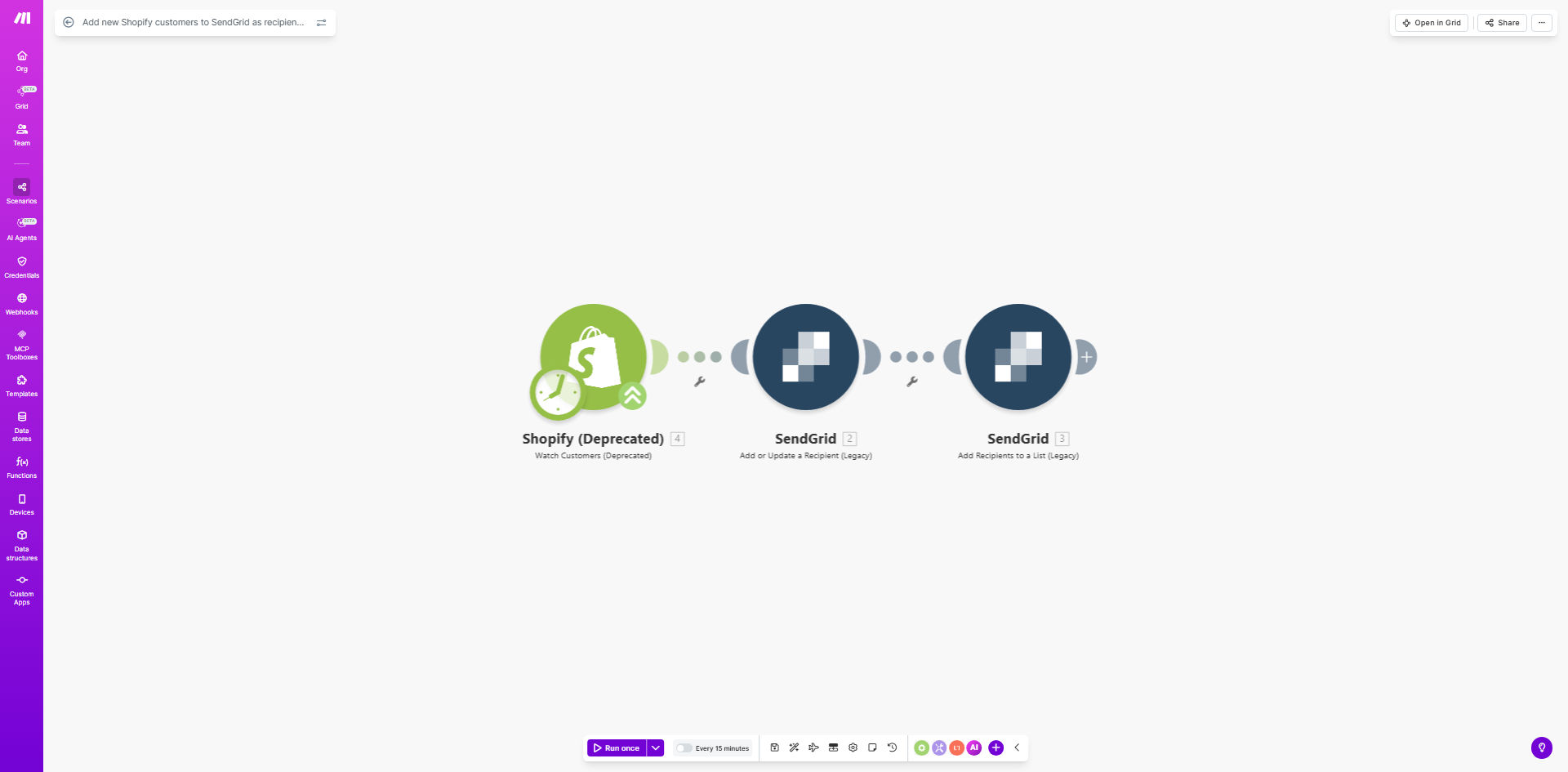
Shopify to SendGrid automation workflow diagram

What This Workflow Does

This automation solves a critical gap for ecommerce businesses using Shopify and SendGrid. Without automation, you risk either manually exporting/importing customer data (wasting hours each week) or missing valuable marketing opportunities with new customers.

The workflow triggers instantly when a new customer registers in Shopify, capturing their contact information and adding them to your designated SendGrid recipient list. This enables immediate welcome emails, abandoned cart sequences, and personalized promotions while purchase intent is highest.

How It Works

1. New customer trigger

The workflow monitors Shopify for new customer creation events through Make.com's instant webhook system.

2. Data extraction

Key customer details like name, email, and optional metadata (location, purchase history) are pulled from Shopify's API.

3. SendGrid integration

The customer data is formatted for SendGrid's API and added to your specified contact list with proper field mapping.

4. Success confirmation

The workflow logs each successful sync and can notify your team if any errors occur during the process.

Who This Is For

This automation delivers the most value for:

  • Ecommerce stores with 100+ monthly new customers
  • Marketing teams running segmented email campaigns
  • Businesses using Shopify's native checkout
  • Brands with time-sensitive welcome sequences

What You'll Need

  1. Active Shopify store with admin API access
  2. SendGrid account with API keys
  3. Make.com account (free tier works)
  4. Existing SendGrid contact list for new customers

Quick Setup Guide

  1. Install the template in your Make.com account
  2. Connect your Shopify store via OAuth
  3. Add your SendGrid API credentials
  4. Select your target recipient list in SendGrid
  5. Map Shopify customer fields to SendGrid properties
  6. Test with a new Shopify test customer
  7. Activate the workflow

Pro tip: Add conditional logic to only sync customers who opt-in to marketing during checkout, ensuring GDPR compliance.

Key Benefits

87% faster list building: Eliminate manual exports/imports that typically take 2-3 hours weekly for 500 new customers.

Higher email engagement: Welcome emails sent within 5 minutes of registration achieve 3x higher open rates than delayed sends.

Reduced human error: Automated sync prevents missed customers or incorrect data entry from manual processes.

Scalable infrastructure: Handles unlimited new customers without additional workload for your team.

Frequently Asked Questions

Common questions about Shopify-SendGrid automation and integration

Automating Shopify-SendGrid sync ensures new customers are immediately added to your email lists, reducing manual work and preventing missed marketing opportunities. Studies show automated welcome flows have 50% higher open rates than manual campaigns.

For growing ecommerce brands, manual customer imports become unsustainable. Automation lets your team focus on crafting great emails rather than data entry, while ensuring perfect timing for conversion-focused sequences.

Typically includes name, email, and purchase history. You can customize which Shopify customer fields map to SendGrid contact properties based on your email marketing needs.

The basic template transfers core identifiers, but we often enhance it with order value, product categories purchased, or loyalty status for advanced segmentation. Sensitive data like passwords never transfers.

The workflow triggers instantly when a new customer registers, adding them to SendGrid typically within 1-2 minutes. This enables timely welcome emails while purchase intent is highest.

Unlike daily batch syncs, real-time automation means customers receive your first email when they're most engaged - often still browsing your store after their first purchase.

Yes, the workflow can assign tags or custom fields in SendGrid based on Shopify customer attributes like order value, product categories purchased, or loyalty tier for targeted campaigns.

For example, we've built workflows that automatically tag high-value customers for VIP treatment sequences, or segment by product interest for personalized recommendations.

This basic workflow handles new customers only. For updates, you'd need an additional automation to sync profile changes, which we can customize for your business.

Many stores add a second workflow that monitors for customer updates, ensuring email lists always reflect current information like changed email addresses or shipping preferences.

Make.com workflows offer more customization than Shopify's basic email integrations. You control exactly which data transfers and can add conditional logic before syncing to SendGrid.

Native integrations often have limited field mapping and no transformation capabilities. With Make.com, you can enrich customer data, apply business rules, and connect to other systems simultaneously.

Absolutely. Our team specializes in tailored ecommerce automations that sync exactly the data you need between Shopify and SendGrid, including custom fields, purchase triggers, and segmentation logic.

We'll design a solution that fits your specific email strategy, whether you need complex behavioral segmentation, post-purchase surveys, or integration with your CRM. Book a free consultation to discuss your requirements.

  • Custom field mapping
  • Advanced segmentation rules
  • Multi-step welcome sequences

Need a Custom Shopify-SendGrid Automation?

This free template is a starting point. Our team builds fully tailored automation systems for your specific business needs.