Make.com Google Photos Wasabi Cloud Backup Automation

Back up new Google photos to Wasabi

Automatically copy new photos and videos from Google Photos to Wasabi cloud storage for secure backup

Get This Workflow → Make.com · Cloud Storage · Free Template
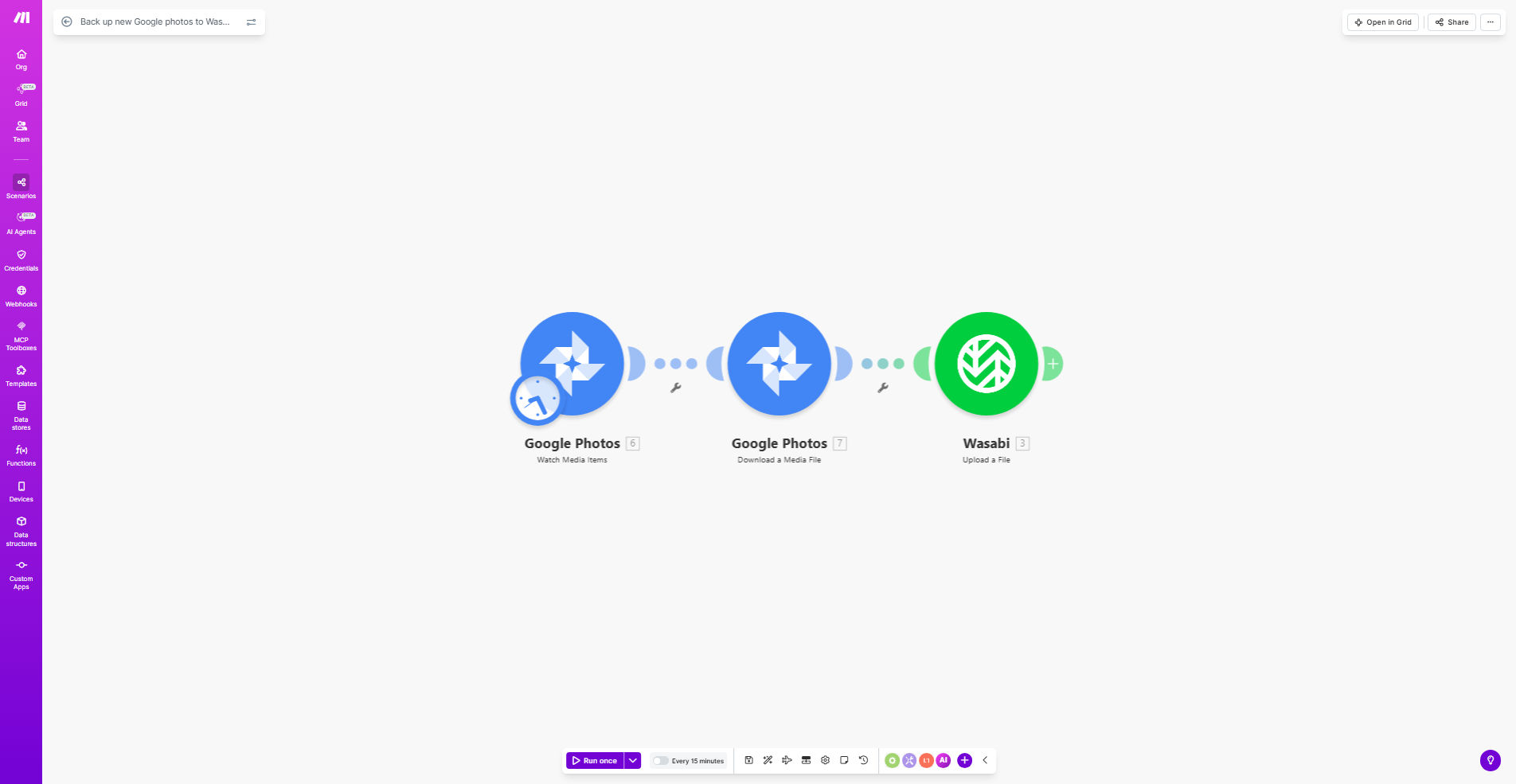
Google Photos to Wasabi backup workflow diagram

What This Workflow Does

This automation solves the critical need for redundant backup of precious memories and important visual assets stored in Google Photos. Many users don't realize that Google Photos doesn't provide true backup protection - your photos could be lost due to account issues or accidental deletion.

The workflow automatically detects when new photos or videos are added to your specified Google Photos album and immediately copies them to your Wasabi cloud storage account. This creates a secure secondary copy with enterprise-grade durability at a fraction of the cost of other cloud providers.

How It Works

1. New photo detection

The workflow continuously monitors your Google Photos account for new uploads using Make.com's polling system. When new media is detected, it triggers the backup process.

2. File retrieval

Make.com retrieves the full-resolution version of each new photo or video from Google Photos, ensuring you're backing up the original quality files.

3. Secure transfer

The files are securely transferred to your Wasabi storage bucket using encrypted connections. You can configure the destination path structure to match your organizational preferences.

4. Verification

The workflow confirms successful transfer and can optionally notify you via email or other channels if any issues occur during the backup process.

Pro tip: Set up a dedicated Wasabi bucket just for photo backups to simplify cost tracking and access management.

Who This Is For

This workflow is ideal for:

  • Photographers wanting to safeguard their portfolio
  • Families preserving precious memories
  • Businesses archiving visual assets
  • Anyone concerned about Google Photos' storage policies
  • Users needing cost-effective cloud backup solutions

What You'll Need

  1. A Google Photos account with photos to backup
  2. A Wasabi cloud storage account (free trial available)
  3. A Make.com account (free tier works for basic usage)
  4. API access enabled for both services

Quick Setup Guide

  1. Clone the template from Make.com
  2. Connect your Google Photos account in Make.com
  3. Connect your Wasabi storage credentials
  4. Specify which Google Photos albums to monitor
  5. Set your preferred Wasabi folder structure
  6. Activate the scenario and test with a new photo upload

Key Benefits

Never lose precious memories - Automatic backups ensure your photos are protected against accidental deletion or account issues.

Cost-effective storage - Wasabi offers enterprise-grade cloud storage at 1/5th the cost of major providers with no egress fees.

Set it and forget it - Once configured, the workflow runs automatically without any manual intervention.

Full resolution backups - Unlike some Google Photos options, this backs up original quality files.

Customizable organization - Structure your Wasabi folders by date, event, or any other system that works for you.

Frequently Asked Questions

Common questions about Google Photos backup automation

Backing up Google Photos to Wasabi provides an additional layer of protection against data loss and gives you control over your media files. Google Photos isn't designed as a true backup solution - your photos could be lost due to account suspension, accidental deletion, or policy changes.

Wasabi offers cost-effective cloud storage with no egress fees, making it ideal for photo archiving. Unlike some providers, Wasabi doesn't compress or modify your files, preserving original quality.

The workflow runs automatically whenever new photos are added to your specified Google Photos album. By default, Make.com checks for new photos every 15 minutes, but you can adjust this interval.

For most users, checking every few hours is sufficient. Businesses with high-volume photo uploads might prefer more frequent checks to ensure timely backups.

No, this workflow only transfers new photos added after setup. It's designed for ongoing backup of new content rather than bulk migration.

For transferring existing photo libraries, we recommend using Google Takeout to export your data, then uploading to Wasabi. We can help create custom automation for large-scale migrations if needed.

The workflow supports all common photo and video formats that Google Photos handles, including JPG, PNG, GIF, MP4, MOV, and more. RAW camera formats from professional cameras are also supported if you've enabled RAW file storage in Google Photos.

Any format Google Photos can display will be backed up to Wasabi in its original form without conversion or compression.

Yes, the transfer uses secure API connections between Google Photos and Wasabi. All data is encrypted in transit using industry-standard TLS protocols.

Your files remain encrypted during the entire process, and Wasabi provides additional encryption-at-rest options if you need enhanced security for sensitive photos.

Yes, you can configure the workflow to create organized folder structures in Wasabi based on dates, albums, or other metadata. The template includes options for basic organization, which you can customize to your needs.

For example, you might set up folders by year/month, by event name, or by camera type. The flexibility of Wasabi's storage system allows for virtually any organizational scheme.

Absolutely! GrowwStacks specializes in custom automation solutions for media backup workflows. While this template provides a great starting point, we can create a fully tailored system for your specific requirements.

Our team can build solutions for high-volume photo workflows, specialized file handling, integration with other business systems, and advanced organization features. We'll design a system that fits your exact workflow and scales with your needs.

  • Custom folder structures and naming conventions
  • Integration with DAM systems or CMS platforms
  • Advanced error handling and notifications

Need a Custom Photo Backup Automation?

This free template is a starting point. Our team builds fully tailored automation systems for your specific business needs.