Make.com Email Marketing CRM Sync Automation

Add new Campaign Monitor contacts to Google Contacts

Automatically sync email subscribers between platforms - eliminate manual data entry

Get This Workflow → Make.com · Campaign Monitor · Free Template
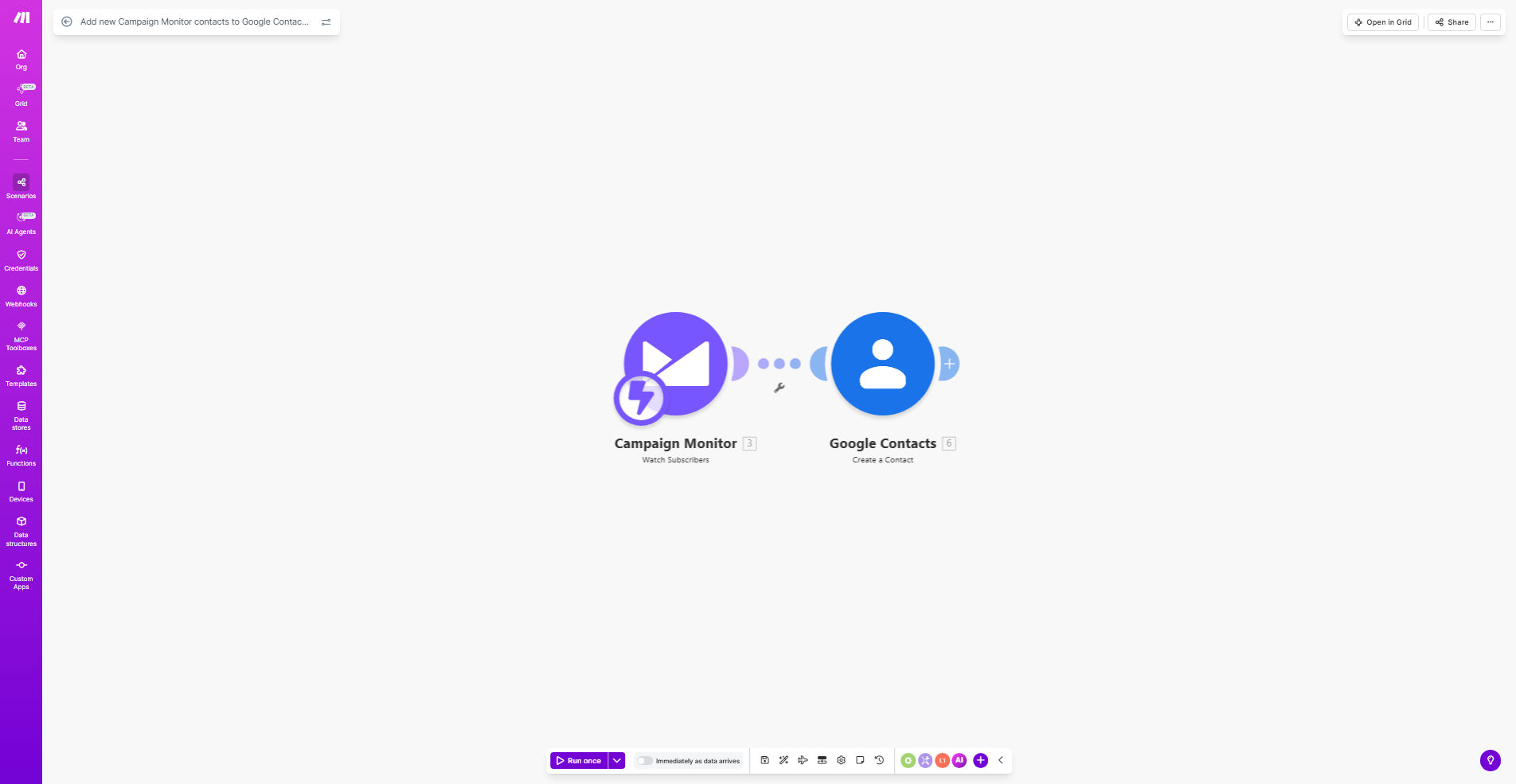
Automation workflow diagram showing Campaign Monitor to Google Contacts integration

What This Workflow Does

This automation solves the common problem of disconnected marketing and CRM systems. When new subscribers join your Campaign Monitor email list, their contact information often needs to be manually added to Google Contacts for sales teams or other business purposes. This workflow eliminates that manual process by automatically creating Google Contacts entries whenever someone subscribes.

The integration maintains data consistency across platforms while saving significant administrative time. Marketing teams can focus on campaigns rather than data entry, while sales teams immediately gain access to new leads in their familiar Google Contacts interface.

How It Works

1. Trigger: New Campaign Monitor subscriber

The workflow activates whenever a new contact is added to your selected Campaign Monitor list. Make.com monitors your account in real-time for these events.

2. Data extraction

The system collects all available subscriber information including name, email address, custom fields, and subscription metadata. This data is formatted for Google Contacts compatibility.

3. Contact creation

Make.com authenticates with your Google account and creates a new contact entry with the subscriber's information. The template includes mapping logic to ensure proper field matching between platforms.

Pro tip: Configure custom field mappings to include valuable segmentation data from Campaign Monitor as notes or labels in Google Contacts.

Who This Is For

This workflow benefits:

  • Marketing teams running email campaigns through Campaign Monitor
  • Sales teams using Google Contacts as their primary CRM
  • Business owners who want to automatically enrich their contact database
  • Operations managers reducing manual data transfer between systems
  • Agencies managing multiple client email lists and CRMs

What You'll Need

  1. A Campaign Monitor account with at least one active subscriber list
  2. A Google account with access to Google Contacts
  3. A Make.com account (free tier sufficient for basic usage)
  4. Admin access to connect both platforms via API

Quick Setup Guide

  1. Click "Get This Workflow" to copy the template to your Make.com account
  2. Connect your Campaign Monitor account via OAuth
  3. Select which subscriber list(s) to monitor
  4. Connect your Google account
  5. Configure field mappings (default settings work for most cases)
  6. Test with a new subscriber to verify the sync
  7. Activate the workflow for continuous automation

Key Benefits

Save 2-3 hours per week by eliminating manual contact transfers between your email marketing platform and CRM. The automation handles this tedious task instantly.

Improve data accuracy with direct system-to-system transfers that avoid human error in manual data entry.

Accelerate sales follow-up by ensuring new leads appear in Google Contacts immediately after subscribing, rather than waiting for manual updates.

Maintain compliance with automatic synchronization of unsubscribe requests and preference changes between systems.

Scale your processes as your subscriber list grows - the automation handles 10 or 10,000 contacts with equal efficiency.

Frequently Asked Questions

Common questions about email marketing automation and integration

Syncing email subscribers to Google Contacts creates a unified customer database accessible across your organization. This eliminates duplicate data entry and ensures your sales, support, and marketing teams all work with the same contact information.

The automation saves 2-3 hours per week typically spent manually transferring subscriber data. For example, a marketing agency managing 20 client lists could reclaim 40+ hours monthly by automating this process.

The workflow transfers subscriber name, email address, subscription date, and any custom fields you've collected in Campaign Monitor. You can configure the template to include additional data points like phone numbers, company names, or segmentation tags.

For instance, if you collect job titles through your signup forms, these can be mapped to the "Organization" field in Google Contacts, giving your sales team valuable context before making outreach.

The sync happens in real-time whenever a new subscriber joins your selected Campaign Monitor list. Make.com processes each new contact within seconds, ensuring your Google Contacts stays continuously updated.

This immediate transfer is particularly valuable for time-sensitive campaigns where quick follow-up converts leads. There's no batch processing delay - contacts appear instantly.

Yes, you can configure filters to only sync subscribers who meet specific criteria. The template includes conditional logic for flexible filtering based on any Campaign Monitor field.

A common use case is syncing only leads from high-value sources. For example, you might set up rules to only transfer contacts who came through your premium content download form or attended a webinar.

  • Filter by signup source
  • Exclude free email domains
  • Sync only contacts with complete profiles

The workflow can be configured to either skip duplicate contacts or update existing entries with new information from Campaign Monitor. This prevents duplicate contacts while ensuring your records stay current.

For updating existing contacts, the template matches on email address by default. You can enhance this with additional matching criteria like name or company for more reliable deduplication.

Yes, Make.com uses OAuth 2.0 authentication and encrypted connections for both Campaign Monitor and Google Contacts. Data transfer occurs through secure APIs without storing subscriber information on intermediary servers.

The integration complies with GDPR and other privacy regulations since it doesn't create copies of your data - it simply facilitates secure transfer between your existing systems.

Absolutely. GrowwStacks specializes in building tailored email marketing automations that connect Campaign Monitor, Google Contacts, and other tools in your stack. Our team creates custom workflows for lead scoring, segmentation, automated follow-ups, and CRM synchronization.

For example, we recently built a system for a client that automatically tags new subscribers based on their engagement history, routes high-value leads to sales reps via Slack notifications, and syncs unsubscribe requests across five integrated platforms.

  • Custom lead scoring models
  • Multi-platform synchronization
  • Automated follow-up sequences

Need a Custom Email Marketing Automation?

This free template is a starting point. Our team builds fully tailored automation systems for your specific business needs.