Email Marketing Data Sync Campaign Monitor Google Sheets

Save new Campaign Monitor subscribers to a Google Sheets spreadsheet

Automatically sync your email list growth with a centralized Google Sheet for reporting, segmentation, and backup

Get This Workflow → Make.com · Email Marketing · Free Template
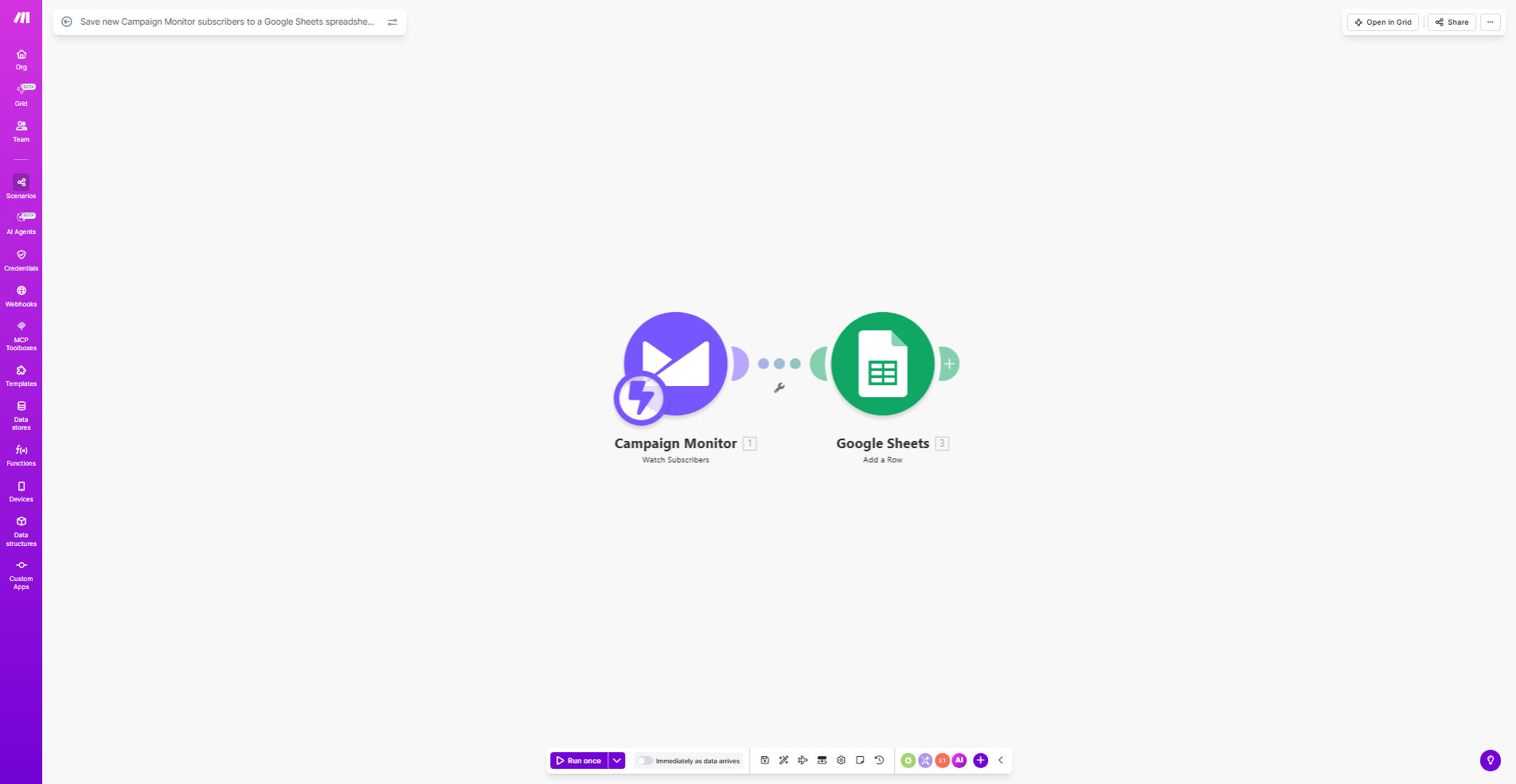
Campaign Monitor to Google Sheets workflow diagram

What This Workflow Does

This automation solves the common challenge of maintaining accurate, up-to-date records of your email subscribers across multiple platforms. When new contacts subscribe to your Campaign Monitor email lists, their information often gets siloed within your email marketing platform, making it difficult to integrate with other business data or create custom reports.

The workflow automatically detects new Campaign Monitor subscribers and saves their complete profile information to a designated Google Sheets spreadsheet. This creates a centralized subscriber database that can be used for segmentation, analytics, CRM integration, or as a backup of your valuable email list data.

How It Works

1. Trigger: New Campaign Monitor subscriber

The workflow starts when a new contact subscribes to your selected Campaign Monitor email list. Make.com monitors your account in real-time for these subscription events.

2. Data extraction

The workflow retrieves all available subscriber data including email address, name, subscription date, custom fields, and any other information collected during signup.

3. Google Sheets update

The subscriber information is formatted and added as a new row in your specified Google Sheet. The workflow can create the sheet if it doesn't exist or append to an existing one.

Pro tip: Use separate tabs in your Google Sheet for different Campaign Monitor lists to maintain organization while keeping all data in one file.

Who This Is For

This automation is ideal for marketing teams, small business owners, and agencies who use Campaign Monitor for email marketing and need better visibility into their subscriber growth. It's particularly valuable for:

  • Businesses that combine email data with other metrics in reports
  • Teams requiring subscriber backups for compliance or redundancy
  • Marketers who segment lists based on multiple data points
  • Companies integrating email data with other business systems

What You'll Need

  1. A Campaign Monitor account with at least one active subscriber list
  2. A Google account with access to Google Sheets
  3. A Make.com account (free plan available)
  4. Basic understanding of how to connect apps in Make.com

Quick Setup Guide

  1. Click "Get This Workflow" to copy the template to your Make.com account
  2. Connect your Campaign Monitor account in the first module
  3. Select which subscriber list(s) to monitor
  4. Connect your Google account and specify the destination spreadsheet
  5. Map the subscriber fields you want to include in your sheet
  6. Test with a new subscription and verify the data appears correctly
  7. Turn on the workflow to begin automatic syncing

Key Benefits

Centralized subscriber data: Maintain all your email contacts in one searchable, sortable database alongside other business metrics.

Time savings: Eliminates manual exports and copy-pasting between systems, saving 2-5 hours per month for most businesses.

Improved reporting: Combine email metrics with sales, web analytics, or other data in custom reports and dashboards.

Data redundancy: Creates an automatic backup of your valuable subscriber list outside Campaign Monitor.

Flexible segmentation: Use Google Sheets formulas and filters to create segments that may not be possible in Campaign Monitor alone.

Frequently Asked Questions

Common questions about email list automation and integration

Syncing Campaign Monitor subscribers to Google Sheets creates a centralized database for segmentation, reporting, and backup. It allows you to combine subscriber data with other business metrics, create custom reports, and maintain historical records outside your email platform.

For example, an ecommerce store could correlate email signups with purchase data to identify their most valuable subscribers. Agencies can maintain client records even if the client changes email platforms.

The automation runs in real-time, updating your Google Sheet immediately when a new subscriber joins your selected Campaign Monitor list. You can also configure the workflow to batch updates at specific intervals if preferred.

Real-time syncing ensures your data is always current for time-sensitive campaigns, while scheduled batches can reduce API calls if you have very high subscription volume.

By default, the workflow transfers all available subscriber fields including email address, name, signup date, and custom fields. You can customize which data points are included during setup to match your reporting needs.

Common useful fields to include are subscription source, opt-in confirmation status, geographic location (if collected), and any custom fields you use for segmentation like interests or purchase history.

Yes, you can configure the workflow to monitor multiple subscriber lists simultaneously. Each list can be saved to separate tabs in your Google Sheet or combined into a master subscriber database with a list identifier column.

This is particularly useful for agencies managing multiple clients or businesses with different brands/product lines that maintain separate email lists but want consolidated reporting.

Maintaining a Google Sheets backup helps demonstrate compliance with data access requests. You can easily provide subscriber records when requested and track opt-in dates and consent details alongside other subscriber information.

The workflow creates an audit trail showing when each subscriber joined and what information they provided at signup. This documentation can be valuable if you need to prove compliance with regulations like GDPR or CAN-SPAM.

The Make.com workflow includes data transformation tools to format, filter, or enrich subscriber data before saving. You can add calculated fields, combine data from other sources, or apply conditional logic to customize the output.

For instance, you might want to add a lead score based on subscription source, format phone numbers consistently, or append demographic data from your CRM before the information reaches Google Sheets.

Absolutely! Our team specializes in building tailored email marketing automations that connect Campaign Monitor with your other business systems. We can create custom workflows for segmentation, lead scoring, behavioral triggers, and multi-channel campaigns.

Whether you need simple data synchronization like this template or complex multi-step customer journeys, we'll design an automation solution that fits your exact requirements and integrates seamlessly with your existing tech stack.

  • Custom subscriber segmentation logic
  • Integration with your CRM or ecommerce platform
  • Automated lead nurturing sequences

Need a Custom Email Marketing Automation?

This free template is a starting point. Our team builds fully tailored automation systems for your specific business needs.