Make.com Google Forms Coda Data Automation No-Code

Save new Google Forms responses to a Coda doc

Automatically transfer form submissions to your Coda database without manual data entry

Get This Workflow Make.com · Google Forms · Free Template
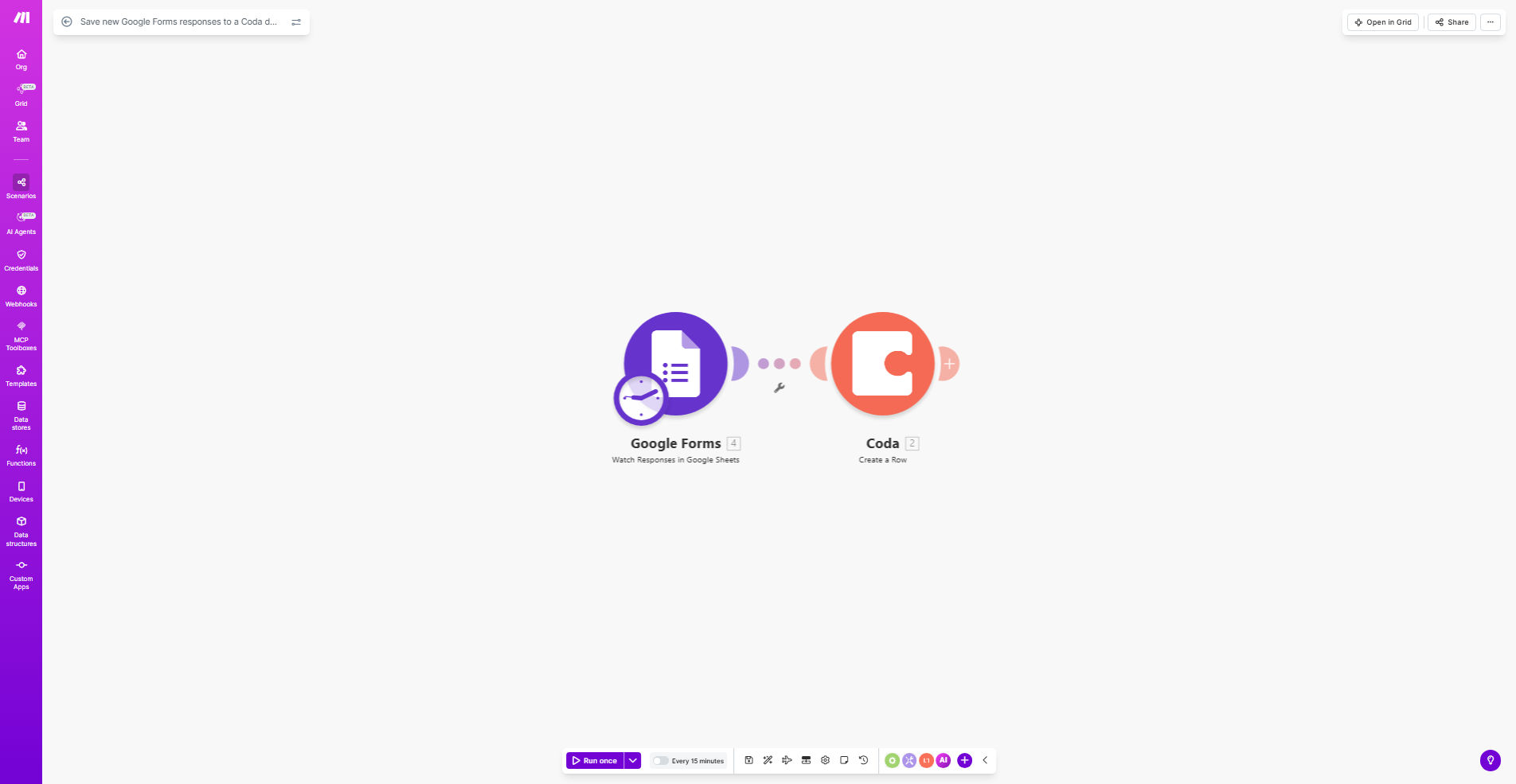
Google Forms to Coda integration workflow diagram

What This Workflow Does

This automation solves the tedious process of manually copying Google Forms responses into Coda documents. Every time someone submits your form, the workflow instantly captures all response data and adds it as a new row in your specified Coda table.

The integration maintains data integrity by perfectly mapping each form field to corresponding columns in Coda. Whether you're collecting customer feedback, employee surveys, or event registrations, this workflow ensures your Coda doc always reflects the latest submissions without spreadsheet exports or copy-paste routines.

How It Works

1. Trigger on new form submission

The workflow activates whenever your Google Form receives a new response. Make.com instantly detects the submission through Google's API.

2. Extract response data

All form fields and their values are captured, including text answers, multiple-choice selections, file uploads (as links), and timestamps.

3. Format for Coda

The data is transformed to match your Coda table structure, with proper field mapping between form questions and database columns.

4. Add row to Coda

The processed data creates a new row in your specified Coda table, maintaining all relationships and formatting rules defined in your doc.

Pro tip: Use this workflow with Coda's "On new row" triggers to create powerful automation chains that notify teams, update dashboards, or trigger follow-up actions when forms are submitted.

Who This Is For

This template benefits anyone regularly collecting data through Google Forms that needs centralized organization in Coda:

  • HR teams managing employee surveys or feedback
  • Event organizers tracking registrations and attendee details
  • Product managers collecting customer feature requests
  • Educators administering quizzes or course evaluations
  • Researchers compiling survey results into analyzable datasets

What You'll Need

  1. A Google Forms form with responses enabled
  2. A Coda account with edit permissions to your target doc
  3. A Make.com account (free plan sufficient)
  4. Basic understanding of your Coda table structure

Quick Setup Guide

  1. Click "Get This Workflow" to copy the template to your Make.com account
  2. Connect your Google Forms and Coda accounts when prompted
  3. Select your source form and target Coda doc/table
  4. Map each form field to its corresponding Coda column
  5. Test with a form submission and verify data appears correctly
  6. Activate the workflow to begin automatic transfers

Key Benefits

Eliminate manual data entry - Save 5-15 minutes per form submission by removing spreadsheet exports and manual copying to Coda.

Real-time data availability - Responses appear in Coda within seconds of submission, enabling faster analysis and action.

Reduce human error - Automated transfers prevent transcription mistakes and missed submissions.

Centralize information - Keep all form data alongside related documents, wikis, and dashboards in Coda.

Scale effortlessly - Handle thousands of submissions without additional administrative work.

Frequently Asked Questions

Common questions about Google Forms to Coda automation and integration

Connecting Google Forms to Coda eliminates manual data entry, reduces errors, and creates a centralized knowledge base. Responses automatically populate your Coda docs where you can analyze trends, create reports, and collaborate with team members in real-time.

For example, a marketing team can automatically capture event registration details in their Coda event planner, triggering follow-up emails and updating attendance dashboards without any manual steps.

This integration works exceptionally well for customer feedback forms, employee surveys, event registrations, and application forms. Structured data collection forms benefit most from automatic transfer to Coda's relational database capabilities.

Simple contact forms with just name/email may not justify the setup, while multi-page forms with conditional logic and file uploads gain tremendous value from seamless Coda integration.

Automation ensures responses are captured immediately without manual copying/pasting. It enables real-time dashboards in Coda, prevents data loss from forgotten exports, and allows instant notifications when new submissions arrive.

One client reduced their survey processing time from 3 hours weekly to just 15 minutes of verification, while another eliminated a 2-day lag between form submission and team visibility.

Yes, the workflow allows complete field mapping customization. You can match each Google Forms question to specific Coda table columns, rearrange data order, and even combine multiple form fields into single Coda cells.

The template includes a visual mapper that shows your form questions on one side and Coda columns on the other, making it simple to drag-and-drop connections between them.

If you add or remove questions from your form, you'll need to update the workflow mapping. The template includes instructions for modifying field mappings to accommodate form changes while preserving existing data flow.

Minor changes like editing question text without altering the field ID won't break the workflow. Major restructuring requires revisiting the mapping configuration.

Make.com uses OAuth 2.0 for secure connections between services. Data transfers are encrypted in transit, and the workflow only has access to the permissions you explicitly grant during setup.

For sensitive data, you can configure the workflow to only transfer anonymized responses or exclude certain fields entirely from the Coda transfer.

Absolutely. You can add conditional logic to only transfer responses that meet specific criteria, like minimum rating scores or particular multiple-choice selections.

Common filters include: only transferring completed applications, excluding test submissions, or flagging urgent support tickets based on severity ratings.

Our team specializes in building tailored form automation systems that connect to your preferred databases with custom validation rules, approval workflows, and advanced data processing features.

We've created solutions that: automatically categorize submissions, trigger department-specific notifications, enrich responses with CRM data, and even initiate fulfillment processes - all from form submissions.

  • Custom field validation and error handling
  • Multi-step approval workflows
  • Integration with your existing business systems

Need a Custom Form Automation?

This free template is a starting point. Our team builds fully tailored automation systems for your specific business needs.